

Loading...
Hi, How Can We Help You?
  • +91 9949062828
  • Address: Hyderabad | Bengaluru
  • Email Address: info@kernelmasters.com

Category Archives: Embedded Systems Career

November 28, 2026

A smart embedded engineer becomes good at making things work.
But after a certain point, career growth often slows down.
Why?

It is not because they have stopped learning. It is not because they
lack discipline, technical knowledge, or talent.

In many cases, they plateau because they continue investing in the
wrong kind of professional progress.

Most embedded engineers believe career growth follows a
straightforward path:

More Projects → More Code → More Experience → More
Seniority

But the reality of the embedded industry is different.

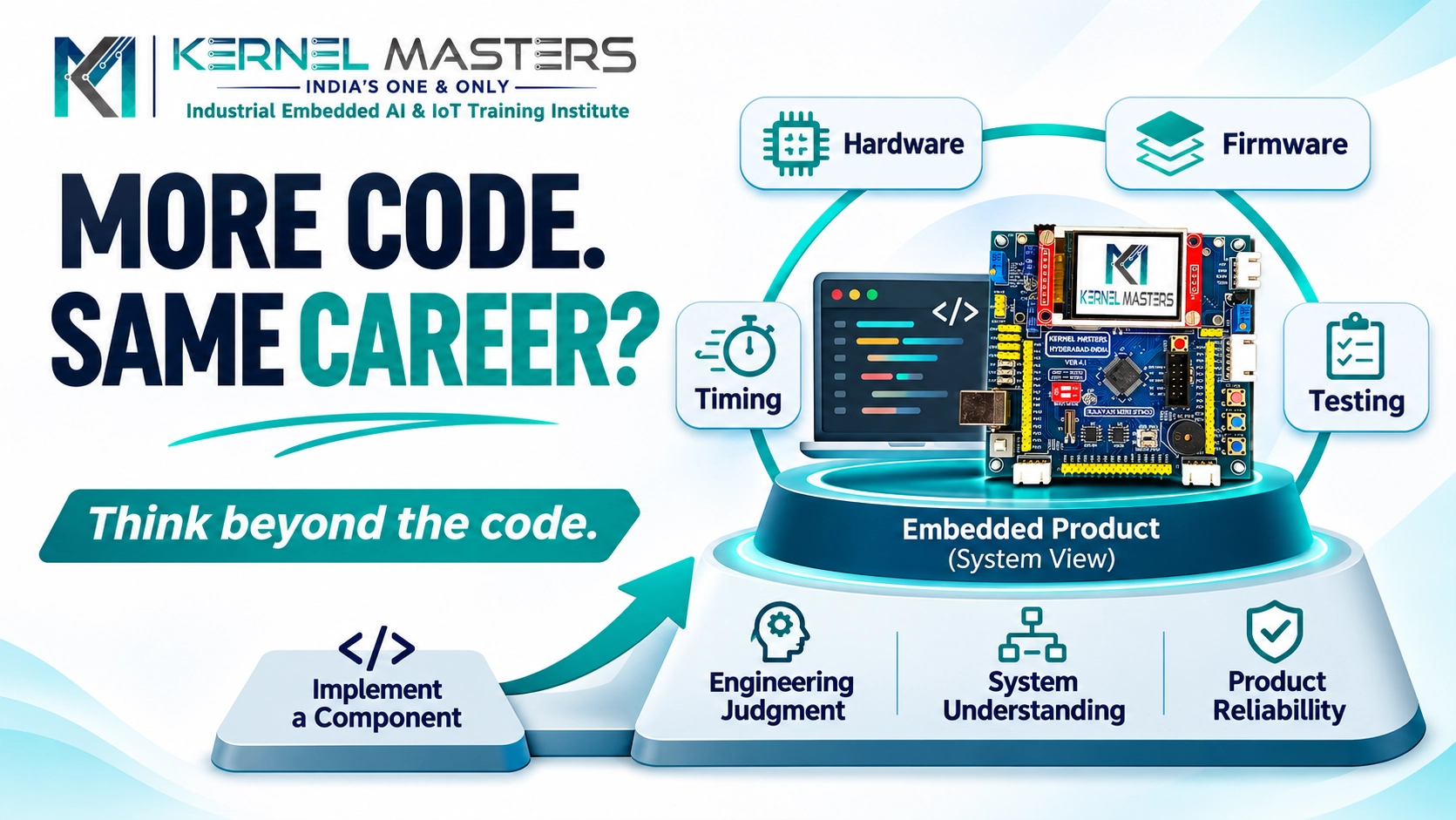
Embedded engineering does not reward technical output alone. It
rewards engineering judgment, system-level thinking, and the ability to
build reliable products.

In other words, the real career transformation happens when
you move from simply implementing features to designing systems that
prevent problems.

Let’s understand what this means in the real world.

Opportunity, role scope, mentorship and personal goals also shape career growth.

1. The Early-Career Engineer: Focused on Implementation

When you begin your embedded engineering career, your primary
responsibility is to make things work.

You create value by completing technical tasks such as:

Writing Embedded C programs and peripheral drivers.

Configuring GPIO, UART, SPI, I2C, ADC, and timers.

Integrating sensors and external peripherals.

Debugging firmware issues.

Bringing up development boards and microcontrollers.

Working with RTOS tasks and inter-task communication.

Making prototypes and demonstrations work successfully.

These are essential engineering skills.

Every embedded engineer must develop strong implementation
capabilities before taking on complex system responsibilities.

However, there is a point in your career when simply completing more
coding tasks is no longer enough.

The expectations change as your engineering responsibilities
grow.

2. The Industry Does Not Always Reward the Engineer Who Writes More Code

Imagine two engineers working on the same embedded product.

Engineer A: Implementation-Focused

  • Quickly writes the required firmware.
  • Integrates the peripherals.
  • Fixes reported bugs.
  • Completes assigned modules.
  • Makes the prototype work.

Engineer B: System-Focused

  • Understands the complete system requirements.
  • Evaluates hardware and software dependencies.
  • Identifies timing and concurrency risks.
  • Defines module boundaries and interfaces.
  • Considers error handling and recovery mechanisms.
  • Plans verification and testing strategies.
  • Evaluates long-term maintainability.

Both engineers are technically valuable.

But Engineer B brings an additional level of value to the
organization.

Why?

Because an engineering team does not need someone who can only write
another driver. It needs engineers who can anticipate problems before
they become expensive failures.

A senior engineer’s contribution is not limited to the code they
produce. It also includes the technical risks they eliminate.

Hypothetical example

A water-tank controller: the demo is only the beginning.

Imagine a controller that starts a pump when the water is low and stops it when the tank is full.
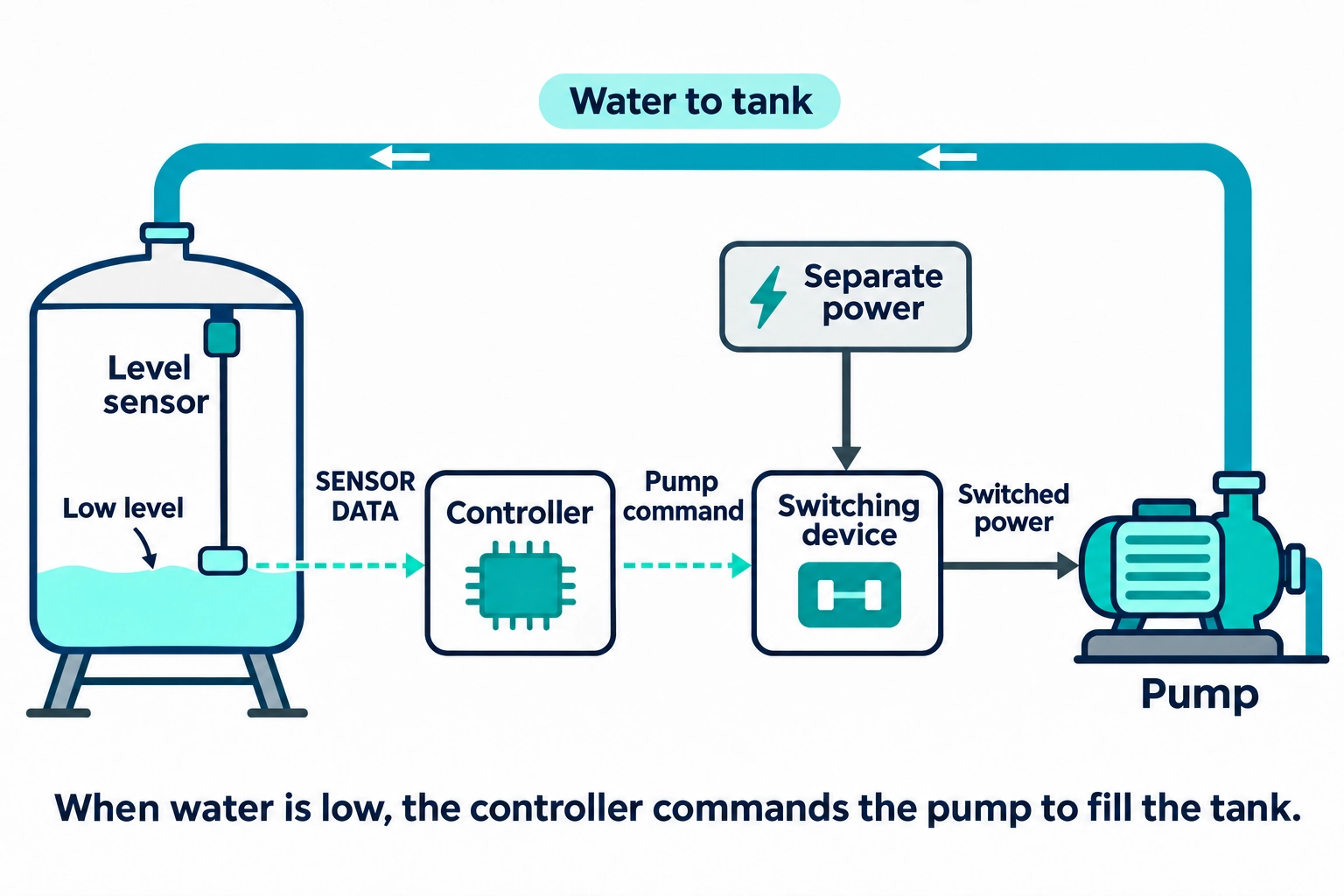

Water-level sensor sends data to a controller, which commands a switching device to power the pump and fill the tank.

The controller sends a control signal to the switching device. The pump uses a separate power circuit.

What you demonstrate What you still need to define
A valid low reading starts the pump. What happens when a reading is missing or invalid?
A valid full reading stops the pump. How does the controller behave after a restart?
Status reaches a connected display or app. Can a communication delay block local monitoring?

Fault response for this controller: when an invalid level reading is detected, stop automatic pumping and indicate a fault.

3. The First Architect-Level Insight: Your Value Is Your Engineering Judgment

Consider some real-world embedded product challenges.

A firmware application may work perfectly during a laboratory
demonstration but fail after continuous operation in the field.

A peripheral driver may function independently but introduce timing
issues when integrated with an RTOS.

A new feature may work correctly but create unexpected regressions in
another module.

A product may successfully complete development but become difficult
to maintain when new features are introduced six months later.

These problems are not necessarily caused by poor coding.

They often originate from decisions made much earlier in the
development process.

For example:

  • A fragile software architecture that cannot accommodate future
    changes.
  • Undefined assumptions about timing and concurrency.
  • Poorly defined module boundaries.
  • Hidden dependencies between software components.
  • Missing fault detection and recovery mechanisms.
  • Inadequate verification and validation strategies.
  • Insufficient consideration of memory and processing
    constraints.

These are system-level engineering problems.

An experienced embedded engineer must learn to identify these risks
before implementation begins.

In practice: identify important risks early, then use prototypes, measurements and testing to refine the design as you learn. Architecture and implementation inform each other.

Your value is not just how quickly you write code. Your value
is how effectively you make engineering decisions.

4. Why Do Many Embedded Engineers Never Make This Transition?

One important reason is that most engineers spend years learning how
to implement technical solutions but receive limited exposure to
system-level engineering decisions.

They learn:

  • How to configure a microcontroller.
  • How to write an interrupt service routine.
  • How to develop device drivers.
  • How to integrate peripherals.
  • How to debug firmware.
  • How to implement RTOS-based applications.

But they may not receive enough practical exposure to questions such
as:

  • Why should this module be independent?
  • What happens if two tasks access the same resource?
  • How will the system behave when communication fails?
  • What happens when a sensor provides invalid data?
  • How will the firmware recover after an unexpected fault?
  • How can the software be tested independently?
  • Will this architecture support future product requirements?

These questions separate implementation-level thinking from
architecture-level thinking.

Technical knowledge helps you solve problems.

Engineering judgment helps you prevent them.

5. A Simple Self-Assessment for Embedded Engineers

Here is a simple exercise.

Think about the next embedded development task assigned to you.

What is your natural first reaction?

Option A: Implementation-First Thinking

  • Open the IDE.
  • Start writing code.
  • Configure the peripherals.
  • Implement the required functionality.
  • Debug until the feature works.

Option B: System-First Thinking

  • Understand the complete requirement.
  • Identify hardware and software dependencies.
  • Define expected system behavior.
  • Evaluate timing, memory, and resource constraints.
  • Identify possible failure scenarios.
  • Plan module interfaces and verification.
  • Then begin implementation.

If your natural approach is Option A, you are not a bad engineer. It
is a normal starting point for many developers.

But if Option A remains your default approach throughout your career,
you may eventually experience professional stagnation.

The objective is not to stop coding.

The objective is to combine strong implementation skills with
system-level engineering thinking.

A quick prototype can be the right first experiment. Be clear about what it proves, what remains unverified, and which requirements still need attention.

6. How Can You Move from an Embedded Developer to an Embedded Systems Engineer?

The transition requires a deliberate change in how you approach
engineering problems.

Here are six areas worth developing.

1. Strengthen Your Fundamentals

Develop a deep understanding of Embedded C, microcontroller
architecture, memory management, interrupts, communication protocols,
and hardware interfaces.

2. Understand Real-Time System Behavior

Learn how RTOS scheduling, task synchronization, semaphores, mutexes,
queues, and interrupt handling affect system performance and
reliability.

3. Develop Hardware-Software Integration Skills

Understand how firmware interacts with actual hardware. Learn to
identify electrical, timing, communication, and integration issues
instead of depending entirely on software simulations.

4. Learn Embedded Linux and Device Driver Development

Understand the Linux kernel, device models, device trees, character
drivers, and hardware-software interfaces. This knowledge helps you work
with more complex embedded platforms.

5. Think About Architecture Before Implementation

Learn to define module boundaries, interfaces, dependencies, error
handling, and resource management before writing the complete
application.

6. Develop Verification and Debugging Strategies

A product that works once is not necessarily a reliable product.
Learn systematic testing, fault injection, debugging techniques, and
validation under different operating conditions.

Choose depth for your direction. Embedded Linux is relevant to Linux-based products; it is not a prerequisite for every microcontroller role. Specialists and architects both contribute, and job titles vary between organizations.

These skills help you evolve from a developer who implements
requirements into an engineer who understands and owns the complete
system.

7. What the Embedded Industry Really Needs

As embedded products become increasingly connected, intelligent, and
software-driven, companies need engineers who understand more than
individual microcontroller peripherals.

They need professionals who can work across:

Microcontroller-based firmware development.

Embedded Linux and device drivers.

RTOS-based application development.

Hardware-software integration.

Industrial IoT systems.

Embedded AI applications.

System architecture and product reliability.

Testing, debugging, and verification.

The ability to connect these technologies and understand their
interactions is becoming an important professional advantage.

A strong embedded engineer must be capable of moving between
implementation details and the bigger system picture.

Final Thoughts: Implementation Makes Progress Visible. Architecture Makes Progress Durable.

There is nothing wrong with being an excellent programmer.

In fact, strong implementation skills are the foundation of every
successful embedded engineer.

But professional growth requires something more.

At the beginning of your career, you are measured by the features you
implement.

As your experience grows, you are increasingly valued for the
technical decisions you make, the risks you identify, and the
reliability you bring to the product.

Remember these two principles:

Implementation makes progress visible.

Architecture makes progress durable.

Do not measure your engineering growth only by the number of projects
you complete or the amount of code you write.

Measure it by how well you understand the complete system, how
effectively you solve complex engineering challenges, and how many
problems you can prevent before they reach the product.

That is the shift from being a good embedded developer to
becoming a valuable embedded systems engineer.

About Kernel Masters

At Kernel Masters, we focus on developing
industry-oriented Embedded Software, Embedded Linux, Device Drivers,
RTOS, Embedded AI, and IoT engineering skills through practical,
hardware-based learning.

Our approach emphasizes understanding, implementation, debugging,
hardware integration, and real-world project development.

We believe that engineering education should go beyond writing code.
Engineers must understand how complete embedded products are designed,
developed, tested, and validated.

Learn to Build. Learn to Debug. Learn to
Engineer.

Explore our industry-oriented training programs at: https://www.kernelmasters.com/

Ready to Become an Industry-Ready Embedded Engineer?

Build practical engineering skills through real hardware,
industry-oriented projects, Embedded C, RTOS, Embedded Linux, Device
Drivers, and Embedded AI.

Kernel Masters – Industrial Embedded AI Training
Institute

Learn with Real Hardware

Microcontroller & real-time direction

Embedded Firmware Engineering

Linux-based platform direction

Embedded Linux & Device Drivers

September 8, 2026

Day 1 · Discover the Embedded World

The Technology Hidden Around You

You may be studying Digital Electronics, Microprocessors, Microcontrollers, C Programming, Signals, Communication Systems and Electronic Devices as part of your engineering degree.

But have you ever stopped to ask: Where are these subjects actually used in industry?

When you look at a car, smartwatch, washing machine, drone, medical device or industrial machine, you see a finished product. An Embedded Engineer sees something different.

Sensors→Electronics→Processor→Firmware→Decision→Output

Before We Begin

How Many Computers Have You Used Today?

Think before checking the answer.

You may immediately think: Smartphone + Laptop = 2.

But what about your smartwatch, Wi-Fi router, television, washing machine, car, air conditioner or Bluetooth earbuds?

Many computers around us do not look like computers. They are hidden inside products and designed to perform specific functions.

Simple Definition

What Is an Embedded System?

An Embedded System is a computing system designed to perform a specific function as part of a larger product or system.

InputSensors, buttons, switches
→
ProcessingMCU / processor + firmware
→
OutputDisplay, LED, buzzer, motor

For connected products, communication interfaces such as Wi-Fi, Bluetooth, UART, CAN or Ethernet may also be part of the system.

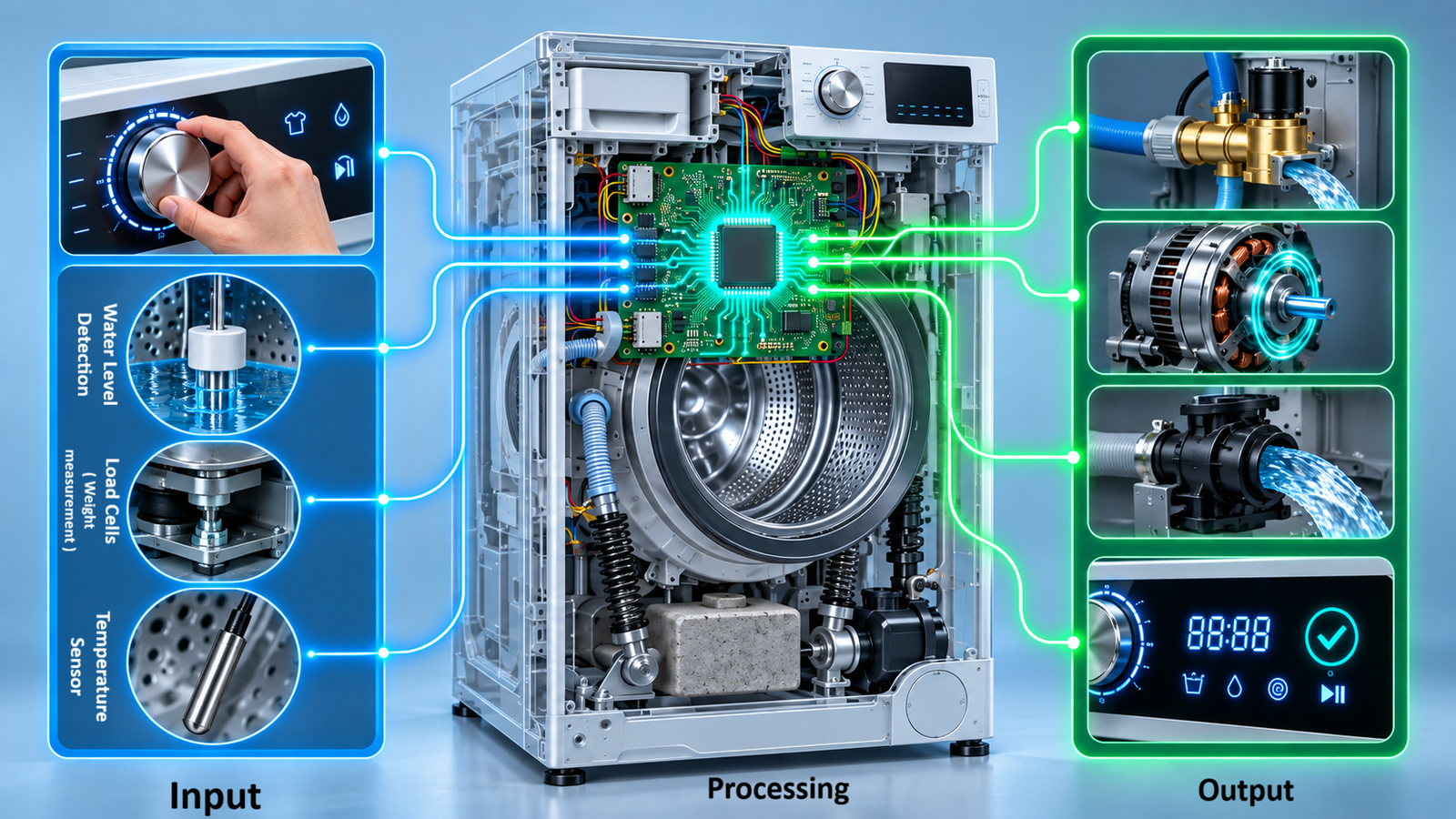
Embedded system concept showing input processing output and communication

Everyday Examples

Embedded Systems Are Already Around You

When students understand this, everyday products start looking different. A washing machine, smartwatch, automobile or medical device is not just hardware. It is electronics and software working together.

Washing Machine

Buttons and sensors provide input. The controller runs firmware to manage water flow, motor control, timing, display and buzzer output.

Smartwatch

Motion sensors, optical sensors, touch input, processor, display, Bluetooth and battery electronics work together continuously.

Automobile

Modern vehicles use electronic controllers for powertrain, braking, airbags, body electronics, infotainment, EV battery systems and driver-assistance functions.

Medical Device

A patient monitor converts physical signals through sensors, electronics, ADC, processor software, display, alarms and communication.

Beginner insight: Even a computer keyboard contains an embedded controller. It scans keys, handles debouncing, converts key presses into data and communicates through USB, Bluetooth or another interface.

Hardware + Firmware

Hardware Alone Does Not Make a Smart Product

Suppose we have a simple setup: Button + STM32 Microcontroller + LED.

The hardware remains exactly the same, but firmware can change the product behaviour.

Firmware Version 1

Press button → Turn LED ON

Firmware Version 2

Single press → LED ON
Double press → LED blink
Long press → LED OFF

Hardware provides capability. Firmware defines behaviour.

What is the “brain” of an embedded product?

People commonly call the microcontroller or processor the “brain”. That is useful as a beginner analogy, but a processor alone cannot create the complete product.

SensorsPhysical input
→
Processor / MCUDecision-making hardware
→
FirmwareDefines behaviour

The magic comes from sensors, electronics, processor, firmware, output devices and communication working together.

Academic → Industry

Why Did We Study Digital Electronics and Microcontrollers?

This is a question many students ask during engineering. The answer becomes clear when you connect academic concepts to real systems.

Academic Concept Where It Appears in Real Systems
Logic Gates Control logic and digital systems
Flip-Flops / Registers State storage, processor registers and peripheral configuration
Multiplexers Signal selection, peripheral routing and pin alternate functions
ADC Analog sensor acquisition
Timers / PWM Periodic operations, motor control, LED brightness and power control
Interrupts Immediate response to external or internal events
UART / I²C / SPI / CAN Debugging, sensors, displays, memory, automotive and industrial communication

A few “Do You Know It?” connections

Android and Linux

Android’s software stack is built on a modified Linux kernel. This creates a direct career connection to Embedded Linux.

Intel 4004

The Intel 4004, introduced in 1971, is widely recognized as the first commercially available microprocessor.

Binary Subtraction

In fixed-width binary arithmetic, subtraction can be implemented using addition and two’s complement. Digital logic concepts are connected to processor design.

Pin Multiplexing

A physical MCU pin may support GPIO, UART, SPI, I²C, timer or ADC functions depending on the device and pin configuration.

During Kernel Masters awareness sessions, these ideas are demonstrated using the Raayan Mini development board based on the STM32F401RBT6 ARM Cortex-M4 microcontroller.

Industry Readiness

What Does an Embedded Software Engineer Actually Do?

Many beginners assume: “Embedded Engineer means someone who writes C programs.” Writing code is important, but it is only one part of the job.

Understand requirementsStudy hardwareRead datasheetsDesign softwareConfigure peripheralsWrite Embedded CCompileFlash firmwareTestDebugIntegrateValidate

This is why Embedded Engineering requires more than programming knowledge. You need to understand the relationship between hardware and software.

Electronics Graduate vs Software Programmer vs Embedded Engineer

An electronics student already has an important advantage: you are studying the hardware foundation. The next step is learning how to apply that knowledge through software and practical implementation.

Profile Main Focus
Electronics Graduate Academic foundation in electronics and engineering
Software Programmer Software logic and application development
Embedded Hardware Engineer Electronic circuits, PCB and hardware design
Embedded Software Engineer Software interacting directly with hardware
Firmware Engineer Low-level software controlling a device or system
Note: In industry, these titles may overlap depending on the company, product and team structure.

Knowing is not the same as implementing

You may know what an ADC is academically. But can you connect a temperature sensor to a microcontroller, configure the ADC, acquire the voltage, convert it into temperature and make a decision based on that value?

That is the transition from knowing → implementing.

“Build Successful” Does Not Mean Product Successful

Your program may compile perfectly. You flash the program. But the LED does not turn on. Possible reasons include wrong pin selection, incorrect hardware connection, peripheral clock not configured, wrong register settings, hardware fault, logic error or timing issue.

A good Embedded Engineer is not someone whose code never fails. A good Embedded Engineer knows how to systematically find out why it failed.

Does Every Embedded System Need an Operating System?

No. The right software platform depends on product complexity, timing needs, hardware resources and system requirements.

Bare-Metal Firmware

A simple microcontroller application can run directly without an operating system.

RTOS

As timing and task complexity increases, engineers may use an RTOS such as FreeRTOS.

Embedded Linux

For more complex connected products, Linux may be suitable because it supports rich drivers, networking and system software.

Connected / AI Systems

Depending on the application, engineers may also work on IoT, gateways, edge processing or Embedded AI workflows.

Can a Software Bug Affect the Physical World?

Yes. This is one major difference between Embedded Software and many ordinary software applications.

Embedded firmware may control motors, relays, power systems, sensors, batteries, industrial equipment, automotive functions or medical systems. A software problem can therefore affect the behaviour of a physical product.

That is why embedded industries give serious importance to testing, debugging, validation, reliability and, where applicable, functional safety.

Career directions in Embedded Systems

Embedded Systems opens multiple career directions. In industry, job titles may overlap depending on the company and product, but students commonly see roles such as:

Embedded Firmware EngineerRTOS / Firmware EngineerAutomotive Embedded EngineerSemiconductor Firmware EngineerEmbedded Linux EngineerLinux Device Driver EngineerIoT EngineerEmbedded AI / Edge AI Engineer

Beginner roadmap: Electronics Fundamentals → C Programming → Embedded C → ARM / STM32 → GPIO, ADC, Timers, Interrupts → UART, I²C, SPI, CAN → RTOS → Embedded Linux → IoT → Embedded AI / Edge AI

Depending on the product and career direction, an embedded engineer may work with microcontroller firmware, RTOS, Embedded Linux, connected systems, IoT or Embedded AI.

At every stage: Learn → Implement → Debug → Demonstrate.

Today’s Challenge

Look Around Your Home and Identify Five Embedded Products

For each product, try to identify the system flow before Day 2.

Input: What information enters the system?
Processing: What could be making the decisions?
Output: What action does the product perform?
Communication: Does it communicate with another device?
Example — Smart Washing Machine: Input: buttons and sensors. Processing: microcontroller and firmware. Output: motor, pump and display. Communication: Wi-Fi, if supported.

What Comes Next?

Today we discovered where Embedded Systems exist. But the next question is more interesting: what is actually happening inside an embedded product?

How does a sensor communicate with the processor? What does firmware actually do? How does software control hardware? Why do we need UART, I²C, SPI or CAN?

Day 2 — Inside an Embedded Product: Sensor → Processor → Firmware → Decision → Action

Final Thought

Your engineering degree gives you the foundation. Becoming industry-ready requires you to connect academic knowledge with real hardware, software, debugging and product development.

Prepare to become an Engineer who can understand, build, debug and explain a real system.

Kernel Masters
Industrial Embedded AI & IoT Software Developer Program
Learn → Implement → Debug → Demonstrate

December 5, 2025

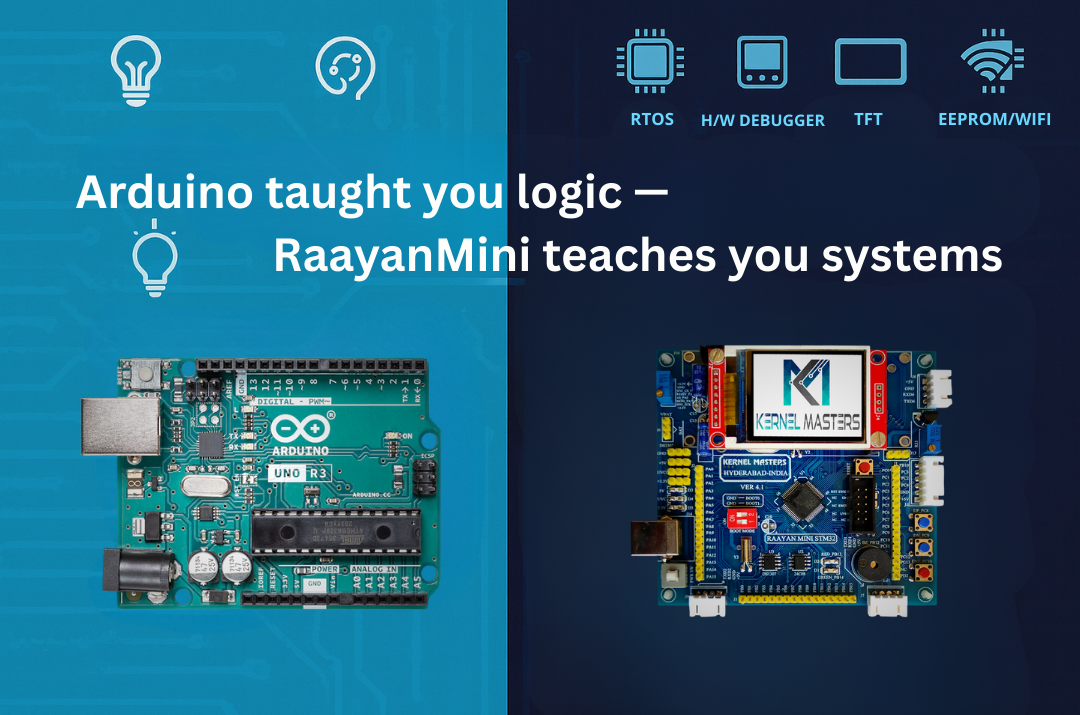
Arduino Uno Or Raayan Mini: Where Should You Really Start Your Embedded Journey?

If you’re a fresher (or working professional switching into embedded), your first board was probably Arduino.
It’s simple, affordable, and tutorials are everywhere. But here’s the critical question:
Is Arduino Uno enough for a professional embedded job, or do you need something like Raayan Mini?

Real question: “If I already know Arduino, do I really need STM32/Raayan Mini for an embedded job?”

Short answer: Arduino is a great start. Raayan Mini is where you grow if you’re serious.

TL;DR (save this):

  • Arduino Uno = fast entry to electronics + coding basics (8-bit, 2KB RAM)
  • Raayan Mini = professional workflow: 32-bit ARM, hardware debugging (ST-LINK), multi-peripheral systems, industry tools
  • If your goal is firmware/embedded jobs, move to 32-bit STM32 learning within 4–8 weeks (if dedicated)
  • The real difference: Arduino teaches “make it work.” Raayan Mini teaches “understand how it works.”

1Understanding Arduino: Value, Limitations & Knowledge Gaps

Arduino Uno is genuinely valuable. It’s introduced millions to electronics and programming. It’s accessible, fun, and results are immediate. But here’s what matters for a fresher pursuing embedded careers: what’s it hiding from you?

⚙️ Arduino Uno Specs

  • MCU: ATmega328P (8-bit AVR)
  • Clock: 16 MHz
  • Flash: 32 KB
  • SRAM: 2 KB
  • EEPROM: 1 KB
  • Peripherals: UART, SPI, I²C (via libraries)

✓ Arduino Excels At

  • First exposure to electronics + coding
  • College projects & hobbyist robotics
  • Rapid prototyping with pre-built libraries
  • Immediate visual feedback (LED, motors)
  • Lower cost barrier to entry

But here’s the real question: Can you answer these after Arduino?

  • What’s in the MCU’s memory map?
  • How does the bootloader start your code?
  • What’s an interrupt vector table?
  • How do you configure registers directly?
  • What’s a hard fault and how do you debug it?
The Knowledge Gap: Arduino abstracts away the “how” so you can focus on “what.” But when you enter embedded jobs, companies expect you to know the “how.” A fresher who can answer those questions above is ready for production work. One who can’t? Still learning hobbyist skills.

Key takeaway: Arduino is excellent for electronics basics. But for embedded careers, you need to move beyond it. The question isn’t “Is Arduino bad?” It’s “Is Arduino enough for what you’re trying to achieve?”

2Meet Raayan Mini: Built for Industry-Level Learning

Raayan Mini is an STM32-based industrial training board designed to bridge academic kits and professional embedded workflows.

⚙️ Core MCU: STM32F401

  • 32-bit ARM Cortex-M4 + FPU
  • Up to 84 MHz clock
  • 128 KB flash, 64 KB SRAM
  • 12-bit ADC + UART/I²C/SPI/etc

🔧 Mini-Lab Peripherals (One PCB)

  • On-board ST-LINK SWD debugger
  • Temperature sensor (LM35) + potentiometer
  • RTC (I²C) + EEPROM (I²C)
  • 16×2 LCD + TFT SPI interfaces
  • UART zones + GPIO/I²C/SPI breakouts

Here’s why Raayan Mini (STM32) answers those Section 1 questions:

  • ST-LINK SWD Debugging: You SEE registers, memory, interrupts happening in real-time (solves the “hard fault” gap)
  • On-board Peripherals: Forced to understand I²C, SPI, ADC configuration—not library abstractions
  • Professional Tools: STM32CubeIDE shows register layouts, memory organization, interrupt vectors visually
  • Architecture-first: You learn memory map, bootloader, startup BEFORE hiding behind libraries

What About Nucleo Boards or Other STM32 Kits?

They’re good, but bare MCU boards. You’re hunting for sensors, displays, debuggers. Raayan Mini (STM32) has LM35, RTC, EEPROM, LCD/TFT, and ST-LINK on one board—no breadboarding, more time learning systems.

Note for beginners: Yes, breadboarding teaches you connections. But managing wiring, connections, and debugging hardware issues can overwhelm your focus. Integrated tools let you concentrate on what actually matters—architecture and systems thinking.

3Quick Comparison: Different Designs, Different Purposes

Arduino and STM32 aren’t “better” or “worse”—they’re designed for different things. Arduino prioritizes ease-of-use and rapid prototyping. STM32 prioritizes system control and professional development. For job-ready embedded learning, the differences matter:

Aspect Arduino Uno Raayan Mini (STM32) Career Impact
Core 8-bit AVR @ 16 MHz 32-bit Cortex-M4 @ 84 MHz Standard ARM dominates embedded jobs (90%+)
Memory 32 KB flash, 2 KB RAM 128 KB flash, 64 KB RAM 4x/32x RTOS, logging, multi-system projects feasible
Peripherals Mostly external (shields) Many built-in (integrated) Multi-peripheral projects
Debugging Serial.print() + LEDs Hardware breakpoints, watch, stack Professional Hardware debugging is industry MUST
Job Market ~2-3% of embedded roles ~90%+ of embedded roles Industry Standard ARM Cortex-M dominates; Arduino-only jobs are rare
Tools Arduino IDE (simple) STM32CubeIDE / Keil / IAR Professional Professional toolchain signals expertise

48-bit vs 32-bit: Why It Matters More Than You Think

On Arduino, math is optimized for 8-bit operations. On STM32, you work natively with 32-bit data, richer instruction sets, and hardware floating-point unit (FPU) for signal processing.

Ask yourself: Do you want to only “make it work”… or understand how it works
(timers, interrupts, registers, memory map, clock configuration)?

32-bit enables you to implement real embedded systems concepts:

Signal Processing
Real-Time OS (RTOS)
Edge AI & ML
Data Logging
Multi-sensor Systems

Why it matters: On 8-bit Arduino with 2 KB RAM, you can’t implement signal processing (DSP) or meaningful ML inference. FreeRTOS technically fits (~1.5KB), but becomes impractical with application code and meaningful tasks. On 32-bit STM32 with 64 KB RAM, these become practical real-world projects that companies actually build.

Memory matters too: 2 KB RAM gets tight with buffers, logs, multiple peripherals. With 64 KB RAM,
you can build clean, modular applications and experiment with real-time concepts.

Note on Edge AI: TinyML and quantized models are possible on STM32 (including F401 with upto 256KB flash), but flash memory becomes tight—you’ll work with smaller models. This is still valuable learning, and more realistic than Arduino’s constraints.

5Project Thinking: Single Feature vs. System

Most Arduino Tutorials

  • Read sensor
  • Display on LCD
  • Blink LED on threshold

Single feature. No integration.

Raayan Mini Style Project

  • Read sensor
  • Timestamp with RTC (I²C)
  • Log to EEPROM
  • Display on LCD/TFT
  • UART menu for config
  • Optional cloud via ESP8266

Multi-peripheral system. Product-like thinking.

Interview perspective: Multi-peripheral integration shows you understand how systems work,
not just libraries.

6Debugging & System Understanding: The Critical Difference

Arduino’s debugging approach: Serial.print() statements to track behavior. It works for simple projects, but here’s the problem: it teaches you the effects, but not the mechanisms of what’s happening under the hood.

You might argue: “But STM32 with HAL also abstracts things.” True! HAL does abstract register-level code. But here’s the critical difference:

Arduino Approach

  • Start with abstraction (Serial.print)
  • Never see what’s below
  • Can’t debug hardware-level issues
  • Knowledge stops at library level

Limited foundation

STM32 (Even with HAL)

  • Start with architecture (memory map, interrupts, registers)
  • Then use HAL libraries confidently
  • CAN debug when HAL isn’t enough
  • Knowledge goes deep + you use abstractions wisely

Strong foundation + tools

Hardware Debugging with ST-LINK SWD:

  • Set breakpoints and step line-by-line
  • Watch variables change in real-time
  • Inspect registers and peripheral setup
  • Analyze call stacks during crashes/hard faults
  • Understand WHAT is happening, not just guess

This is the key: Companies don’t expect you to avoid abstractions. They expect you to understand what’s being abstracted so you can debug when something breaks. Arduino doesn’t give you that foundation. STM32 does—even if you use HAL.

7Other Board Options: Quick Reality Check

Let’s be honest about alternatives. Some are stepping stones, some can work—but the documentation story matters more than you think.

8-bit Arduinos (Nano, Mega, Pro Mini)

Spec: ATmega328P, 16 MHz, 2 KB RAM (same as Uno)

Problem: Still 8-bit AVR architecture. Arduino reference manual teaches you abstraction, not the microcontroller fundamentals your B.Tech curriculum covers.

Good for: Learning code logic. Bad for: Understanding embedded systems.

32-bit Arduinos (Due, Zero, Nano 33)

Spec: ARM Cortex-M3/M0+ processors (same architecture as STM32)

The catch: They’re ARM under the hood, YES—but Arduino’s documentation doesn’t prioritize this. The Arduino IDE reference manual focuses on libraries, not interrupts, memory maps, or peripheral control registers. You’re learning abstraction layers, not the architecture.

Good for: Quick prototyping. Bad for: Career preparation (conceptual gaps remain).

Here’s the real issue: You can have an ARM chip, but if your reference manual doesn’t teach you how ARM works, you’re missing the point. Arduino’s docs are tutorials, not technical references. STM32’s ecosystem provides both: tutorials AND detailed datasheets that explain architecture, memory, peripherals at the register level.

Bottom line: Choose a board where the reference documentation actually teaches you the concepts, not just the code. That’s what separates learning-for-fun from learning-for-careers.

8What Hiring Managers Actually Evaluate

Skill Area STM32 Signal
Architecture ARM Cortex-M/Similar MPU: memory map, startup, interrupts Strong
Drivers Write drivers: GPIO, UART, I²C, SPI, ADC, displays Strong
Debugging Breakpoints, watches, call stack, faults Professional
Projects Multi-peripheral systems Mature
Advanced FreeRTOS tasks, queues, ISRs Optional → Required

9What Real Companies Actually Use

Here’s why learning STM32 and ARM Cortex-M architecture is smart—it’s what the industry actually manufactures:

🚗 Automotive

  • STM32H7 series (high performance)
  • NXP S32 family
  • Microchip PIC32

Example: In-car infotainment, ADAS systems

🌐 IoT & Smart Devices

  • STM32L series (ultra-low power)
  • Nordic nRF52 (Bluetooth)
  • Espressif ESP32 (WiFi)

Example: Smart home, wearables, sensors

🏥 Medical Devices

  • Microchip PIC32MX/MZ
  • STM32F4/L4 series
  • TI MSP432

Example: Glucose monitors, patient monitors

⚙️ Industrial Control

  • STM32H7 series
  • TI C2000 (real-time)
  • NXP LPC55

Example: Motor drives, PLCs, robotics

Bottom line: ARM Cortex-M (used in STM32, NXP, TI, Microchip) powers millions of professional products—automotive, medical, industrial, IoT. Arduino exists commercially too (toys, hobbyist IoT gadgets), but if you’re pursuing an embedded career, learning ARM architecture prepares you for what real companies actually hire for. Learning STM32 specifically teaches you this architecture; the exact vendor matters less once you know the fundamentals.

10Common Fresher Mistakes (Don’t Make These)

❌ Mistake #1

Spending 6+ months on Arduino

Most Arduino tutorials plateau after 3–4 projects. To go deeper, you must read ATmega328P datasheets independently.
STM32’s ecosystem teaches this naturally—that’s why the timeline matters.

❌ Mistake #2

Skipping datasheets

“I’ll learn by tutorials” is fine at first, but professional jobs require reading 100-page datasheets.
Start early with datasheet practice.

❌ Mistake #3

Not using hardware debugging from Day 1

Hardcoding Serial.print() for debugging becomes a bad habit.
Use ST-LINK breakpoints from your first project.

❌ Mistake #4

Ignoring architecture

“How does the MCU start?” “Where is my code in memory?” “What’s an ISR vector?”
These aren’t optional—they’re fundamental.

11Quick Questions Answered

Q1: If I write 32-bit math on an 8-bit AVR, what happens?

The compiler breaks it into multiple 8-bit operations. It works, but it’s slower and heavier than native 32-bit math.
This is why architecture matters for real applications.

Q2: What’s the biggest difference between Arduino and STM32?

Debug workflow + system visibility. Breakpoints, register inspection, call stacks, fault analysis—
plus understanding MCU startup, linker scripts, and interrupt vectors. Arduino hides all of this.

Q3: Do I need FreeRTOS to get a job?

Entry-level (freshers): Not mandatory—most companies train you on RTOS after hiring.

Mid-level (3+ years, ₹8-12 LPA+): RTOS fundamentals are expected in interviews.

Strategy: Master it within your first 6 months of dedicated learning, or before applying for senior intern/mid-level positions. In India’s embedded job market, RTOS is increasingly common even at 6-8 LPA roles.

Q4: What should I explain in an interview after STM32 practice?

Interrupt flow, timer configuration, peripheral initialization, debugging techniques, and how your firmware
is structured (modules, layers, state machines). Not just “it works,” but “here’s why I architected it this way.”

12Final Takeaway

Arduino is an educational prototyping platform. Raayan Mini is an industrial training board.

When you can honestly say: “I built multi-peripheral firmware on STM32, debugged with ST-LINK,
read datasheets, and wrote drivers,” you’ve transitioned from prototyping-focused to systems-thinking.
That’s the inflection point most companies value.

Remember: The board is a tool. Your commitment to understanding systems is what matters.
Whether you choose Raayan Mini, Nucleo, or any other STM32 board—success depends on your dedication to learning architecture, not just writing code.

Ready to Start Your Professional Embedded Journey?

Master registers, debugging, multi-peripheral systems, and real-time concepts.
With dedicated focus (40+ hours/week), 10–12 weeks gets you interview-ready. For part-time learning, expect 4–6 months.


Explore Raayan Mini


View Learning Resources

September 18, 2024

Embedded Software

  • C Programming Skills (Function, Pointers, Arrays, and Structures, Bit-wise operations should be your best friends). Master C programming skill. This is the most essential skill for the ECE students today. Without this skill you will find it difficult to enter into electronics core companies.
  • Embedded C Programming (Microcontroller Programming)
  • Operating Systems Concepts (Process Management, File Management, Memory Management, Inter Process Communication)
  • Linux Basics/Commands
  • Work on Community development boards.

Resources

  • C in Depth by Srivastava and The C Programming Language by K & R
  • Operating System Concepts (book) by Galvin

Embedded Hardware

  • Computer Organization (Microprocessor,  Microcontroller)
    • I/O Organization (Polling, Interrupt, DMA)
    • Memory Organization (Memory Hierarchy, cache Memory, MMU, Virtual Memory)
  • Understand the Digital Circuit thoroughly from AND, OR, NOT gates to Microprocessors.

Resources:

  • Computer organization by Morris Mano
  • Digital Systems by Morris Mano
  • 8086 microprocessor interfacing

Project Work:

Buy a Community development board and apply the C programming skill to do good electronic projects by yourself without copying a single line of code from net/book/friends.

🚀 Admission for 6 months Embedded AI & IoT offline course at Hyderabad & Bangalore
🚀  Admission for 6 months Embedded AI & IoT offline course at Hyderabad & Bangalore
1s
C Programming & Data Structures
Working Professional
🕮 Kishore Kumar Boddu | 【┘】 2 Months
About This Course

This course is designed for working professionals who want to build a strong foundation in C Programming and Data Structures.
Starting from the fundamentals, the course focuses on practical programming, problem solving, pointers, strings, memory concepts and core data structures — helping learners strengthen their programming skills and prepare confidently for technical interviews.

Course Objective
  • Build in-depth knowledge of C Programming from the fundamentals
  • Gain hands-on experience with core C programming features
  • Develop a strong understanding of pointers, strings, arrays and memory concepts
  • Improve problem-solving and programming skills
  • Become interview-ready for C Programming technical rounds
  • Implement Data Structures using C
Course Details:
  • Batch Starts: 1st Oct 2026
  • Duration: 2 Months
  • Class Timings: 7 PM – 8:30 PM
  • Mode: 100% Online Blended Learning
         (Online Interactive Session + Primer Videos)
  • Prerequisite: Basic Linux knowledge and familiarity with common terminal commands
👉 Course Fee: ₹12000 /-
Working Professional
C Programming & Data Structures
🕮 Kishore Kumar Boddu  |【┘】2 Months
About This Course:
This course is designed for working professionals who want to build a strong foundation in C Programming and Data Structures.
Starting from the fundamentals, the course focuses on practical programming, problem solving, pointers, strings, memory concepts and core data structures — helping learners strengthen their programming skills and prepare confidently for technical interviews.
Course Objectives:
  • 1. Build in-depth knowledge of C Programming from the fundamentals
  • 2. Gain hands-on experience with core C programming features
  • 3. Implement Data Structures using C
  • 4. Improve problem-solving and programming skills
  • 5. Develop a strong understanding of pointers, strings, arrays and memory concepts
  • 6. Become interview-ready for C Programming technical rounds
  • Duration: 2 Months
  • Class Timings: 7 PM – 8:30 PM
  • Mode: 100% Online Blended Learning
    (Online Interactive Session + Video Primers)
  • Prerequisite: Basic experience with Linux
Course Details:
Course Fee:
₹12000 /-