Hi, How Can We Help You?
  • +91 9949062828
  • Address: Hyderabad | Bengaluru
  • Email Address: info@kernelmasters.com

Blog

December 5, 2025

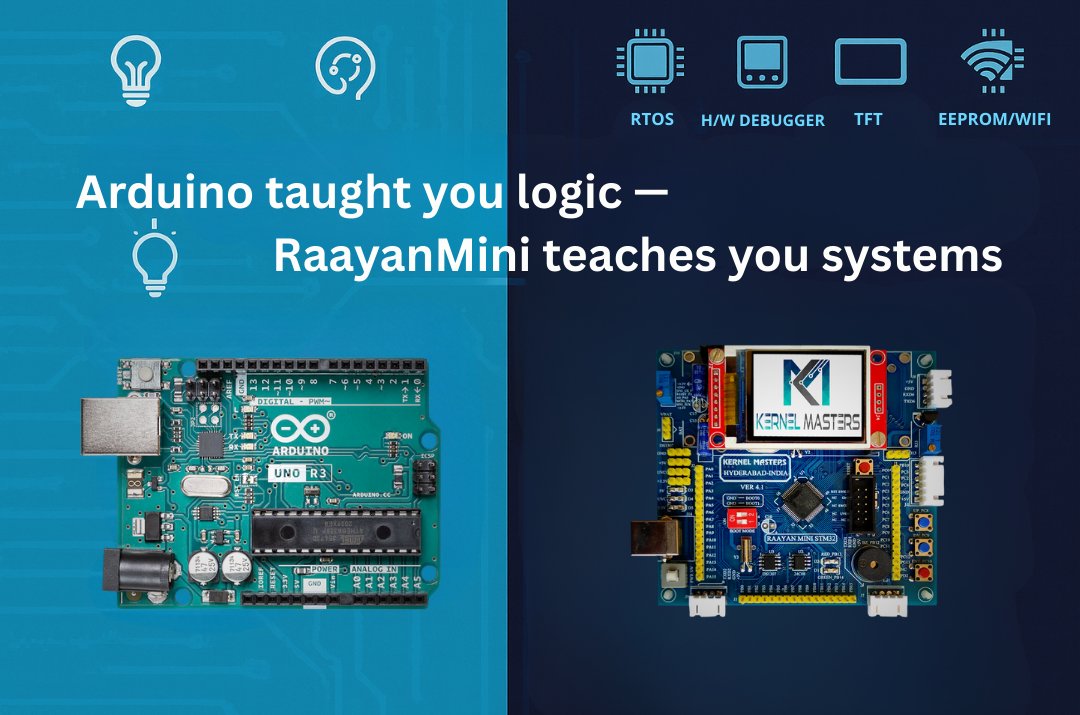
Arduino Uno Or Raayan Mini: Where Should You Really Start Your Embedded Journey?

If you’re a fresher (or working professional switching into embedded), your first board was probably Arduino.
It’s simple, affordable, and tutorials are everywhere. But here’s the critical question:
Is Arduino Uno enough for a professional embedded job, or do you need something like Raayan Mini?

Real question: “If I already know Arduino, do I really need STM32/Raayan Mini for an embedded job?”

Short answer: Arduino is a great start. Raayan Mini is where you grow if you’re serious.

TL;DR (save this):

  • Arduino Uno = fast entry to electronics + coding basics (8-bit, 2KB RAM)
  • Raayan Mini = professional workflow: 32-bit ARM, hardware debugging (ST-LINK), multi-peripheral systems, industry tools
  • If your goal is firmware/embedded jobs, move to 32-bit STM32 learning within 4–8 weeks (if dedicated)
  • The real difference: Arduino teaches “make it work.” Raayan Mini teaches “understand how it works.”

1Understanding Arduino: Value, Limitations & Knowledge Gaps

Arduino Uno is genuinely valuable. It’s introduced millions to electronics and programming. It’s accessible, fun, and results are immediate. But here’s what matters for a fresher pursuing embedded careers: what’s it hiding from you?

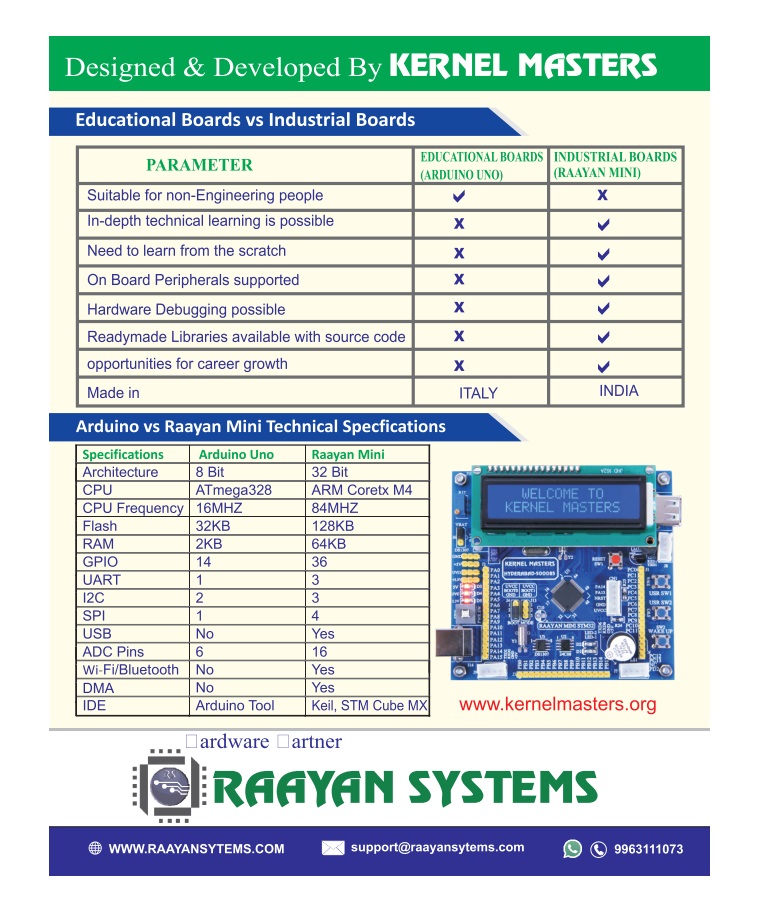
⚙️ Arduino Uno Specs

  • MCU: ATmega328P (8-bit AVR)
  • Clock: 16 MHz
  • Flash: 32 KB
  • SRAM: 2 KB
  • EEPROM: 1 KB
  • Peripherals: UART, SPI, I²C (via libraries)

✓ Arduino Excels At

  • First exposure to electronics + coding
  • College projects & hobbyist robotics
  • Rapid prototyping with pre-built libraries
  • Immediate visual feedback (LED, motors)
  • Lower cost barrier to entry

But here’s the real question: Can you answer these after Arduino?

  • What’s in the MCU’s memory map?
  • How does the bootloader start your code?
  • What’s an interrupt vector table?
  • How do you configure registers directly?
  • What’s a hard fault and how do you debug it?
The Knowledge Gap: Arduino abstracts away the “how” so you can focus on “what.” But when you enter embedded jobs, companies expect you to know the “how.” A fresher who can answer those questions above is ready for production work. One who can’t? Still learning hobbyist skills.

Key takeaway: Arduino is excellent for electronics basics. But for embedded careers, you need to move beyond it. The question isn’t “Is Arduino bad?” It’s “Is Arduino enough for what you’re trying to achieve?”

2Meet Raayan Mini: Built for Industry-Level Learning

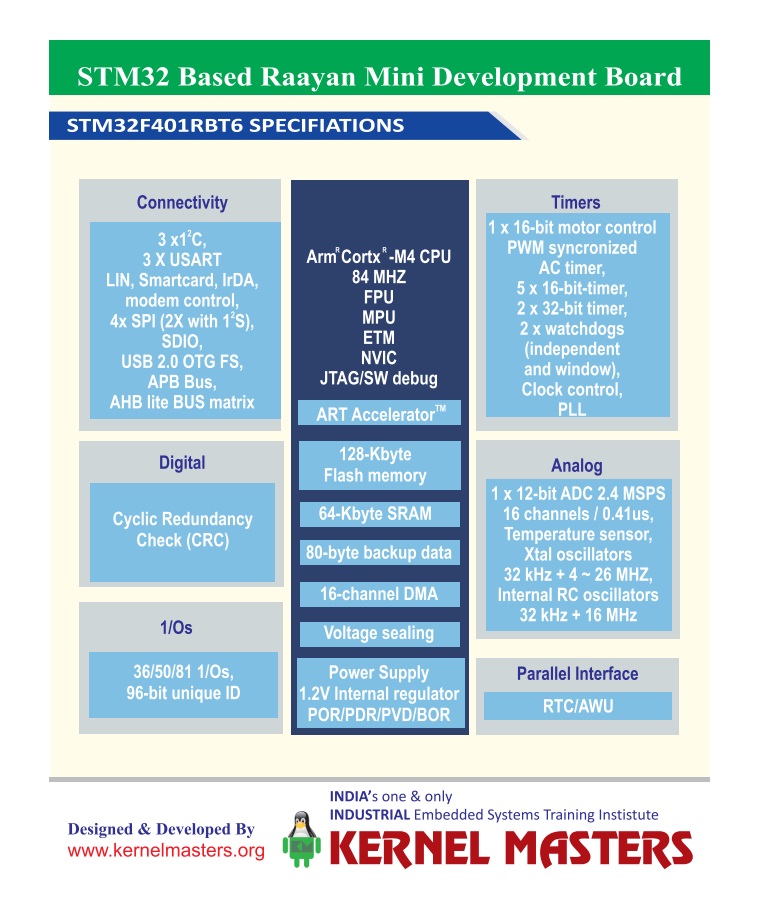
Raayan Mini is an STM32-based industrial training board designed to bridge academic kits and professional embedded workflows.

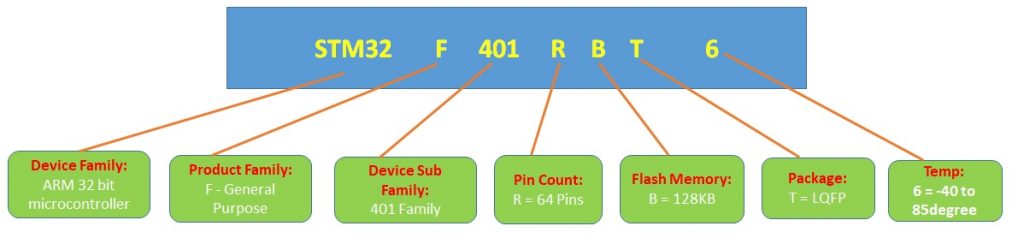
⚙️ Core MCU: STM32F401

  • 32-bit ARM Cortex-M4 + FPU
  • Up to 84 MHz clock
  • 128 KB flash, 64 KB SRAM
  • 12-bit ADC + UART/I²C/SPI/etc

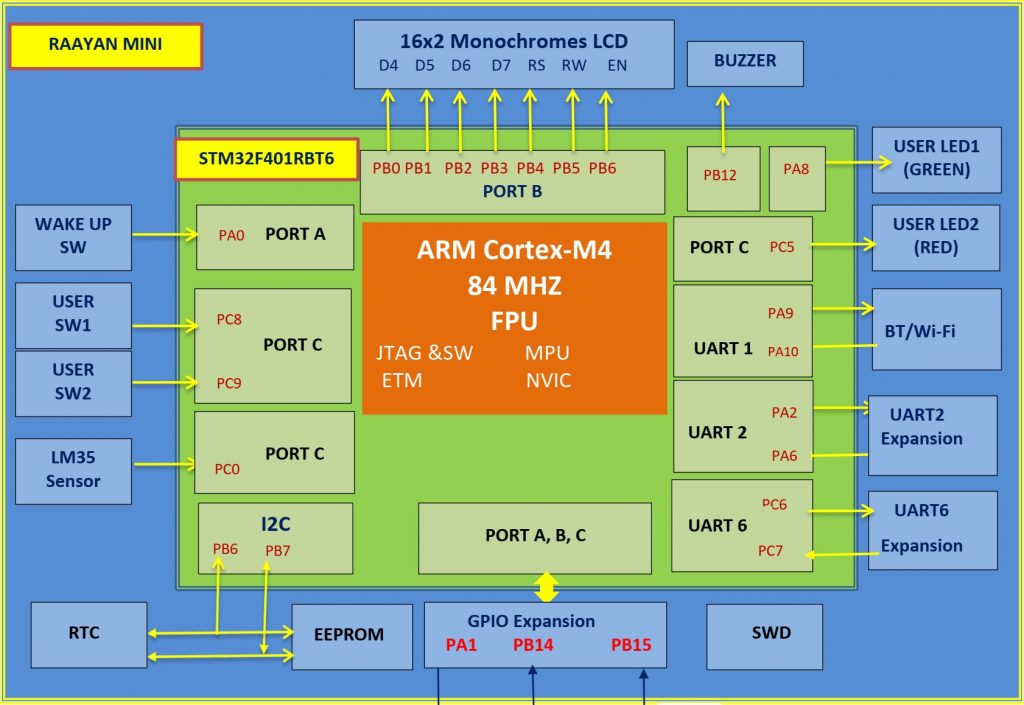
🔧 Mini-Lab Peripherals (One PCB)

  • On-board ST-LINK SWD debugger
  • Temperature sensor (LM35) + potentiometer
  • RTC (I²C) + EEPROM (I²C)
  • 16×2 LCD + TFT SPI interfaces
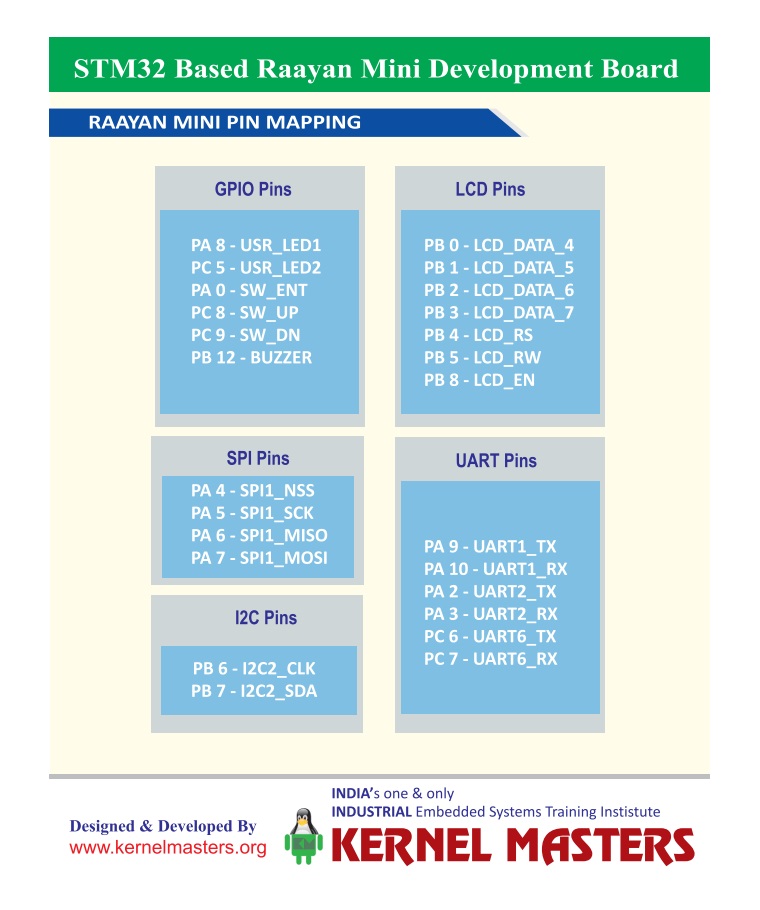
  • UART zones + GPIO/I²C/SPI breakouts

Here’s why Raayan Mini (STM32) answers those Section 1 questions:

  • ST-LINK SWD Debugging: You SEE registers, memory, interrupts happening in real-time (solves the “hard fault” gap)
  • On-board Peripherals: Forced to understand I²C, SPI, ADC configuration—not library abstractions
  • Professional Tools: STM32CubeIDE shows register layouts, memory organization, interrupt vectors visually
  • Architecture-first: You learn memory map, bootloader, startup BEFORE hiding behind libraries

What About Nucleo Boards or Other STM32 Kits?

They’re good, but bare MCU boards. You’re hunting for sensors, displays, debuggers. Raayan Mini (STM32) has LM35, RTC, EEPROM, LCD/TFT, and ST-LINK on one board—no breadboarding, more time learning systems.

Note for beginners: Yes, breadboarding teaches you connections. But managing wiring, connections, and debugging hardware issues can overwhelm your focus. Integrated tools let you concentrate on what actually matters—architecture and systems thinking.

3Quick Comparison: Different Designs, Different Purposes

Arduino and STM32 aren’t “better” or “worse”—they’re designed for different things. Arduino prioritizes ease-of-use and rapid prototyping. STM32 prioritizes system control and professional development. For job-ready embedded learning, the differences matter:

Aspect Arduino Uno Raayan Mini (STM32) Career Impact
Core 8-bit AVR @ 16 MHz 32-bit Cortex-M4 @ 84 MHz Standard ARM dominates embedded jobs (90%+)
Memory 32 KB flash, 2 KB RAM 128 KB flash, 64 KB RAM 4x/32x RTOS, logging, multi-system projects feasible
Peripherals Mostly external (shields) Many built-in (integrated) Multi-peripheral projects
Debugging Serial.print() + LEDs Hardware breakpoints, watch, stack Professional Hardware debugging is industry MUST
Job Market ~2-3% of embedded roles ~90%+ of embedded roles Industry Standard ARM Cortex-M dominates; Arduino-only jobs are rare
Tools Arduino IDE (simple) STM32CubeIDE / Keil / IAR Professional Professional toolchain signals expertise

48-bit vs 32-bit: Why It Matters More Than You Think

On Arduino, math is optimized for 8-bit operations. On STM32, you work natively with 32-bit data, richer instruction sets, and hardware floating-point unit (FPU) for signal processing.

Ask yourself: Do you want to only “make it work”… or understand how it works
(timers, interrupts, registers, memory map, clock configuration)?

32-bit enables you to implement real embedded systems concepts:

Signal Processing
Real-Time OS (RTOS)
Edge AI & ML
Data Logging
Multi-sensor Systems

Why it matters: On 8-bit Arduino with 2 KB RAM, you can’t implement signal processing (DSP) or meaningful ML inference. FreeRTOS technically fits (~1.5KB), but becomes impractical with application code and meaningful tasks. On 32-bit STM32 with 64 KB RAM, these become practical real-world projects that companies actually build.

Memory matters too: 2 KB RAM gets tight with buffers, logs, multiple peripherals. With 64 KB RAM,
you can build clean, modular applications and experiment with real-time concepts.

Note on Edge AI: TinyML and quantized models are possible on STM32 (including F401 with upto 256KB flash), but flash memory becomes tight—you’ll work with smaller models. This is still valuable learning, and more realistic than Arduino’s constraints.

5Project Thinking: Single Feature vs. System

Most Arduino Tutorials

  • Read sensor
  • Display on LCD
  • Blink LED on threshold

Single feature. No integration.

Raayan Mini Style Project

  • Read sensor
  • Timestamp with RTC (I²C)
  • Log to EEPROM
  • Display on LCD/TFT
  • UART menu for config
  • Optional cloud via ESP8266

Multi-peripheral system. Product-like thinking.

Interview perspective: Multi-peripheral integration shows you understand how systems work,
not just libraries.

6Debugging & System Understanding: The Critical Difference

Arduino’s debugging approach: Serial.print() statements to track behavior. It works for simple projects, but here’s the problem: it teaches you the effects, but not the mechanisms of what’s happening under the hood.

You might argue: “But STM32 with HAL also abstracts things.” True! HAL does abstract register-level code. But here’s the critical difference:

Arduino Approach

  • Start with abstraction (Serial.print)
  • Never see what’s below
  • Can’t debug hardware-level issues
  • Knowledge stops at library level

Limited foundation

STM32 (Even with HAL)

  • Start with architecture (memory map, interrupts, registers)
  • Then use HAL libraries confidently
  • CAN debug when HAL isn’t enough
  • Knowledge goes deep + you use abstractions wisely

Strong foundation + tools

Hardware Debugging with ST-LINK SWD:

  • Set breakpoints and step line-by-line
  • Watch variables change in real-time
  • Inspect registers and peripheral setup
  • Analyze call stacks during crashes/hard faults
  • Understand WHAT is happening, not just guess

This is the key: Companies don’t expect you to avoid abstractions. They expect you to understand what’s being abstracted so you can debug when something breaks. Arduino doesn’t give you that foundation. STM32 does—even if you use HAL.

7Other Board Options: Quick Reality Check

Let’s be honest about alternatives. Some are stepping stones, some can work—but the documentation story matters more than you think.

8-bit Arduinos (Nano, Mega, Pro Mini)

Spec: ATmega328P, 16 MHz, 2 KB RAM (same as Uno)

Problem: Still 8-bit AVR architecture. Arduino reference manual teaches you abstraction, not the microcontroller fundamentals your B.Tech curriculum covers.

Good for: Learning code logic. Bad for: Understanding embedded systems.

32-bit Arduinos (Due, Zero, Nano 33)

Spec: ARM Cortex-M3/M0+ processors (same architecture as STM32)

The catch: They’re ARM under the hood, YES—but Arduino’s documentation doesn’t prioritize this. The Arduino IDE reference manual focuses on libraries, not interrupts, memory maps, or peripheral control registers. You’re learning abstraction layers, not the architecture.

Good for: Quick prototyping. Bad for: Career preparation (conceptual gaps remain).

Here’s the real issue: You can have an ARM chip, but if your reference manual doesn’t teach you how ARM works, you’re missing the point. Arduino’s docs are tutorials, not technical references. STM32’s ecosystem provides both: tutorials AND detailed datasheets that explain architecture, memory, peripherals at the register level.

Bottom line: Choose a board where the reference documentation actually teaches you the concepts, not just the code. That’s what separates learning-for-fun from learning-for-careers.

8What Hiring Managers Actually Evaluate

Skill Area STM32 Signal
Architecture ARM Cortex-M/Similar MPU: memory map, startup, interrupts Strong
Drivers Write drivers: GPIO, UART, I²C, SPI, ADC, displays Strong
Debugging Breakpoints, watches, call stack, faults Professional
Projects Multi-peripheral systems Mature
Advanced FreeRTOS tasks, queues, ISRs Optional → Required

9What Real Companies Actually Use

Here’s why learning STM32 and ARM Cortex-M architecture is smart—it’s what the industry actually manufactures:

🚗 Automotive

  • STM32H7 series (high performance)
  • NXP S32 family
  • Microchip PIC32

Example: In-car infotainment, ADAS systems

🌐 IoT & Smart Devices

  • STM32L series (ultra-low power)
  • Nordic nRF52 (Bluetooth)
  • Espressif ESP32 (WiFi)

Example: Smart home, wearables, sensors

🏥 Medical Devices

  • Microchip PIC32MX/MZ
  • STM32F4/L4 series
  • TI MSP432

Example: Glucose monitors, patient monitors

⚙️ Industrial Control

  • STM32H7 series
  • TI C2000 (real-time)
  • NXP LPC55

Example: Motor drives, PLCs, robotics

Bottom line: ARM Cortex-M (used in STM32, NXP, TI, Microchip) powers millions of professional products—automotive, medical, industrial, IoT. Arduino exists commercially too (toys, hobbyist IoT gadgets), but if you’re pursuing an embedded career, learning ARM architecture prepares you for what real companies actually hire for. Learning STM32 specifically teaches you this architecture; the exact vendor matters less once you know the fundamentals.

10Common Fresher Mistakes (Don’t Make These)

❌ Mistake #1

Spending 6+ months on Arduino

Most Arduino tutorials plateau after 3–4 projects. To go deeper, you must read ATmega328P datasheets independently.
STM32’s ecosystem teaches this naturally—that’s why the timeline matters.

❌ Mistake #2

Skipping datasheets

“I’ll learn by tutorials” is fine at first, but professional jobs require reading 100-page datasheets.
Start early with datasheet practice.

❌ Mistake #3

Not using hardware debugging from Day 1

Hardcoding Serial.print() for debugging becomes a bad habit.
Use ST-LINK breakpoints from your first project.

❌ Mistake #4

Ignoring architecture

“How does the MCU start?” “Where is my code in memory?” “What’s an ISR vector?”
These aren’t optional—they’re fundamental.

11Quick Questions Answered

Q1: If I write 32-bit math on an 8-bit AVR, what happens?

The compiler breaks it into multiple 8-bit operations. It works, but it’s slower and heavier than native 32-bit math.
This is why architecture matters for real applications.

Q2: What’s the biggest difference between Arduino and STM32?

Debug workflow + system visibility. Breakpoints, register inspection, call stacks, fault analysis—
plus understanding MCU startup, linker scripts, and interrupt vectors. Arduino hides all of this.

Q3: Do I need FreeRTOS to get a job?

Entry-level (freshers): Not mandatory—most companies train you on RTOS after hiring.

Mid-level (3+ years, ₹8-12 LPA+): RTOS fundamentals are expected in interviews.

Strategy: Master it within your first 6 months of dedicated learning, or before applying for senior intern/mid-level positions. In India’s embedded job market, RTOS is increasingly common even at 6-8 LPA roles.

Q4: What should I explain in an interview after STM32 practice?

Interrupt flow, timer configuration, peripheral initialization, debugging techniques, and how your firmware
is structured (modules, layers, state machines). Not just “it works,” but “here’s why I architected it this way.”

12Final Takeaway

Arduino is an educational prototyping platform. Raayan Mini is an industrial training board.

When you can honestly say: “I built multi-peripheral firmware on STM32, debugged with ST-LINK,
read datasheets, and wrote drivers,” you’ve transitioned from prototyping-focused to systems-thinking.
That’s the inflection point most companies value.

Remember: The board is a tool. Your commitment to understanding systems is what matters.
Whether you choose Raayan Mini, Nucleo, or any other STM32 board—success depends on your dedication to learning architecture, not just writing code.

Ready to Start Your Professional Embedded Journey?

Master registers, debugging, multi-peripheral systems, and real-time concepts.
With dedicated focus (40+ hours/week), 10–12 weeks gets you interview-ready. For part-time learning, expect 4–6 months.

Explore Raayan Mini


View Learning Resources

June 3, 2025
June 3, 2025

Why Embedded AI Is the Future: A Career Path for Engineers, Coders & Innovators

In today’s AI-driven world, we hear a lot about chatbots, recommendation engines, and cloud-powered tools. These are all part of what we call Traditional AI—systems that rely on massive infrastructure and powerful computing resources hosted on the cloud. But there’s a new, emerging alternative that’s faster, leaner, and smarter for edge applications: Embedded AI.

🧠 What is Traditional AI?

Traditional AI refers to high-performance artificial intelligence that runs on powerful servers—typically in cloud data centers. These systems are great for analyzing big data, generating insights, and powering large-scale enterprise solutions.

Examples of Traditional AI Applications:

  • Virtual assistants like Siri, Alexa, or Google Assistant
  • Search engines and recommendation systems (e.g., YouTube, Netflix)
  • Fraud detection systems used by banks
  • AI-powered cloud-based medical diagnostics

Key Characteristics of Traditional AI:

Feature Description
🧠 Model Complexity Uses large machine learning or deep learning models (e.g., GPT, CNNs, RNNs)
💾 Data Usage Requires large volumes of data for training and inference
☁️ Execution Platform Runs mostly on cloud servers, GPUs, or high-end CPUs
🌐 Connectivity Often needs internet access to communicate with the cloud
Power Consumption High, because of resource-intensive computations
⏱️ Latency Higher latency due to data transmission and processing delays
🧑‍💻 Application Areas Natural Language Processing (NLP), computer vision, finance, healthcare, recommendation systems

While powerful, traditional AI has limitations for real-time, offline, or power-constrained applications. That’s where Embedded AI comes in.

🔍 What is Embedded AI?

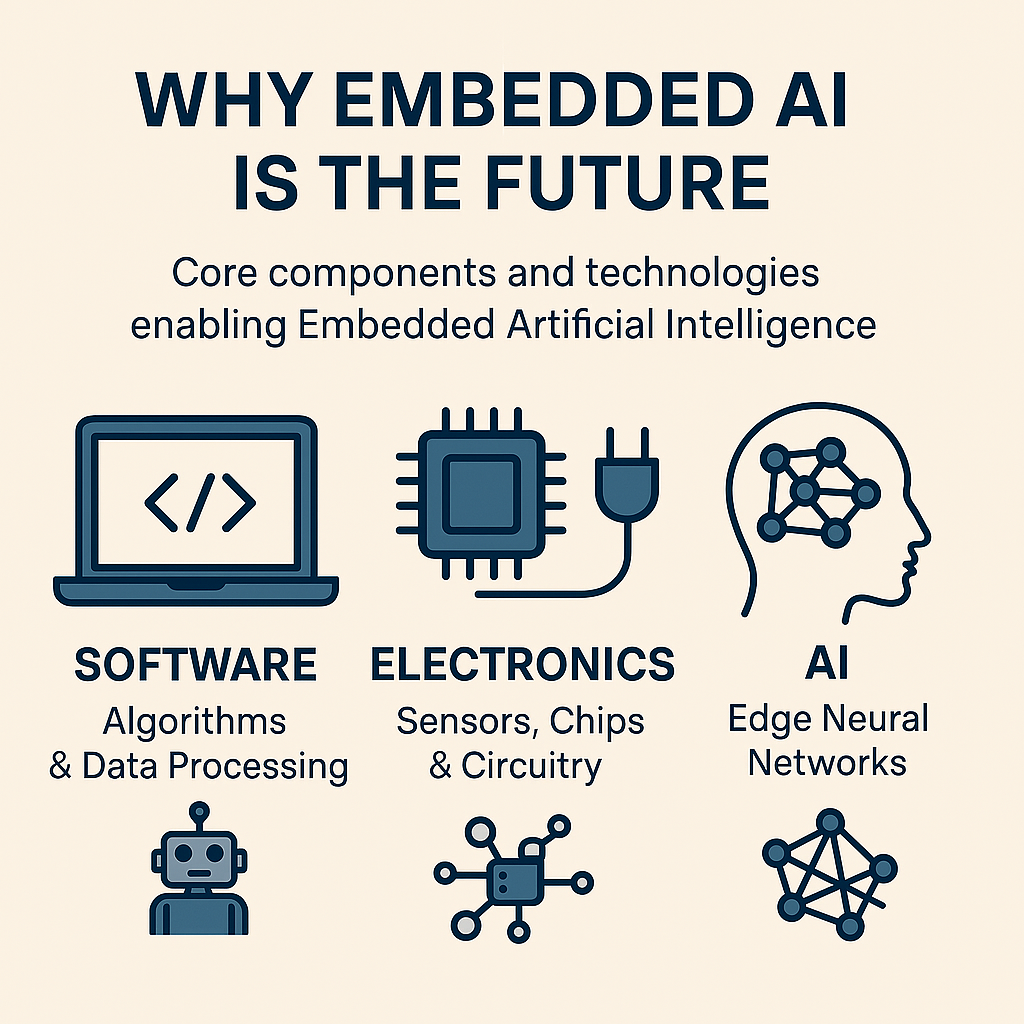
Embedded AI is the combination of electronics, software, and AI running on small, resource-limited hardware such as microcontrollers. Unlike traditional AI systems that depend on cloud servers for processing, Embedded AI enables local intelligence—allowing devices to think, learn, and act without internet or cloud access.

🧩 Real-World Applications of Embedded AI

Embedded AI is no longer a concept of the future — it’s already powering the intelligent devices all around us. From smart homes to industrial automation, here are some of the most impactful and current applications of Embedded AI today:

  • Smart Cameras & Appliances: Face detection, voice control, and personalized suggestions.
  • Wearables & Health Monitors: Track health vitals, detect falls, and monitor sleep patterns.
  • Industrial Automation: Predictive maintenance, quality checks, and smart energy metering.
  • ADAS & Smart Vehicles: Lane assist, collision detection, and AI-powered dashcams.
  • Drones & Surveillance: Real-time obstacle avoidance and intelligent mapping.
  • Smart Homes & IoT: AI security systems, energy optimization, and leak detection.
  • Agritech: Smart irrigation, disease detection in crops, and autonomous monitoring.
  • Retail & POS: Smart vending, fraud detection, and inventory tracking robots.

💡 Why Do We Need Embedded AI?

Embedded AI solves several critical issues posed by traditional cloud-based AI:

Feature Description
💡 Local Intelligence AI runs on the device itself, not in the cloud
⚙️ Hardware Used Microcontrollers (e.g., STM32), NPUs, DSPs, SoCs
Low Power Designed for low energy consumption, ideal for battery-powered devices
⏱️ Real-Time Response Fast decision-making without internet delays
🧩 Compact Models Uses TinyML, quantized and optimized models
🔒 Privacy Friendly Keeps data on-device, enhancing security
🌐 Connectivity Optional Works offline or intermittently connected

🧠 What Makes Embedded AI Possible?

🧩 Key Components:

Programming Concepts
Software

Foundations of coding and software tools.

Industrial Hardware
Electronics

Microcontrollers and sensor integration.

AI Framework & AI Tools
AI

TinyML and edge intelligence systems.

💻 Software
Core Topics:
  • Programming Languages – C, C++, Python for embedded and general-purpose development
  • Development Tools – STM32CubeIDE, Arduino IDE, and Visual Studio Code
  • Version Control – Git and GitHub for managing collaborative projects
🔌Electronics
Key Concepts:
  • Microcontrollers – STM32, ESP32, Arduino, and more
  • Sensors & Actuators – Interfacing with real-world inputs and outputs
  • Communication Protocols – I2C, SPI, UART for hardware integration
🤖 AI
Embedded AI Overview:
  • TinyML enables machine learning on microcontrollers with minimal resources
  • TensorFlow Lite for Microcontrollers – Lightweight ML runtime for constrained devices
  • STM32Cube.AI – Converts neural network models into optimized embedded code

Embedded AI is where software meets electronics and AI—a perfect blend of disciplines.

⚖️ Embedded AI vs Traditional AI

🔴 Traditional AI Problems 🟢 How Embedded AI Solves It
❗ High latency (due to cloud dependency) ✅ Runs locally on devices (real-time response)
❗ Requires constant internet connectivity ✅ Works offline — ideal for remote or mobile use
❗ High power consumption (GPU/CPU-heavy) ✅ Optimized for low-power microcontrollers (e.g., STM32)
❗ Privacy issues (data sent to cloud) ✅ Local inference means data stays on device
❗ Not suitable for real-time control (e.g., robotics, cars) ✅ Real-time decisions using embedded AI chips
❗ Expensive hardware required ✅ Uses low-cost, efficient MCUs and NPUs

🚀 Career Opportunities in Embedded AI

If you’re a student, fresher, or a professional with a passion for both coding and hardware, Embedded AI is a game-changing career path. Here’s why:

✅ Rare and Valuable Skillset

You’ll master both low-level embedded systems (e.g., STM32, C) and high-level AI (e.g., ML, TinyML).

🌐 High Industry Demand

Used in:

  • IoT Devices (Smart homes, Smart cities)
  • Automotive (ADAS, EVs)
  • Industry 4.0 (Robotics, predictive maintenance)
  • Healthcare (Wearables)
  • Agriculture (AI-powered drones)

🔄 Cross-Domain Roles

  • Embedded Software Developer
  • AI/ML Engineer
  • Firmware Developer
  • Robotics Engineer
  • AIoT Product Designer

🔮 Future-Proof Your Career

Embedded AI intersects with AI, IoT, and 5G—three massive future tech waves.

🏢 Top Companies Hiring in Embedded AI

Global Tech Giants:

  • NVIDIA (Jetson edge AI)
  • Intel (Movidius, OpenVINO)
  • Qualcomm (Snapdragon NPE)
  • STMicroelectronics (STM32 with AI)
  • NXP, Texas Instruments, ARM

These companies are investing heavily in edge computing and AI hardware—the backbone of Embedded AI.

🧑‍💻 Who Can Learn Embedded AI?

🚫 Myth: Only ECE/EEE students can build careers in Embedded AI
Reality: Embedded AI is a cross-disciplinary field:

  • Software (CSE, IT)
  • Electronics (ECE, EEE)
  • AI/ML (Any branch)

If you love problem-solving, coding, or building smart systems, this path is for you.

🎓 Learn Embedded AI with Kernel Masters

If you’re looking for a practical, job-ready course in Embedded AI, Kernel Masters stands out with:

  1. Expert Instruction: 20+ years of experience from Kishore Kumar Sir.
  2. Industrial Syllabus: Covers embedded C, STM32, ARM, and AI tools.
  3. Hands-on Projects: Build real products like smart attendance systems and gateways.
  4. Personal Attention: One-on-one support, performance tracking.
  5. Placement Support: End-to-end career support—regardless of degree, marks, or batch.

📈 Conclusion

Embedded AI isn’t just the future—it’s the now for smart, scalable, and efficient AI solutions. Whether you’re an engineer, coder, or AI enthusiast, this is a path where hardware meets intelligence—and careers take off.

If you’re serious about building a future in tech, start with Embedded AI. 🌍💡

September 18, 2024


Linux Kernel Programming Linux Device Drivers
Kernel Developers focus on interfaces, data structures, algorithms and optimization for the core of the operating system. Device Drivers use the interfaces and data structures written by the kernel developers to implement device control and IO.
Kernel programming is done using Module programming technique.There are no standard libraries available. Have to use pure C programming. Device Drivers is done using Module programming technique.There are no standard libraries available. Have to use pure C programming.
A very good kernel programmer may not know a lot about interrupt latency and hardware determinism, but he will know a lot about how locks, queues and Kobjects work. A device driver programmer will know how to use locks, queues and other kernel interfaces to get their hardware working properly and responsively, but he won’t be as likely to fix a page allocation bug or write a new scheduler.


September 18, 2024

Embedded Software

  • C Programming Skills (Function, Pointers, Arrays, and Structures, Bit-wise operations should be your best friends). Master C programming skill. This is the most essential skill for the ECE students today. Without this skill you will find it difficult to enter into electronics core companies.
  • Embedded C Programming (Microcontroller Programming)
  • Operating Systems Concepts (Process Management, File Management, Memory Management, Inter Process Communication)
  • Linux Basics/Commands
  • Work on Community development boards.

Resources

  • C in Depth by Srivastava and The C Programming Language by K & R
  • Operating System Concepts (book) by Galvin

Embedded Hardware

  • Computer Organization (Microprocessor,  Microcontroller)
    • I/O Organization (Polling, Interrupt, DMA)
    • Memory Organization (Memory Hierarchy, cache Memory, MMU, Virtual Memory)
  • Understand the Digital Circuit thoroughly from AND, OR, NOT gates to Microprocessors.

Resources:

  • Computer organization by Morris Mano
  • Digital Systems by Morris Mano
  • 8086 microprocessor interfacing

Project Work:

Buy a Community development board and apply the C programming skill to do good electronic projects by yourself without copying a single line of code from net/book/friends.

September 18, 2024
September 18, 2024

ARM cores are designed specifically for embedded systems. The needs of embedded systems can be satisfied only if features of RISC and CISC are considered together for processor design. So ARM architecture is not a pure RISC architecture. It has a blend of both RISC and CISC features.

ARM Architecture Features and Benefits:

Features Benefits to embedded system
High Performance Ensures the system has a fast response
Low power consumption Makes the system more energy efficient
Low silicon area Reduces the size and also consumes less power
High Code density Helps embedded system to have less memory footprint
Load/store architecture Used to load data from the memory to the ARM CPU register or store data
from the CPU register to the memory; enables the memory access when
required
Register bank with large number
of working registers
Required to perform most of the operations within the CPU and provides
faster context switch in a multitasking applications

In the path of architectural evolution, ARM has contributed many versions of IP cores to the embedded computing world. ARM pioneered embedded products are excelling in every visible spectrum. Since its inception, ARM has migrated over a long meaningful road map starting from v4T ARM7TDMI to v7 Cortex series of architectures achieving many strong milestones in between. It is currently the new era of feature rich ARM Cortex series architectures truly empowering the embedded computing world.

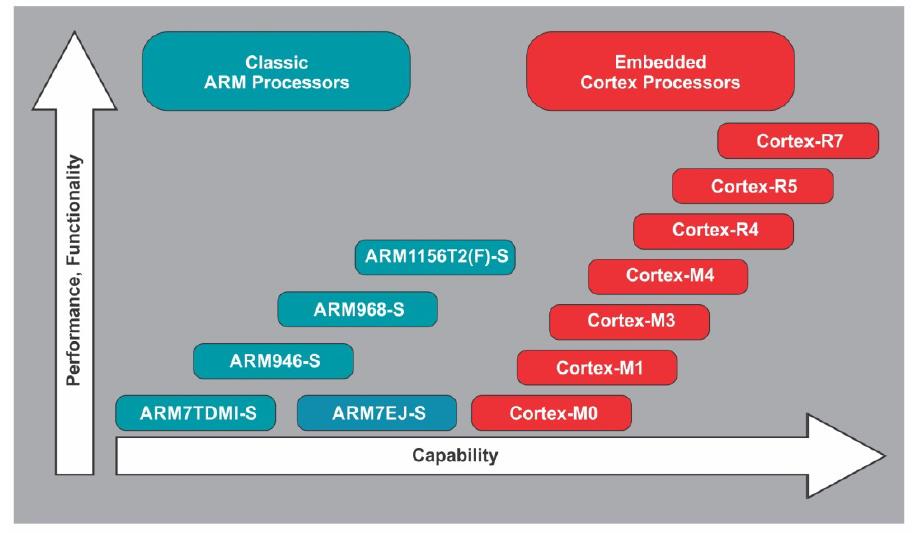
ARM architecture evolution:

Comparison chart showing performance and capability of Classic ARM Processors versus Embedded Cortex Processors
Performance and capability comparison of ARM7, ARM9, ARM11 series processors with Cortex-M and Cortex-R embedded cores

ARM architecture v7 profile:

In order to provide a wide coverage of different application domains, addressing their specific requirements, ARM core is evolved into architecture version7 which has three different profiles: the application profile, real time profile and microcontroller profile. Architecture v7 should not be confused with ARM7 which has been explained before under architecture v4.

Application profile (Cortex -A)

Cortex A series of architectures are multicores with power efficiency and high performance. Every Cortex – A implementation is intended for highest performance at ultralow power design. It supports with, in-built memory management unit. Being influenced by multitasking OS system requirements, it has virtualization extensions and provides a trust zone for a safe and extensible system. It has enhanced Java support and provides a secure program execution environment. These architectures are typically designed for high end real time safety critical applications like automotive powertrain system. Some Cortex- A application products are smart phones, tablets, televisions and even high end computing servers.

Real-time profile (Cortex -R)

Cortex R series of architectures are designed for deeply embedded real time multitasking applications. They have low interrupt latency and predictability features for real time needs. It provides memory protection for supervisory OS tasks being in privileged mode. It also provides tightly coupled memories for fast deterministic access. Typical application examples are: hard disk drive controller and base band controller for mobile applications and engine management unit where high performance and reliability at very low interrupt latency and determinism are critical requirements.

Microcontroller profile (Cortex -M)

Cortex M series of architectures have v6-M as cortex M0, M0+ and M1 and v7-M with Cortex M3, M4 and other successors. This series of architectures developed for deeply embedded microcontroller profile, offer lowest gate count so smallest silicon area. These are flexible and powerful designs with completely predictable and deterministic interrupt handling capabilities by introducing the nested vector interrupt controller (NVIC). The small instruction sets support for high code density and simplified software development. Developers are able to achieve 32-bit performance at 8-bit price. The very low gate count of Cortex M0 facilitates its deployment in analog and mixed mode devices. Due to further demanding applications requiring even better energy efficiency, Cortex M0+ was designed with two stage pipeline and achieved high performance with very low dynamic power consumption, reduced branch shadow and reduced number of flash memory access. Cortex M1 was designed for implementation in FPGA. It is functionally a subset of Cortex M3 and runs ARM v6 instruction set with OS extension options. It has 32-bit AHB lite bus interface, separate tightly coupled memory interface and JTAG interface to facilitate debug options. It has three stage pipeline implementation and configurable NVIC for reducing interrupt latency.

Cortex M4 Features:

  • Thumb2 instruction set delivers the significant benefits of high code density of Thumb with
  • 32-bit performance of ARM.
  • Optional IEEE754-compliant single-precision Floating Point Unit.
  • Code-patch ability for memory system updates.
  • Power control optimization by integrating sleep and deep sleep modes.
  • Hardware division and fast multiply and accumulate for SIMD DSP instructions.
  • Saturating arithmetic for noise cancellation in signal processing.
  • Deterministic, low latency interrupt handling for real time-critical applications.
  • Optional Memory Protection Unit(MPU) for safety-critical applications
  • Extensive implementation of debug, trace and code profiling capabilities.

ARM Cortex M Programming Model:

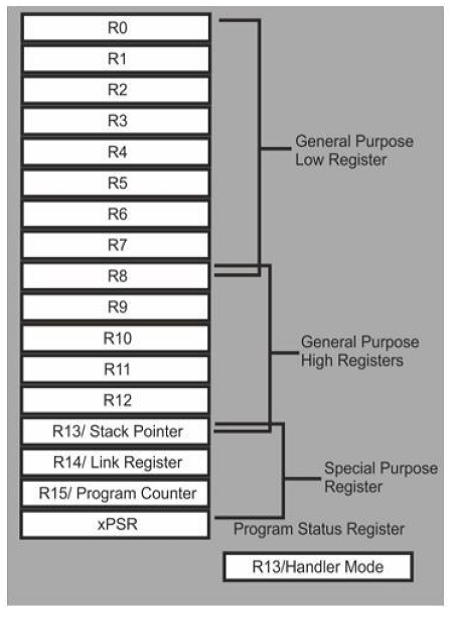
The programming model of the Cortex-M4 processors has 18 working registers shown in below Figure. Thirteen of them are general purpose 32-bit registers, three have special uses and two stack pointers.

Diagram of ARM processor register set including low, high, special purpose registers and program status register
Visual overview of ARM processor registers showing R0–R12 general purpose registers, special purpose registers R13–R15, and xPSR status register
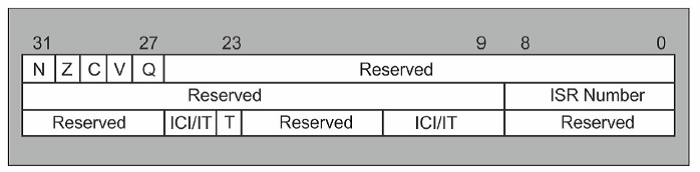
Diagram showing the layout of ARM processor status register bits including flags N, Z, C, V, Q, ISR number, and reserved sections
Detailed breakdown of the ARM processor status register showing key flags and reserved bits crucial for system-level programming
September 18, 2024
September 18, 2024

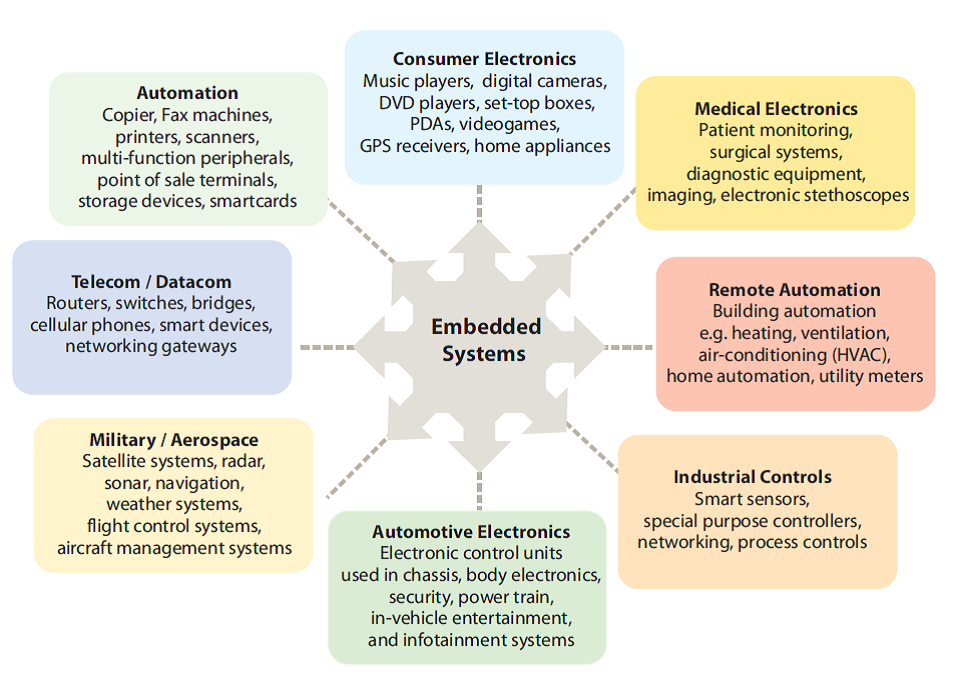
Embedded Systems Applications

Embedded systems development environment

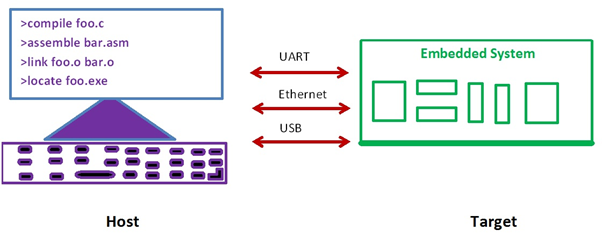
Embedded software build process is a transformation performed by software running on a general purpose computer.

The compiler, assembler, linker and locator are all pieces of software that run on a host computer, rather than on the embedded system itself. Finally executable image run on a target embedded system.

Host (Development) machine communicate to the target various types of interfaces like UART, Ethernet and USB.

Types of computer architectures

  1. Based on Program Memory and Data Memory (Harvard and Von Neumann computer architectures)
  2. Based on Mechanism (RISC and CISC)
  3. Based on Data transfer to the Memory (Little Endian and Big Endian)
  4. Based on Types of Address (I/O mapped I/O and Memory Mapped I/O)
  5. Based on Instruction Set

Harvard and Von Neumann computer architectures

Embedded Systems
Embedded device
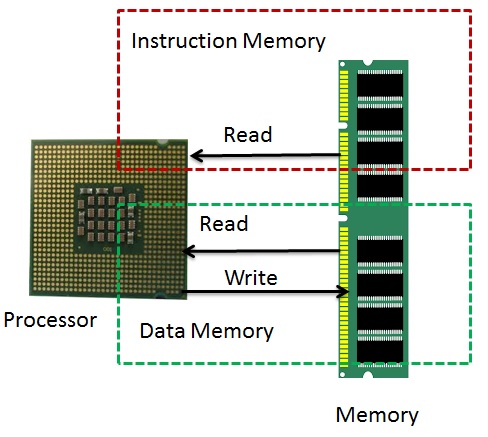
VON NEUMANN ARCHITECTURE
  • It is named after the mathematician and early computer scientist John Von Neumann. The computer has single storage system memory) for storing data as well as program to be executed.
  • There is no real difference between data and instructions.
  • Data and instructions share the same memory.
  • Processor needs two clock cycles to complete an instruction. Pipelining the instructions is not possible with this architecture.
  • In the first clock cycle the processor gets the instruction from memory and decodes it. In the next clock cycle the required data is taken from memory. For each instruction this cycle repeats and hence needs two cycles to complete an instruction
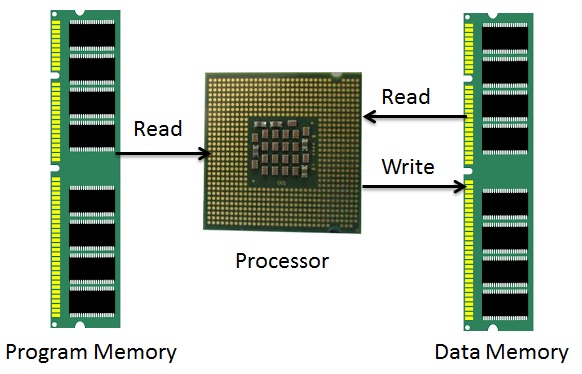
Harvard Architecture
  • The name is originated from “Harvard Mark I” a relay based old computer.
  • The computer has two separate memories for storing data and program.
  • Processor can complete an instruction in one cycle if appropriate pipelining strategies are implemented. In the first stage of pipeline the instruction to be executed can be taken from program memory. In the second stage of pipeline data is taken from the data memory using the decoded instruction or address.
  • Most of the modern computing architectures are based on Harvard architecture. But the number of stages in the pipeline varies from system to system.

RISC and CISC:

CISC RISC
Many complex instructions Simple instructions, few in Number, Few addressing modes
Variable length instructions Fixed length instructions
Many instructions can access memory Only LOAD/STORE instructions access
memory
mov ax, 10
mov bx, 5
mul bx, ax
mov ax, 0
mov bx, 10
mov cx, 5
Begin add ax, bx
loop Begin
The total clock cycles for the CISC version might be:
(2 movs × 1 cycle) + (1 mul × 30 cycles) = 32 cycles
While the clock cycles for the RISC version is:
(3 movs × 1 cycle) + (5 adds × 1 cycle) + (5 loops × 1 cycle) = 13
cycles
Example: x86 ISA Examples: ARM, MIPS, PowerPC (IBM), SPARC (Sun)

Little Endian and Big Endian

Little Endian Big Endian
“Little Endian” means that the lower-order byte of the number is stored in memory at the lowest address, and the high-order byte at the highest address. “Big Endian” means that the high-order byte of the number is stored in memory at the lowest address, and the low-order byte at the highest address.
For example, a 4 byte Integer
Byte3 Byte2 Byte1 Byte0
will be arranged in memory as follows:
Base Address+0 Byte0
Base Address+1 Byte1
Base Address+2 Byte2
Base Address+3 Byte3
The same 4 byte integer would be stored as:
Base Address+0 Byte3
Base Address+1 Byte2
Base Address+2 Byte1
Base Address+3 Byte0
Intel processors (those used in PC’s) use “Little Endian” byte order. ARM processors (those used in PC’s) use “Big Endian” byte order.

I/O mapped I/O and Memory Mapped I/O:

I/O Mapped I/O Memory Mapped I/O
Separate address bus for I/O and memory. Common address bus for I/O and Memory.
Support IN and OUT Assembly Instructions. There are no separate IN & OUT instructions. What are the instructions are to communicate memory same instructions useful to communicate I/O.
Separate control lines for I/O. IOR and IOW No separate control Lines for I/O. Memory control lines only MEMR, MEMW.

Register Plus Memory Architecture and Load Store Architecture

Register Plus Memory Load Store Architecture
Allows operations to be performed on (or from) memory, as well as registers.
If the architecture allows all operands to be in memory or in registers, or in combinations, it is called a “register plus memory” architecture.
load/store architecture divides instructions into 2 categories:
• Memory access (load and store between memory and registers).
• ALU operations (which only occur between registers).
Example: ADD M ; A <- A + [M Example: ADD r3,r2,r1

Embedded Hardware

Hardware Required Desktop Computer Simple Embedded
Computer
Ex: remote Controller
Complex Embedded
Computer
Ex: Mobile Phone
Processor
(Bus Width)
High end processor
32 bit/ 64 bit
Ex: Intel Processor
Low End Processor
8 bit/16 bit
Ex: 8051 (8 bit)
ARM Cortex M4
High end processor
32 bit/ 64 bit
Ex: ARM Cortex A9
CISC or RISC CISC RISC RISC
Caches and MMU Yes No Yes
Memory 2G to 64 GB 32KB to 128 MB 128 MB to 4GB
Multiprocessor Supports Dual Core/ Quad Core/ Hexa Core Doesn’t support Multicore Supports Dual Core/ Quad Core/ Hexa Core
Sensors Doesn’t Support Sensor interface Support Sensors Interface Support High end sensors interface
External Device Interface Supports Once Device manufactured, can’t interface new device to the target. Once Device manufactured, can’t interface new device to the target.
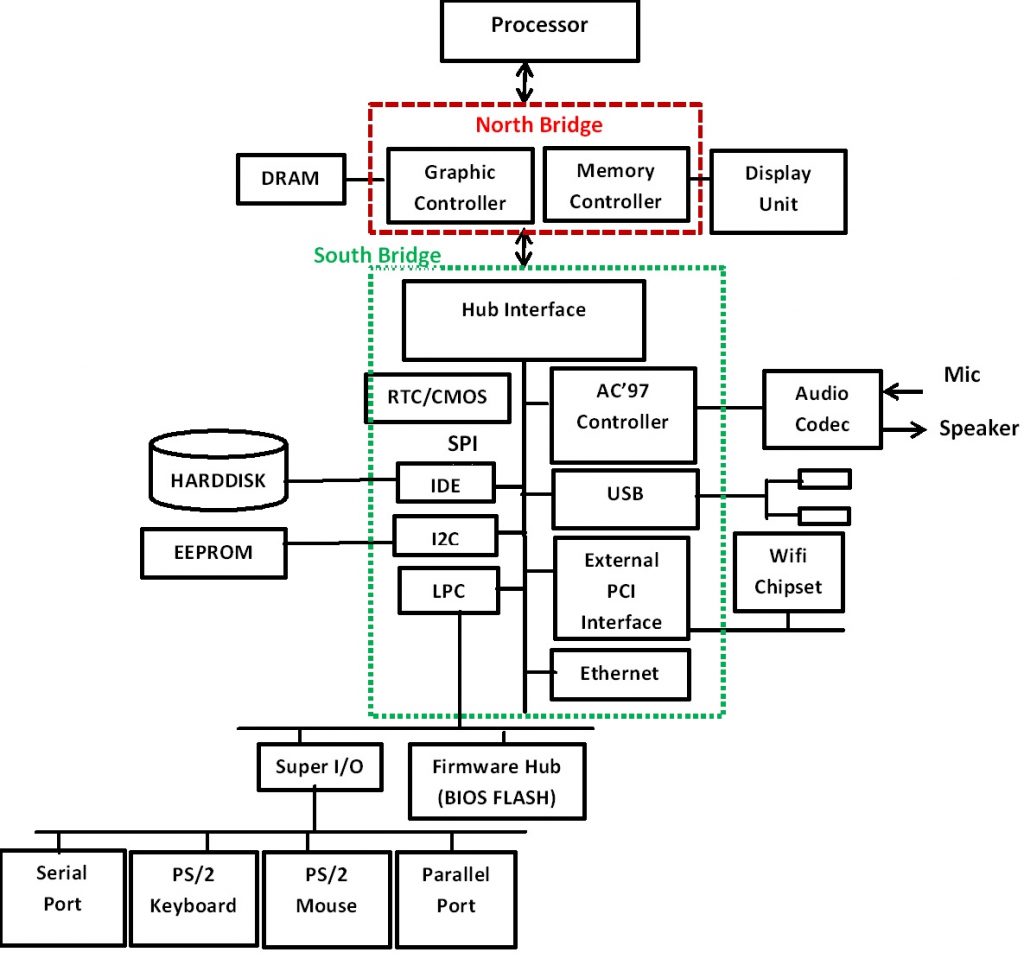
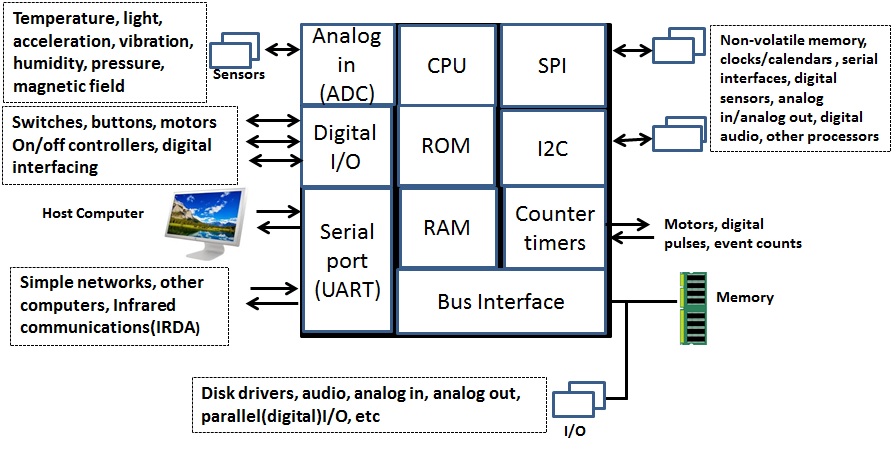
Desktop Block Diagram:
Simple Embedded Systems Block Diagram: (Remote Controller)
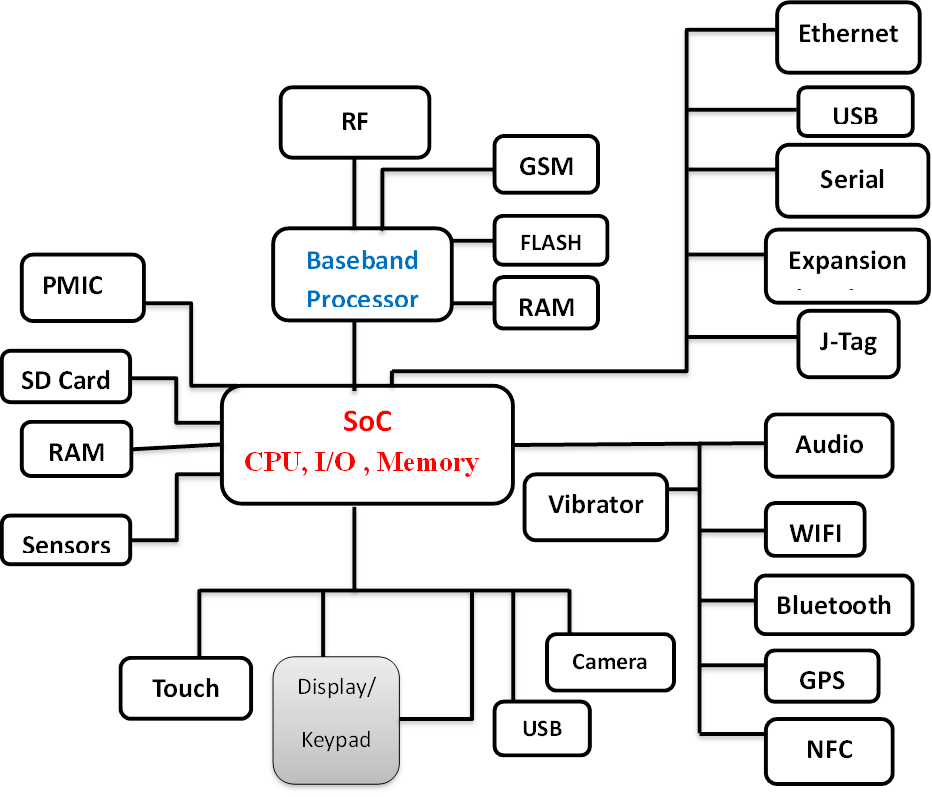
Complex Embedded systems Block Diagram (Example: Mobile Phone)

Embedded Software

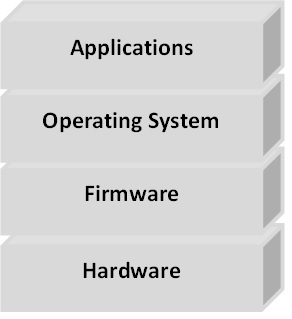
Software Layers in the Computer

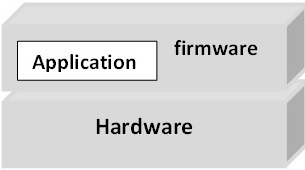
Software Required Desktop Computer Simple Embedded
Computer
Ex: remote Controller
Complex Embedded
Computer
Ex: Mobile Phone
Software layers in the Computer
Operating System Windows/Linux Doesn’t Support OS. Supports Windows/Linux/Android
Firmware BIOS Whole system develops using firmware Bootstrap program
Programming Languages C/C++/Java/html/
php
Assembly/C Assembly/C/C++/Java/
html/php

At the lowest level are programs that are run by the processor when the computer first powers up. These programs initialize the other hardware subsystems to a known state and configure the computer for correct operation. The software, because it is permanently stored in the computer’s memory, is known as firmware.

Above the firmware, the operating system controls the operation of the computer.

Firmware:

Firmware is software that is programmed into chips permanent/temporary and usually performs basic instructions, like BIOS, for various components, Network cards, and computer BIOS, etc…

Embedded C Programming is also called Firmware.

Embedded C vs General C:

  • C is a widely used general purpose high level programming language mainly intended for system programming.
  • Embedded C is an extension to C programming language that provides support for developing efficient programs for embedded devices.
  • Embedded C has to use with the limited resources, such as RAM, ROM, I/Os on an embedded processor.

Operating System

An operating system (OS) is system software that manages computer hardware and software resources and provides common services for computer programs.

Kernel

Kernel is core part of the operating system. Kernel provides core service like Process management, Memory management, File management, Device and network services.

September 18, 2024

Which course should be opted in Engineering?

To all the students who are looking forward to take Engineering admission, and to their parents, we would like to give some suggestions about branch selection.

There is no doubt that every student’s first choice is Computer Science only.But, to bring awareness in students, about the enormous opportunities provided by electronics field and about its importance and to encourage them to choose Electronics field, is the main agenda of this blog post.

Why is there so much demand for Computer Science Engineering?

Due to the salaries and lifestyle provided by software industry, not only the students, their parents are also attracted to this field.

Nowadays situation has become such that, job means only software engineer job, engineering means only computer engineering, nothing else is considered good.

As lot of people compete for Software Engineering jobs, only few of them get proper development opportunities.Remaining candidates just end up doing maintenance & support kind of jobs with no proper career growth.

What is the importance of Electronics branch in Engineering?

Nowadays mobile phone has become the basic necessity of human life along with food, clothes and shelter.

We cant imagine life without smart phone.

We cant find a house without atleast one electronic device. There will be atleast a TV and a Set top box to say minimum.

How are these electronic devices made?

Electronic core fields like Embedded Systems & VLSI design and manufacturing fields are the ,main reason that we have all these devices.

Electronics field is no way inferior to Software field in terms of Job opportunities.

Most of the Electronics students are not aware of the opportunities provided by Electronics field, so they are either choosing Software field or moving on to higher studies etc.

As long as the situation is like this, we will have to import every electronics device that we need, from other countries like China or Japan.Make In India can never become reality.

What are the new courses added to Computer science branch, and what are the consequences of adding them?

In this academic year (2020-2021), 6 new engineering courses were added to the computer science department.

Those are

  • Computer Science Engineering – Software Engineering
  • Computer Science Engineering – Artificial Intelligence & Machine Learning
  • Computer Science Engineering – Data Science
  • Computer Science Engineering – Cyber Security
  • Computer Science Engineering – Internet of Things
  • Computer Science Engineering – Networks

Most of the subjects in these courses are taken from the Computer Science Standard Curriculum.They should have been added as Specialisations in M.Tech instead of adding as new branches in B.Tech.

Because of adding these new branches in B.Tech, approximately 19000 new seats got added to Computer Science department alone.Because of the increased seats, most of the students will opt for Computers branches, which will effect core fields like Electronics Civil, Mechanical etc.

As these core fields get effected as no one is opting for them, the technology advancements in these fields will be hindered.If you see countries like China or Japan, they are technologically very advanced.

Why are these countries so developed? Because they give equal importance to all core fields, not just one field. That is why now they are in a stage to manufacture anything on their own and export it to other countries.

Because of the newly added seats in computer science department, all students will tend to choose Computer science branch only.

But we need to understand that increase of seats in a particular field does not mean increase in job opportunities. It means competition is increasing in that field.

One more thing is, technologies like Artificial Intelligence & Machine Learning are no doubt in demand, but these technologies have to be used in electronic devices only.So inorder to use these advanced technologies, we will require electronics basic knowledge.

Which means, Electronics field will continue to provide job opportunities and there will be demand for skilled resources.

So is it right that everyone chooses software field, leaving such an evergreen field like Electronics?

What I want to tell to students and their parents is,choose the field which provides good job opportunities, growth in career along with good salaries and job satisfactionChoose Electronics Core field.

Let us together pledge to save the electronics core field branches like ECE & EEE. And make “Make In India” possible.

September 18, 2024

For Freshers, the resume should be mainly about their skill-set and academic details. Here are some tips about how to build your resume, section wise.

  • Career Objective Section:
    • It is absolutely unnecessary. The Career objectives are just like heritage carried from your senior’s CV’s to your CV, then to your junior’s. You can safely remove it as it is nothing but copy paste.
    • If you have something of your original, that reflects your real career motto or attitude, you may add it, just to bring some interest.
  • Technical Summary:
    • Add a line in technical summary about training attended at Kernel Masters. Course name is Certified Industrial Embedded Systems Developer training.
    • Or add any other relevant course that you have attended at any institute.
    • Update the skillset or technical summary section with whatever topics you learnt at Kernel Masters, or implemented, like socket programming, inter process communication etc.
    • You may also add the major subjects studied in technical summary/skillset, like C Programming, Embedded C with STM32, Operating System concepts, Git, GDB , KGDB etc.
    • Protocol names must be mentioned.
    • Sometimes it may be required that you have to update your technical skillset based on the company’s requirement and Job Description. So keep visiting this section from time to time and update.
  • Projects:
    • Add the embedded C project done at Kernel Masters, to your profile above your academic projects.
    • Add Project Title first.
    • Add project abstract / description. Add this in your own words, to reflect how you understood the project in general words. Include some key technical words that help describe the project.
    • Do not copy paste project description from anybody else.
    • Quality is more important than quantity when it comes to projects. You will be validated based on how much practical implementation you have done on one project with perfect understanding, than how many projects you have done.
    • Add the responsibilities handled by you and the technologies & protocols used.
    • Under responsibilities you will have to add details like ,data sheet study, any kind of analysis done, sensors studied etc in bullet points.
    • Academic project should be added only if you are able to explain about it in interviews.
  • Experience Summary:
    • Add your experience or internship details if any only if it is related to Embedded field.
    • Add companyname, designation and duration for which you have served at the company.
    • Do not add teaching experience or experience from any other field that is not relevant to Embedded Industry.
  • Education Details:
    • Academic percentages, branch or specialization and passedout years are mandatory in education details.
    • Also add the university and college names for graduation and post graduation.
  • Personal Details:
    • Personal details section is not usually required if you are providing your residential address at the top.
    • If you want to provide, put your date of birth & Residential address. Family details are not required.
  • Contact Information:
    • Add a valid mobile number and a mail id that you regularly use and check. The mobile number that you provide in resume, must always be available.
    • Make sure your email id that you provide has a professioal looking user name that shows your full name as part of it.
    • Do not use any unprofessional & funky mail ids like mylifemywish@gmail.com.
    • Better to add your residential address to give the employer an idea of your current location, there by decide the mode of interview.
    • Add your SkypeId.
  • Other Key points to Note:
    • Name your resume file in this format “FullName_Fresher/x+exp” Full name is mandatory. Never name it like “my_resume”, “resume”,”resumeupdated” etc. Resumes wrongly named will be discarded.
    • Send only word documents to me, if you are under my placement assistance program (only for Kernel Masters students).
    • Wish you All the Best.
September 18, 2024

The Linux community World wide contains many students who are developing the code either out of Interest or as part of their academic projects.

But most of the colleges doesn’t have the proper environment suitable for Open Source Projects (Except for top most colleges like IITs/NITs). The students in those colleges don’t get any guidance on how to start with open source projects.

That is what we are implementing in our course, “Android for Embedded Systems” where we are going to make students do some real-time projects that are based on Linux / Android open source code.We also have academic projects for B.Tech / M.Tech students that are purely based on Linux / Android open source code.