

Loading...
Hi, How Can We Help You?
  • +91 9949062828
  • Address: Hyderabad | Bengaluru
  • Email Address: info@kernelmasters.com

Category Archives: Embedded System

October 17, 2026

Imagine a sensor generates three short pulses while your microcontroller has interrupts temporarily masked.

When interrupts are unmasked, how many times will your Interrupt Service Routine (ISR) execute?

Pause and predict

Which claim is safe to make?

Reveal the explanation

Three times? Not necessarily. Several physical events can leave a single pending indication. The exact result depends on the interrupt source, its flags and buffering, and when the handler services it.

We will follow a specific one-call sequence below. Other timing and event-storage conditions can produce a different result.

Misunderstanding this behavior can cause missing pulse counts, incorrect measurements, communication failures and bugs that are difficult to reproduce. To understand why, we need to follow an interrupt request through the hardware.

We will use RaayanMini (STM32F401RBT6), an Arm Cortex-M4 platform, as our reference. The central lesson applies more broadly to Cortex-M firmware; the EXTI and timer register details below describe this STM32 device.

1. Understanding the NVIC pending state

The Nested Vectored Interrupt Controller (NVIC) manages interrupt requests, their priorities and their eligibility for exception handling. Each external interrupt number has a pending state.

When a request becomes pending, the processor knows that the interrupt needs servicing. However, pending state is not a counter that records every occurrence of an event. Repeated requests of an interrupt that is already pending do not create a separate queued entry for every occurrence.

For a GPIO interrupt on the STM32F401, the path also includes an important peripheral before the NVIC:

01 · SOURCE

Input edge

Physical pulse

02 · STM32

EXTI flag

EXTI_PR bit

03 · CORTEX-M

NVIC pending

IRQ awaiting service

04 · SOFTWARE

ISR runs

Handles the source

EXTI and NVIC have distinct pending indications. Neither one is a count of repeated edges.

The STM32 EXTI peripheral detects a configured edge and sets that line’s pending bit in EXTI_PR. EXTI can request service from the NVIC, which has its own pending state for the corresponding IRQ. Several peripheral sources can also share one IRQ; a handler must identify which source requires attention.

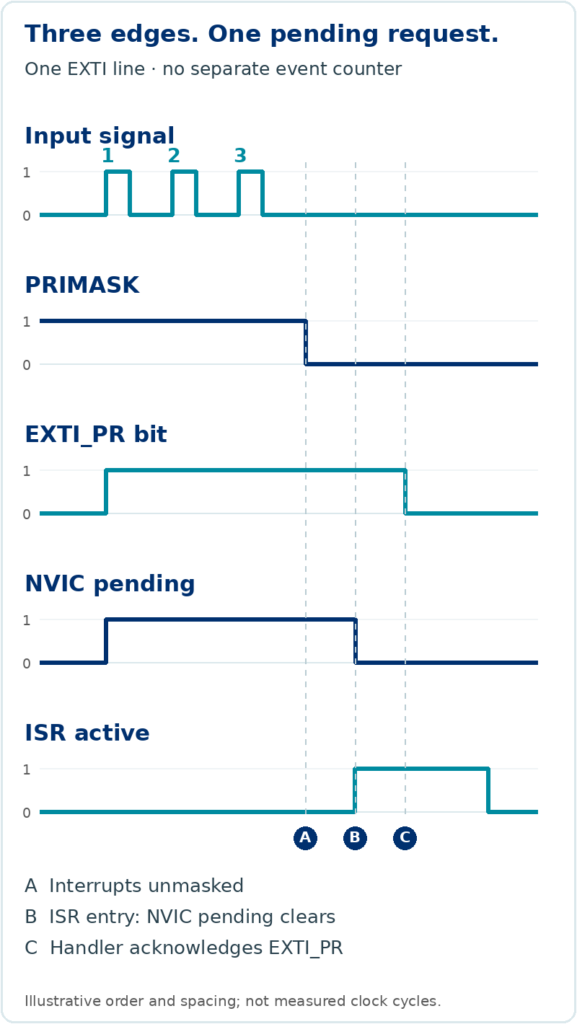
Consider a sequence in which all three valid rising edges reach one EXTI line before the handler can run:

  1. The first edge sets the peripheral’s pending indication and requests service.
  2. The second edge arrives while the same indication is already set.
  3. The third edge also arrives before the source is serviced.
  4. Interrupts become eligible for execution.

Watch the hardware · one illustrative sequence
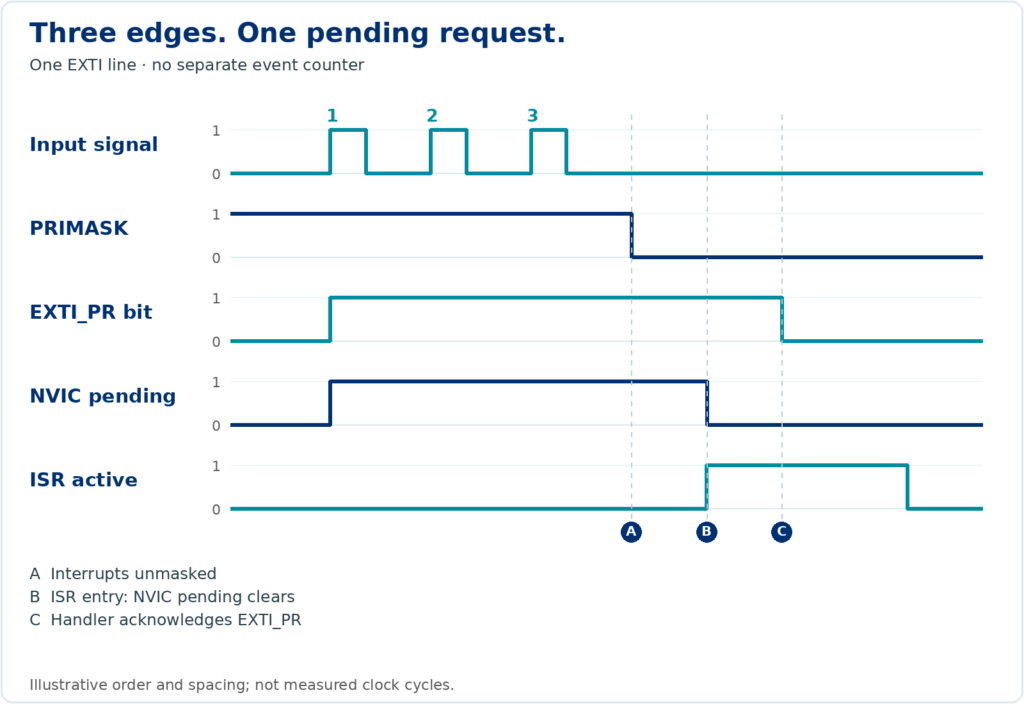
The peripheral remains configured throughout. No additional edge arrives during service, and no separate counter or buffer records the three edges.

The CPU may execute the ISR only once for those three edges. The pending indications tell software that at least one request occurred; they cannot reconstruct the original number of edges.

Assumptions for this illustration: all three edges are detected, the peripheral remains configured, no separate counter or buffer records them, no new edge arrives during servicing, and the handler acknowledges the source correctly. Physical pulses must meet the device’s input requirements.

2. Pending, active and masked: what is the difference?

These concepts are related, but they describe different things:

Pending

A request awaits service by the processor.

Active

The exception has been entered and has not completed. It can remain active while preempted by another handler.

Masked

A masking mechanism or priority restriction prevents the processor from taking the interrupt.

On Cortex-M4, setting PRIMASK prevents activation of configurable-priority exceptions; NMI and HardFault are not blocked by this mask. A request can still become pending and be serviced later. Masking does not create storage for each repeated request.

Masking with PRIMASK is different from disabling an individual IRQ through its NVIC enable bit. An NVIC-disabled interrupt can still become pending. Disabling the peripheral’s own request generation is yet another operation, whose effect depends on that peripheral.

Two state bits · four combinations

ACTIVE 0 · PENDING 0

Inactive

No active handler and no pending request.

ACTIVE 0 · PENDING 1

Pending

The request is waiting to be taken.

ACTIVE 1 · PENDING 0

Active

The handler has entered and has not completed.

ACTIVE 1 · PENDING 1

Active and pending

A further request is pending while the handler remains active.

Request

ISR entry

Further request

Selected transitions. Masking is a separate eligibility condition; it is not a fifth mutually exclusive exception state.

Read the interrupt configuration at both layers: the peripheral controls whether and how it generates requests; the NVIC and processor masks control whether the CPU can take them.

A pending interrupt does not guarantee that every physical event behind it has been preserved.

3. A practical example: why did the pulse counter undercount?

Suppose you are developing a motor-speed measurement system. A sensor produces pulses, and your firmware increments a variable whenever it services the sensor interrupt.

volatile uint32_t pulse_count = 0;

// Illustrative pseudocode: helper names need real peripheral handling.
void SENSOR_IRQHandler(void)
{
    if (sensor_interrupt_pending()) {
        acknowledge_sensor_interrupt();
        pulse_count++;
    }
}

The intent looks straightforward: each serviced notification increments the counter. But if several edges arrive while the interrupt is masked or its source remains pending, some edges may never be represented by separate handler executions.

Worked example · under the three-pulse assumptions

3

detected edges

All arrive before service

1

counter increment

One serviced notification

2

edges uncounted

No individual record survives

This group loses two increments. The 1,000-versus-997 table is a separate illustrative total.

Measurement Illustrative count
Pulses generated by the sensor 1,000
Pulses counted by the firmware 997
Difference 3

These numbers illustrate a possible failure mode. They are not measured RaayanMini results, and they do not imply that every masking interval loses three pulses. If exactly three edges collapse into one increment, that particular group contributes two missing increments.

The real outcome depends on the hardware and timing. A hardware counter, capture register, FIFO or other storage may preserve some or all of the needed information. A single latched status flag only preserves an indication that something occurred.

On STM32F401 EXTI, the acknowledgement must clear the appropriate EXTI_PR bit by writing 1. The pseudocode above is not a complete board driver. Leaving the peripheral source asserted can make the ISR run again, even without another physical edge.

This explains why a debugger can show correct interrupt configuration while the application still reports an incorrect measurement: correct notification does not prove complete event recording.

4. Why the ISR alone cannot guarantee accurate event counting

An ISR is software executed in response to a request. It may process stored data, but the handler is not automatically the hardware mechanism that records each physical event.

A slowly operated button can make a simple interrupt-driven application appear reliable. A high-speed encoder, motor sensor or pulse generator can expose the limits much sooner. If events arrive before the CPU or peripheral can preserve and process them, application information can be lost.

Common contributors include:

  • Interrupts are masked for too long.
  • Higher-priority interrupts delay the handler.
  • The CPU spends too much time in an ISR.
  • The source provides only one latched status indication.
  • Several events occur before software services or clears the peripheral status.
  • The application assumes every physical edge produces a separate ISR entry.

Interrupt latency and event-storage capacity are different design concerns. Reducing latency can shorten the time before service. It cannot turn a one-bit flag into a queue, and it cannot recover events that were never recorded individually.

Checkpoint 01 Does a shorter ISR guarantee that every edge is counted?

No. A shorter handler reduces delay, but flags and storage still have finite capacity. Verify the worst-case event rate and the mechanism that records each occurrence.

5. What if another event arrives while the ISR is running?

An interrupt can be active and pending: its handler has not completed, and another request of the same IRQ is pending. If the request remains pending and becomes eligible after the current handler finishes, the processor can enter that handler again.

Several additional requests arriving while it is already pending still do not create a separate NVIC queue entry for each event. Keep these two cases distinct:

  • Several events occur before the first ISR entry while the interrupt is pending.
  • New events occur while the ISR is active and may cause another pending request.

The peripheral matters in both cases. A new edge after an EXTI flag has been cleared can set it again. Edges arriving while it remains set do not add a count to that bit. Clearing flags without understanding their semantics can also discard an indication that software has not processed.

A new EXTI edge during servicing

Edge before acknowledgement

  1. ISR enteredEXTI_PR = 1
  2. New edge arrivesStill 1; no extra count
  3. Handler acknowledgesEXTI_PR = 0

One latched bit cannot distinguish the two edges.

Edge after acknowledgement

  1. Handler acknowledgesEXTI_PR = 0
  2. New edge arrivesEXTI_PR becomes 1
  3. Request is retainedA further service can follow

The newly asserted request can require another handler entry.

Simplified timing cases. These are not a universal instruction to clear status first; use each peripheral’s required read-and-acknowledge sequence.

The NVIC automatically removes the pending state when it takes an interrupt, but that does not automatically acknowledge the peripheral source. A level-sensitive request that remains asserted can cause another ISR entry. Consult the peripheral’s interrupt-generation logic, status registers and acknowledgement rules.

Checkpoint 02 You need pulse width. Which timer feature helps?

Input capture. Capture timestamps at the required edges and calculate their interval, accounting for timer rate and wraparound. Use external counting when the requirement is the number of edges.

6. How can you capture events reliably?

Choose a mechanism that preserves the information your application needs, then verify its limits against the real signal.

A · COUNT EDGES

Use a hardware timer as an external event counter

Each accepted edge advances CNT

0→1→2→3

The CPU reads the accumulated count later.

If you need the number of pulses, a supported timer input can clock a hardware counter from external edges. The counter advances without the CPU entering an ISR for each pulse. Firmware can read it periodically or respond to appropriate timer conditions.

Applications: motor RPM, flow meters, industrial pulse counting and frequency measurement. For quadrature encoders, use a supported timer encoder mode when direction and both phases matter.

Check input routing, electrical levels, accepted frequency, filtering and prescalers. Account for overflow and read timing; an overflow flag itself is not an unlimited count of wraps.

B · RECORD TIME

Use input capture for precise timing

An edge latches a timer snapshot

CNT
120edge →CCR
120

The next capture can replace the stored value. Watch overcapture.

To measure the interval between edges, use input capture. A configured edge latches the timer’s counter value into a capture register, reducing dependence on when the CPU enters the ISR.

Applications: pulse width, frequency, ultrasonic echo timing, time-of-flight interfaces and motor timing, where the timer’s resolution and input capabilities meet the measurement requirements.

A basic capture channel has limited storage. On STM32F401, a capture sets CCxIFCCxOF

C · TRANSFER DATA

Use DMA for supported data streams

Supported peripheral → DMA → memory

120180240…

Illustrative timestamp buffer. Transfer and consumption must keep up.

DMA can move peripheral data into memory with less CPU intervention. For a supported timer capture channel, it can transfer captured timestamps into a memory buffer without an ISR for every capture.

Applications: timer capture streams, ADC samples, serial receive data and continuous sensor acquisition on peripherals that provide the required requests.

DMA cannot automatically count arbitrary EXTI events. Verify the peripheral’s DMA request support, mapping, transfer rate and buffer management. A capture can overrun before transfer, and a memory buffer can fill before software consumes it.

D · BUFFER DATA

Use peripheral FIFOs and hardware buffers

A FIFO retains several items, if supported

Oldest → CPU

D1D2D3…

Generic peripheral example; not an STM32F401 USART FIFO claim.

Some communication peripherals provide FIFOs or other buffers, allowing several data items to accumulate while the CPU is busy. For example, a UART with an RX FIFO can retain multiple received bytes up to that FIFO’s capacity.

Applications: bursty communication and interfaces where processing may be delayed temporarily.

FIFO availability varies by MCU and peripheral; do not assume that the STM32F401 USART has a multi-byte receive FIFO. Monitor the relevant overrun indicators and drain or transfer data quickly enough.

E · RESPOND PROMPTLY

Keep interrupt service routines short

A short service path

Identify→Read / acknowledge→Store / defer→Exit

The peripheral defines the required data and flag handling order.

A handler should generally do the essential work required by its peripheral:

  1. Identify the source that needs service.
  2. Read data and acknowledge status in the sequence the peripheral requires.
  3. Store essential information in an appropriate counter or buffer.
  4. Signal deferred processing when needed.
  5. Exit promptly.

Lengthy calculations, blocking calls and unnecessary processing delay other work. The exact read-and-clear sequence is peripheral-specific; “clear all flags first” is not a universal rule.

A short handler improves responsiveness. Hardware event capture is still needed when software cannot reliably service each occurrence in time.

7. Event notification and event recording

An interrupt requests the processor’s attention. A separate mechanism may preserve the event count, timestamp or data until the processor can deal with it.

Mechanism Purpose Limitation
NVIC pending state Marks an IRQ awaiting service Does not count repeated requests
ISR software counter Counts serviced notifications in this example Cannot recover edges never recorded separately
Timer external counter Counts supported input edges Input limits, configuration and wraparound
Input capture Latches timer values at edges Limited capture storage and overcapture
Peripheral FIFO Buffers several data items Finite capacity; may overflow
DMA and memory buffer Transfers supported data with less CPU work Transfer and buffer limits still apply

Ask these questions before choosing an interrupt-driven design:

  1. What tells the processor that an event needs attention? Identify the peripheral request, flags and NVIC IRQ.
  2. What preserves every required event or its data until it can be handled? Identify the counter, capture register or buffer and its capacity.

Test the shortest expected event interval against the longest processing delay. Use a scope or logic analyzer to check the physical signal, and compare it with hardware counts, capture data and overrun flags. ISR entry counts alone do not demonstrate complete event capture.

Design for the events your application must preserve

Three pulses arriving while a Cortex-M interrupt is masked do not guarantee three ISR entries. The NVIC tracks pending state, while the peripheral determines what event information is retained.

For a simple notification, an interrupt may be sufficient. For accurate pulse counting, timestamping or continuous acquisition, use the timer, capture and buffering facilities that match the measurement. Verify their capacities and timing on the actual hardware.

If every occurrence matters, make sure something records every occurrence. Your ISR may only be processing a notification.

Learn · Implement · Debug · Demonstrate

Understand interrupts on real hardware.

Explore STM32 peripheral drivers, timers, Embedded C, interrupt handling and practical debugging on RaayanMini with Kernel Masters.

October 13, 2026

2047, 2048, 2047, 2048 looks like a reassuringly stable ADC reading. But what if the voltage calculated from those codes disagrees with the voltage at the MCU input pin?

The ADC register contains a digital code, not a measurement already expressed in volts. That code depends on the voltage captured during sampling and the reference used during conversion. A repeatable code can therefore be a repeatable error.

We will use the 12-bit SAR ADC in the Raayan Mini’s STM32F401RB to follow the signal through the circuit. Other ADC architectures can acquire signals differently; the switched-capacitor timing details below describe this STM32 example.

1. The code is a ratio

The STM32 ADC compares its captured input with its reference. A 12-bit result has 4096 possible codes: 0 to 4095. One ideal LSB spans VREF / 4096 volts. For a quick estimate away from the range limits:

ADC code ≈ (captured input voltage / VREF) × 4096, limited to 0–4095.

Real codes are quantized and affected by the ADC’s own errors, so the following numbers are illustrative estimates, not guaranteed readings.

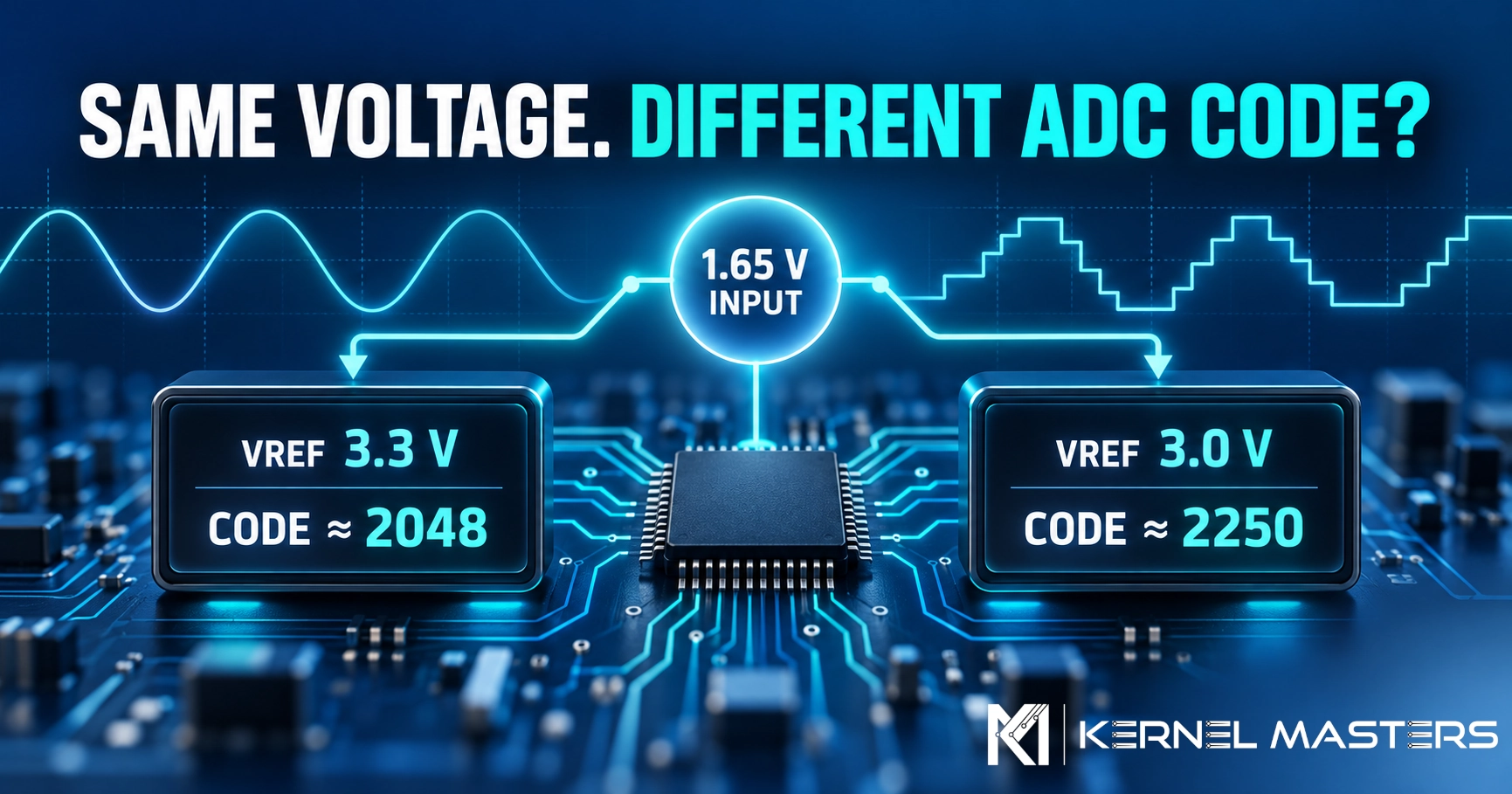
With a fixed 1.65 V at the input and VREF at 3.3 V, expect a code near 2048. Keep the input at 1.65 V but lower VREF to 3.0 V, and the expected code moves to roughly 2250. The input stayed fixed; its ratio to the reference changed.

Fixed input · VREF 3.3 V

Code ≈ 2048

1.65 ÷ 3.3 = 0.50 of full scale

Same input · VREF 3.0 V

Code ≈ 2250

1.65 ÷ 3.0 = 0.55 of full scale

A useful exception: if the input itself follows the same supply as the reference, both can move together and the code may remain nearly unchanged. A divider or potentiometer powered from the ADC reference can behave this way. Verify the actual board connections before treating a particular sensor as ratiometric.

On the STM32F401RB, VREF+ is internally tied to VDDA and VREF− to VSSA. A firmware constant of 3.3 V does not force the board’s analog supply to be exactly 3.300 V.

2. What reaches the sampling capacitor?

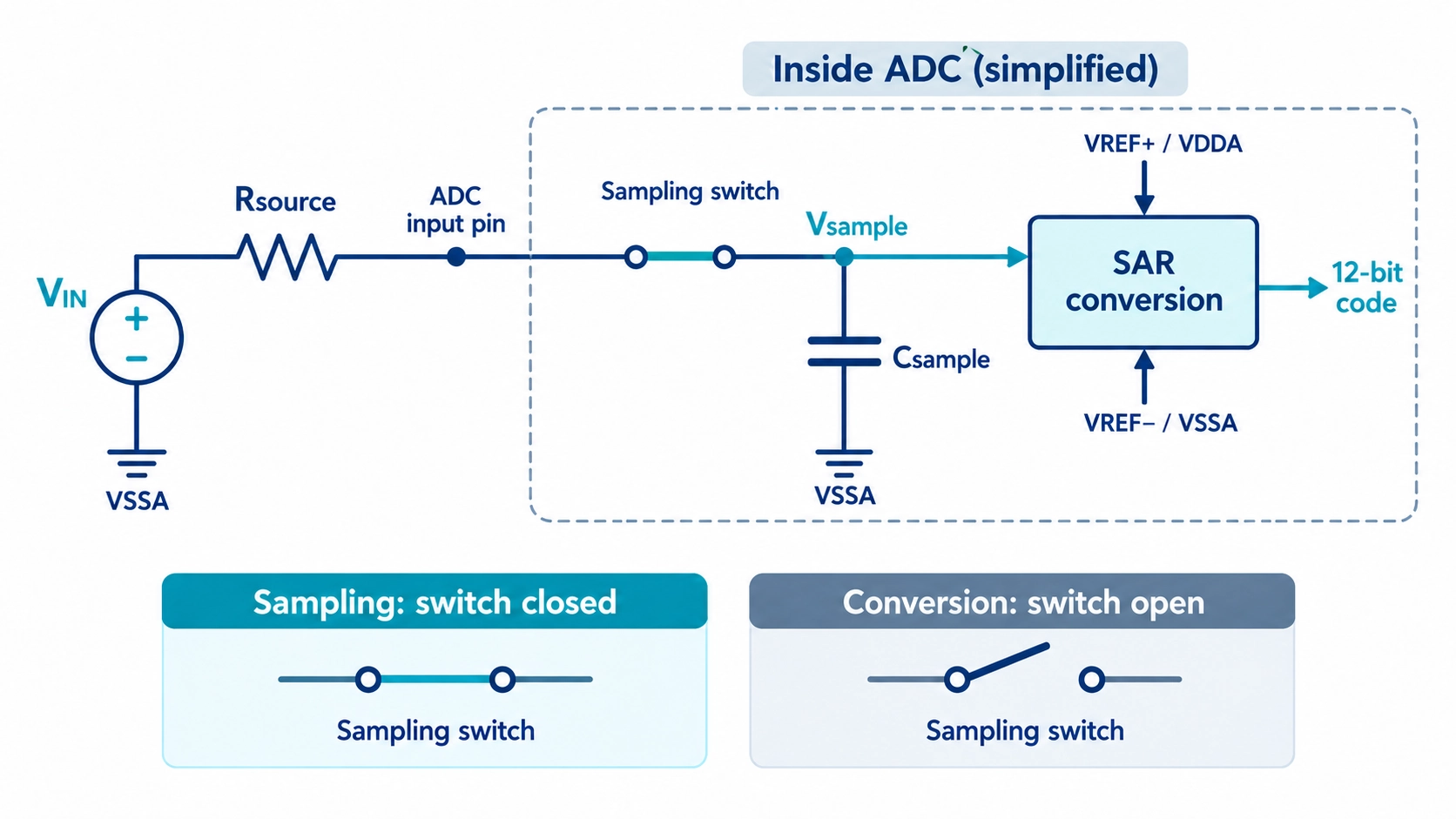
The F401’s SAR ADC has a switched-capacitor input stage. During the programmed sampling time, an internal switch connects the selected channel to a sampling capacitor. During the conversion phase, the captured charge is used by the SAR circuitry to produce the code.

Simplified STM32F401 ADC input: source resistance and sampling switch charge a capacitor; SAR conversion uses the captured input and analog reference.

Functional model of the sampling path. The capacitor and switch explain acquisition; the reference participates in conversion. This is not the physical silicon schematic.

The diagram is a functional model, not a transistor-level drawing of the silicon. Rsource includes the resistance of the sensor, divider, or conditioning circuit. The ADC switch has its own resistance; the pin and PCB also add capacitance. These details matter when selecting a sampling time.

If the switch is open before the capacitor has settled near the new input, conversion uses the capacitor voltage that was reached—not necessarily the voltage currently present at the sensor output. For a simplified RC model:

Vsample(t) = VIN + (Vinitial − VIN) × e^(−t/τ), where τ ≈ (Rsource + Rswitch) × Csample.

This explains the direction of the error; it is not a substitute for the device’s input-impedance and sampling-time specifications. ST provides those conditions in the datasheet and AN2834.

For 12-bit operation, the F401 reference manual gives a total conversion time of sampling time + 12 ADC clock cycles. Sampling-time settings range from 3 to 480 cycles, chosen per channel. More time can improve settling for a difficult source, but it also reduces the attainable conversion rate.

3. Why channel order can matter

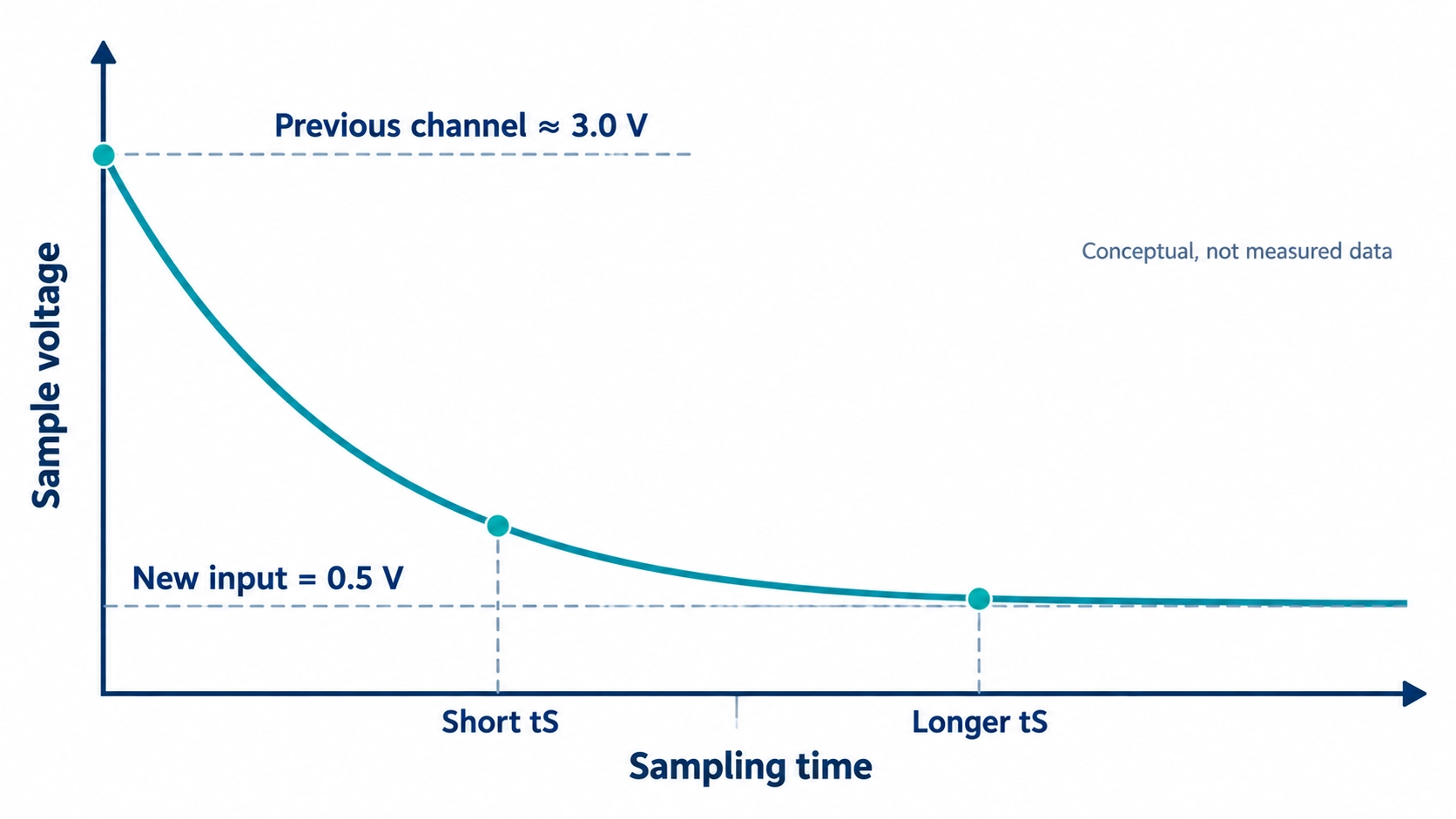
Imagine a scan reading a channel near 3.0 V, then one near 0.5 V. Charge remaining in the input network can make the second channel’s early sample too high if it cannot settle in time. Internal switching also affects the starting charge; the simple RC picture is only a teaching approximation.

Conceptual graph of sampling capacitor voltage settling from a previous high channel toward a new 0.5 V input; a longer sample time reduces the remaining difference.

Conceptual response after switching from a high channel to a lower channel. A longer acquisition interval can reduce the settling difference; this is not measured Raayan Mini data.

This is a possible mechanism, not a prediction that the first conversion is always wrong. A practical test is to compare the suspect channel alone and within the scan, then change its sampling time and channel order. If the reading moves, investigate impedance and settling before changing the voltage formula.

4. A stable code does not prove accuracy

Noise and resolution are only part of measurement quality. The input might be steady at the sensor and different at the MCU pin. VDDA may differ from the number used in firmware. Ground voltage can move under switching currents. Filtering can make an offset reading look even steadier.

Term What it tells you
Resolution How finely the input range is divided into codes.
Repeatability Whether repeated readings are similar.
Accuracy Whether the result is close to the quantity being measured under known conditions.

A 12-bit converter offers fine code steps. It does not promise 12-bit system accuracy. Compare a measurement against a suitable known input or instrument, and include the sensor and analog circuit in that comparison.

5. Debug the complete measurement path

  1. Capture raw codes. Temporarily remove display scaling and filtering from the investigation.
  2. Measure at the MCU input. Check against the sensor output; a discrepancy between the two points indicates something in the board signal path.
  3. Check the analog reference path. On the F401RB, determine VDDA rather than assuming the firmware’s 3.3 V constant is the measured reference.
  4. Lengthen the channel’s sampling time as a test. Improvement is evidence to investigate settling and source impedance; it is not a complete diagnosis on its own.
  5. Read one channel, then scan several. Compare channel order to reveal possible charge or timing interactions.
  6. Check time-varying signals with a scope. A meter’s averaged voltage and an ADC’s instantaneous samples may legitimately differ. Observe the same point and timing.
  7. Recheck the calculation. Apply the actual reference, ADC code range, and sensor transfer function only after understanding the raw measurement.

Bringing the idea to Raayan Mini

Raayan Mini training uses an analog potentiometer and an LM35 temperature sensor. The LM35’s nominal output scale is 10 mV/°C; its output and supply must not automatically be treated as the ADC’s reference. A potentiometer is useful for moving an ADC input across its range, but whether it is ratiometric depends on how its ends are powered on the board.

The next step for a board-specific lab would be to record the board revision, exact input channel, analog supply, sampling-time setting, voltage at the MCU pin, and raw code. Until then, the diagrams and numbers here explain principles rather than claim a measured result from this board.

Takeaway

The code represents what the sampling network captured relative to the reference. When the value seems wrong, trace the signal from the source through the input network, reference, and conversion settings before trusting the displayed number.

September 10, 2026
Day 3 · Embedded Systems Awareness Course

From Classroom to Industry: How Engineering Subjects Are Used in Real Embedded Products

Many Electronics students study Digital Electronics, Microprocessors, Microcontrollers, C Programming, Signals and Systems, Communication Systems and Control Systems as separate subjects.

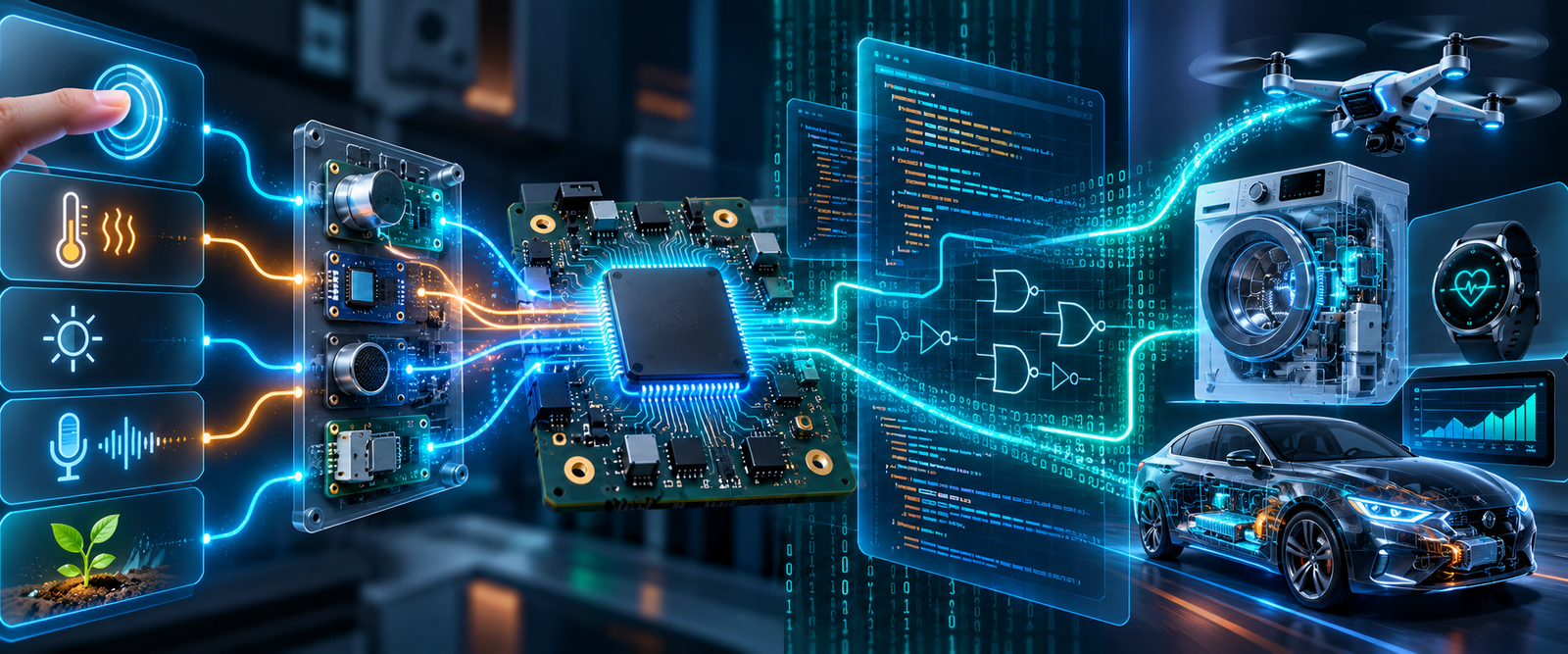
But industry does not use them separately. A real embedded product may combine concepts from all of them at the same time.

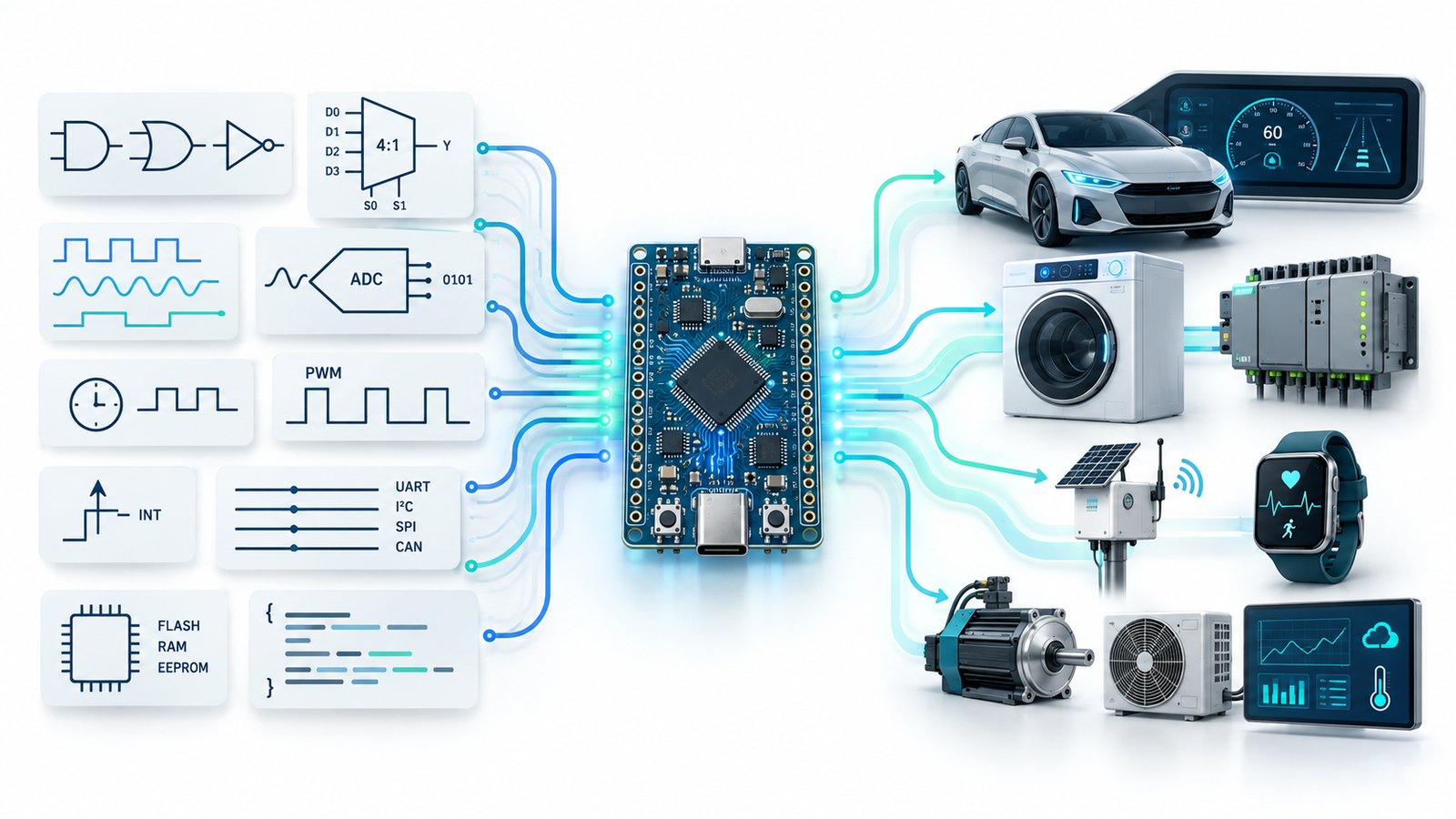
The objective of Day 3 is simple: understand where the subjects you already studied are actually used inside modern electronic products.
Classroom Concept→Microcontroller→Real Product→Industry Application

01 · Academic to Industrial

Are Engineering Subjects Really Useful?

Students sometimes ask: “Why did we study Multiplexers?” “Where will I use ADC?” “Why do we need Timers?” “Why should I learn Signals and Systems?” “Where are Flip-Flops used?”

The problem is usually not the subject. The missing piece is the connection between academic knowledge and industrial application.

A modern embedded product may use Digital Electronics for logic and registers, microprocessor concepts for CPU and memory, C for firmware, Signals and Systems for sensor data, communication protocols for connecting devices, and Control Systems for motors and automation.

Do you know it?

Which statement is closest to reality?

A. Most engineering subjects are useful only for examinations
B. Industry uses completely different concepts
C. Industry combines many academic concepts inside products
D. Only C Programming matters in Embedded Systems
Correct answer: C. A real product is where your individual engineering subjects finally meet.
A better question is not “Is this subject useful?” Ask: “Where is this concept being used inside a real product?”

02 · Multiplexer to Pin Multiplexing

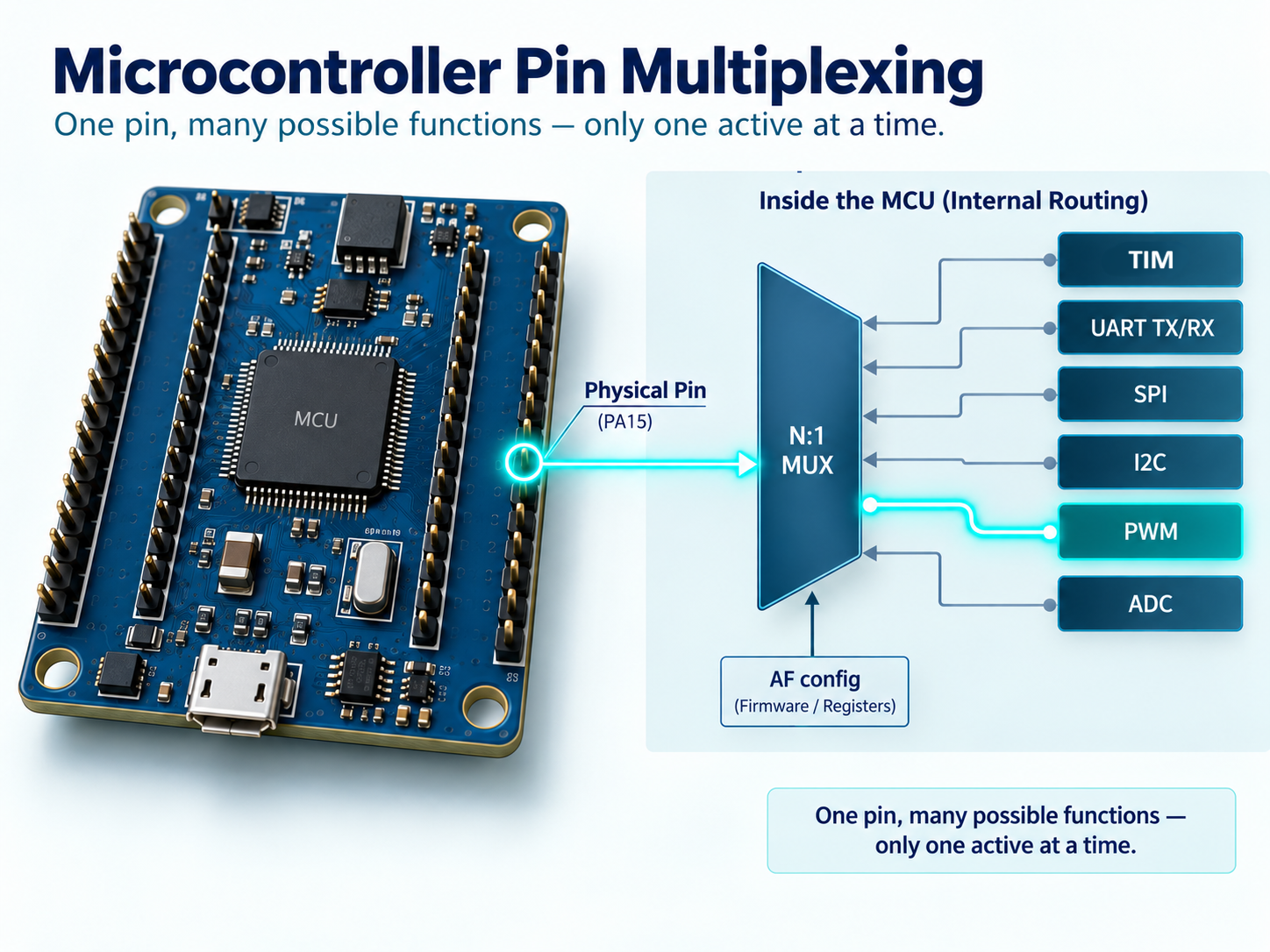
Can One Microcontroller Pin Perform Different Jobs?

Most Electronics students learn Multiplexers in Digital Electronics. A multiplexer can be thought of as multiple inputs → selection → one output.

Now consider a modern microcontroller such as the STM32F401RBT6 Cortex-M4 used on the Kernel Masters Raayan Mini platform. The microcontroller contains GPIO, UART, I²C, SPI, timers, ADC and other functions, but the physical IC package has a limited number of pins.

Providing a separate external pin for every possible internal peripheral signal would make the device much larger and more expensive. Instead, microcontrollers use pin multiplexing.

GPIODigital I/O
→
UART / SPIAlternate functions
→
Timer / ADCPeripheral signals
→
Pin-Mux LogicSelection
→
Physical PinExternal connection

Do you know it?

Can one physical microcontroller pin support multiple possible functions?

A. No, one pin can perform only one job
B. Yes, depending on internal configuration
C. Only if external hardware is added
D. Only in high-end processors
Correct answer: B. This is one practical application of the Multiplexer concept you studied in Digital Electronics.
Important correction: Multiple possible functions do not mean multiple simultaneous functions. A pin may support UART TX and SPI clock, but under normal configuration, one function is selected for that pin at a given time.

Why pin planning matters

Which MCU pin is physically connected on the board?
Which alternate functions does that pin support?
Is another peripheral already using the same pin?
Does the board schematic match the intended peripheral?

This is why embedded engineers work with both datasheets and schematics, not just C code.

Microcontroller pin multiplexing showing one physical pin supporting multiple possible functions

03 · Signals to Action

ADC, Timers and PWM: Connecting the Physical World to Software

A microcontroller works with digital information. But the real world contains analog quantities such as temperature, pressure, light, battery voltage, current, sound and vibration.

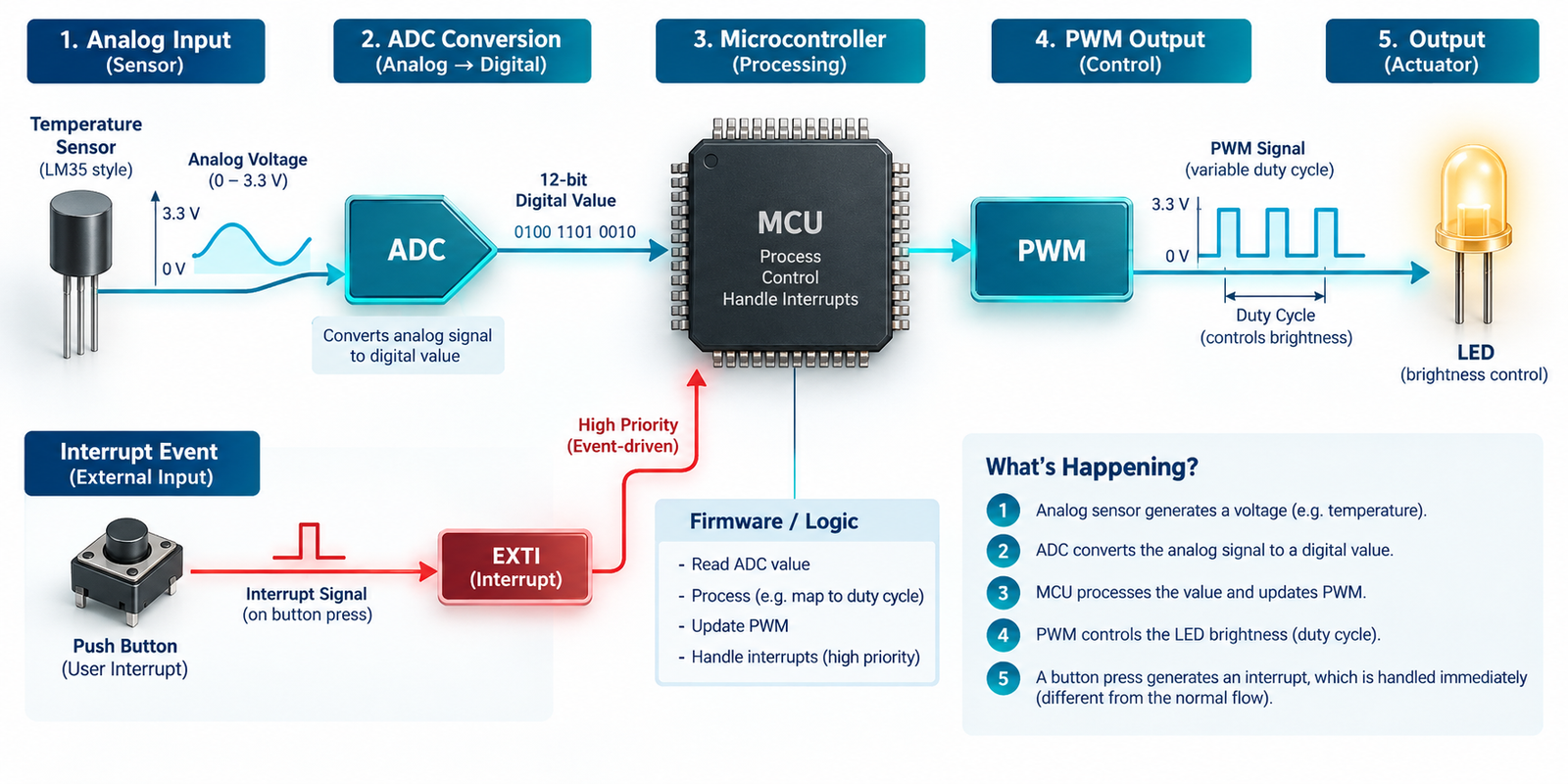
ADC: Analog quantity to digital number

Suppose a temperature sensor produces an analog voltage. The CPU does not directly understand “this voltage means 32°C.” The ADC converts the analog signal into a digital code, and firmware interprets that code as an engineering value.

TemperaturePhysical world
→
SensorAnalog voltage
→
ADCDigital code
→
FirmwareCalculation
→
TemperatureValue in °C

Do you know it?

How many possible digital codes can a 12-bit ADC represent?

A. 12
B. 256
C. 1024
D. 4096
Correct answer: D. A 12-bit ADC can represent 2¹² = 4096 codes, usually from 0 to 4095.

Timers

A hardware timer counts clock events and generates accurate timing events. Timers are used for periodic execution, timeouts, frequency measurement, input capture, output compare, PWM generation and RTOS timing.

Concept note: Timers allow accurate timing without forcing the CPU to waste all its time in software delay loops.

PWM

Pulse Width Modulation rapidly switches an output ON and OFF. The percentage of each cycle for which the signal remains ON is called duty cycle.

Example: For an LED driven appropriately by PWM, increasing duty cycle generally increases perceived brightness.

04 · Event Response

Interrupts: When Something Important Happens

Imagine a processor monitoring an emergency-stop button. One method is to repeatedly check: “Pressed?” “Pressed?” “Pressed?” This is called polling.

Another approach is to let the processor continue useful work. When the event occurs, the hardware informs the processor: “Something important happened!” This mechanism is called an interrupt.

The CPU temporarily handles the event and then returns to its previous work.

Do you know it?

Which mechanism is often suitable when the processor must respond quickly to an unexpected event?

A. Ignore the event
B. Interrupt
C. Only software delay
D. ADC
Correct answer: B. An interrupt tells the CPU: “Something happened that needs your attention.”
Interrupts can be generated by emergency inputs, UART data reception, timer expiry, ADC conversion completion and hardware faults. But interrupts are not automatically better than polling in every situation. The right choice depends on timing requirements, complexity and system design.
05 · Devices Talking to Devices

Communication Protocols: How Devices Talk to Each Other

A microcontroller rarely works alone. It may communicate with sensors, memories, displays, wireless modules, other microcontrollers, automotive ECUs and industrial controllers.

ProtocolCommon applicationsBeginner idea
UARTDebug console, GPS, Bluetooth/Wi-Fi modules and simple serial devices.Simple serial communication between devices.
I²CRTC, EEPROM, accelerometers, temperature sensors and low-speed peripherals.Multiple devices can share SDA and SCL lines using addresses.
SPITFT displays, external Flash memories, SD cards, ADCs and high-speed sensors.Useful for relatively fast peripheral communication.
CANAutomotive ECUs and industrial control systems.Reliable communication between controllers in demanding systems.

CAN inside vehicles

Modern automobiles contain many Electronic Control Units such as engine ECU, ABS, airbag controller and dashboard. These controllers need a reliable communication mechanism. CAN is one of the most important protocols used in automotive embedded systems.

Engine ECU ABS Airbag Controller Dashboard CAN Network

06 · Digital Electronics Inside Products

Memory, Logic Gates and Registers

Computer Organization and Digital Electronics become more interesting when students understand where those ideas appear inside embedded products.

Flash Memory

Typically stores program code, constants and non-volatile information. Flash retains its contents when power is removed.

RAM

Typically stores runtime variables, stack, buffers and temporary data. RAM normally loses its contents when power is removed.

Registers

Registers store processor or peripheral state and provide fast access to control information.

C Variables

Your variables eventually occupy real memory locations. This connects C programming to processor memory.

Logic gates: not just truth tables

Consider an industrial machine. It should run only when the door is closed, the start button is pressed and emergency stop is not active.

RUN = Door_OK AND Start AND NOT Emergency

The same AND, OR and NOT concepts studied in Digital Electronics appear in real safety and control logic.

Flip-Flops → Registers → Processor

Flip-FlopStores one bit
→
RegisterStores state
→
CPU / PeripheralControl information
→
Embedded CFirmware access
Digital Electronics → Processor Architecture → Firmware

07 · Signals to Intelligence

Signals, Control Systems and Embedded AI

Embedded AI does not begin with AI. It begins with the physical world. A vibration sensor on an industrial machine collects raw signals that may contain noise, useful frequencies, transient events and mechanical signatures.

Signal processing may be used to clean, filter or extract useful information before an intelligent decision is made.

Vibration SensorPhysical signal
→
Raw SignalNoisy data
→
Signal ProcessingUseful features
→
AI ModelDecision support
→
Normal / AbnormalEdge decision
Important idea: Before an Edge AI model can make a meaningful decision using sensor information, it needs meaningful sensor data. This is why sensing, Electronics, Signals and Embedded Software remain important even in the AI era.

This is an example of Edge AI, where intelligence operates closer to the device instead of depending entirely on a remote cloud.

08 · Complete Mapping

Academic Concept → Industrial Application

Here is the complete connection. This is the section students should revisit whenever they feel their classroom subjects are disconnected from real products.

Academic concept Industrial application
Logic Gates Safety logic and control decisions.
Multiplexer MCU pin and peripheral-function selection.
Flip-Flops Registers and state storage.
ADC Analog sensor acquisition.
Timers Precise timing.
PWM Motor, fan and LED control.
Interrupts Event-driven response.
UART / I²C / SPI / CAN Debugging, sensors, displays, memories, automotive and industrial communication.
RAM / Flash Runtime data and firmware storage.
Signals Sensor processing.
Control Systems Motors, robotics and automation.
AI Intelligent local decision-making where applicable.

09 · Challenge

Mini Challenge: Smart Industrial Temperature Controller

Imagine an industrial system that must measure temperature, display the value, control a cooling fan, sound an alarm if temperature becomes dangerous and send status information to another controller.

Requirement Embedded concept
Temperature measurement Sensor + ADC
Decision making STM32 + Firmware
Display SPI or I²C depending on the display
Fan speed Timer + PWM
Critical alarm Firmware + output control
Communication UART / CAN / another suitable interface
Look carefully. One small embedded product already combines multiple academic subjects. This is how industry works.

Day 3 Summary

Day 3 Key Takeaways

The most important lesson from Day 3 is that your engineering subjects are not isolated academic chapters.

Multiplexer appears in MCU pin selection.
ADC converts physical-world signals into digital information.
Timers create accurate timing.
PWM controls motors, fans and LEDs.
Interrupts respond to real events.
Communication protocols connect devices.
Memory stores code and runtime data.
Signals become the starting point for Edge AI systems.
The Product Is Where Your Engineering Subjects Meet.

Day 3 Assignment: Classroom-to-Industry Challenge

Choose one engineering subject such as Digital Electronics, Microprocessors, Signals and Systems, Control Systems, Communication Systems, Electronic Devices or C Programming.

Identify three concepts from that subject and, for each concept, find one real industrial application. Try to explain your answer in 60 seconds.

Example: Digital Electronics

Multiplexer → MCU pin multiplexing

Logic Gates → Industrial safety logic

Flip-Flops → Processor registers

Final Thought

Your engineering subjects were never completely separate. The separation existed mainly in your academic timetable.

Inside a real embedded product, Digital Electronics meets C, sensors meet ADC, timers meet motors, communication meets devices, and signals meet AI.

And the Embedded Engineer connects all of them.

Learn → Implement → Debug → Demonstrate
Kernel Masters
September 9, 2026

Day 2 · Embedded Systems Awareness Course

From Sensor to Processor to Firmware to Action

Embedded Systems are everywhere around us — in smartphones, washing machines, smartwatches, cars, Wi-Fi routers, medical equipment, industrial machines and even simple remote controls.

In Day 1, we discovered where Embedded Systems are used. Today, we go one step deeper and ask: what actually happens inside an embedded product?

By the end of this article, you should be able to look at a product and identify its input, processor, firmware role, decision logic, output and communication path.
Sensor / Input→Processor→Firmware→Decision→Action

01 · Button to Action

What Happens When You Press a Button?

Let us start with a simple example. Imagine pressing a button on an electronic product. A common assumption is that the button directly controls the LED, motor or buzzer.

But in most modern embedded products, that is not how it works. The button creates an input. The microcontroller reads that input. The firmware decides what action the product should perform.

ButtonUser input
→
GPIO InputPin state
→
MicrocontrollerReads input
→
FirmwareMakes decision
→
OutputLED / buzzer / motor

Do you know it?

When you press a button on an embedded product, what part of the system decides what happens next?

A. Button
B. Sensor
C. Microcontroller / Processor
D. LED
Correct answer: C. The processor executes the instructions written in firmware and decides how the product should respond.
Hardware detects the event. Firmware decides the behaviour.

02 · Real Product Example

Inside a Washing Machine

A washing machine is a very good embedded-system example because almost everyone understands the product from the outside. But internally, many decisions happen after you press the START button.

Inputs the machine may read

  • Start button
  • Door sensor
  • Water-level sensor
  • Temperature sensor
  • Load sensor

Outputs it may control

  • Motor
  • Water inlet valve
  • Heater
  • Display
  • Buzzer and drain pump

The firmware checks questions such as: Is the door closed? Is enough water available? Which wash mode was selected? How long should the motor rotate? When should the direction change?

Based on these decisions, the product controls motors, valves, pumps, display and alerts. So a washing machine is not simply electrical hardware. It is a combination of sensors, electronics, processor, firmware and outputs.

Important idea: A sensor provides information. It normally does not make the overall product decision by itself. Firmware reads that information and decides the next action.

03 · System Layers

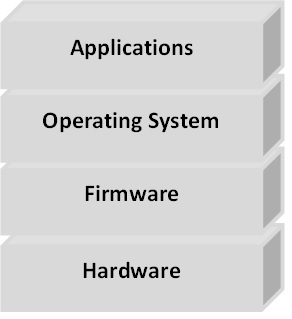
Hardware, Firmware, Operating System and Application

Students often hear these terms, but they may not clearly understand the difference. Let us simplify them.

Layer Meaning Examples
Hardware The physical electronic system that provides capability. Microcontroller, processor, memory, sensors, display, motor, communication ICs and power electronics.
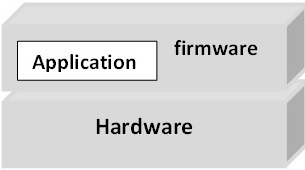
Firmware Low-level software that controls the hardware and defines product behaviour. Sensor reading, motor control, alarm logic, communication handling and peripheral configuration.
Operating System Used when the product becomes complex and needs task, memory, driver and resource management. FreeRTOS, other RTOS platforms, Embedded Linux and Android.
Application The user-facing functionality built above lower software layers. Smartphone apps, dashboards, screens, settings and product features.

Example: Android stack

ApplicationUser feature
→
Android FrameworkSoftware services
→
Linux KernelLow-level foundation
→
HardwareDevice resources

Android uses the Linux kernel as its low-level operating-system foundation. The Linux kernel handles important functions such as memory management, process management, device drivers, hardware access and networking.

This is one reason why Linux is an important skill in the embedded industry. It can lead toward careers in Embedded Linux, Linux Device Drivers, Android platform development, BSP development, semiconductor software and system software.

04 · Universal Flow

The Universal Embedded System Flow

Almost every embedded system can be understood through one simple flow. Something happens in the physical world, the product senses it, the processor receives information, firmware makes a decision, and the product creates an output or communication response.

Physical WorldTemperature, motion, button, obstacle
→
Sensor / InputElectrical information
→
InterfaceGPIO, ADC, UART, I²C, SPI, CAN
→
ProcessorReads and executes
→
Firmware ActionDecision, output, communication
What is an interface? It is the connection method through which the processor reads or communicates with another part of the system. It may be GPIO, ADC, UART, I²C, SPI, CAN or another hardware interface.

Analog and digital inputs

Some inputs are already digital, like a button. Some inputs are analog, like a sensor voltage. Analog inputs usually need an ADC before firmware can process them.

Do you know it?

A temperature sensor gives an analog voltage. Can the microcontroller directly understand that voltage as temperature?

A. Yes
B. No
C. Only through Wi-Fi
D. Only through UART
Correct answer: B. The microcontroller first needs ADC — Analog-to-Digital Converter — to convert the analog signal into digital data. Firmware then converts the ADC value into a useful engineering value such as degrees Celsius.

Examples of the same flow

Product Input Processing / Decision Output / Communication
Temperature monitor Temperature sensor and ADC value STM32 firmware calculates temperature Display, fan or alarm
Car parking sensor Ultrasonic sensor detects obstacle distance Firmware calculates distance and warning level Buzzer frequency changes
Smartwatch Accelerometer detects body movement Processor runs signal processing and step-count algorithm Display update or Bluetooth communication
Smart weather monitor Temperature and humidity sensors Firmware processes data and checks abnormal conditions Display, Wi-Fi/cloud update or buzzer alert

05 · Firmware and Debugging

Real Hardware Makes the Difference

Embedded systems cannot be understood only through presentation slides. Real learning starts when software interacts with actual hardware.

For example, using the Kernel Masters Raayan Mini STM32 platform, students can observe a simple system:

ButtonExternal event
→
STM32 GPIOInput read
→
FirmwareDecision
→
LED / BuzzerVisible output

Same hardware. Different firmware. Different behaviour.

Version 1: Button → LED ON
Version 2: Button → Buzzer ON
Version 3: Button → Change system mode

The hardware remains almost the same. The product behaviour changes because the firmware changes. This is one of the most powerful characteristics of embedded software.

What does an embedded software engineer actually do?

Many students assume, “Embedded Engineer means C programmer.” C programming is extremely important, but embedded engineering involves much more than writing code.

Requirement→Hardware→Datasheet→Firmware→Flash→Test→Debug→Validate

An embedded software or firmware engineer may read circuit schematics, study processor datasheets, configure peripherals, write Embedded C, develop drivers, interface sensors, implement communication, test hardware, debug failures, integrate modules, use Git/version control and coordinate with hardware and testing teams.

Build successful does not mean product successful.

A program may compile successfully but still fail on hardware. Possible reasons include wrong GPIO pin, incorrect clock configuration, wrong peripheral configuration, wiring problem, timing issue, protocol failure, power-supply issue, logic error or memory problem.

A strong embedded engineer must know how to find the root cause when something does not work.

Two small academic connections

Processor evolution

The Intel 4004, introduced in 1971, is widely recognized as an early commercially available single-chip microprocessor. From early processors, the industry evolved toward modern microcontrollers such as STM32 that integrate CPU, RAM, Flash, timers, ADC, UART, SPI, I²C, CAN and interrupt controllers in one device.

Digital electronics inside processors

Binary subtraction can be implemented using addition through two’s-complement arithmetic. This connects classroom concepts such as binary numbers, adders and complements to processor architecture.

06 · Interfaces and Careers

How Does the Processor Communicate With Other Devices?

A microcontroller usually does not work alone. It may communicate with sensors, memories, displays, other processors, communication modules, automotive controllers and industrial devices.

Protocol Common use Typical examples
UART Simple serial communication Debug console, GPS, Bluetooth module, Wi-Fi modem and serial devices
I²C Multiple low-speed devices using fewer communication lines EEPROM, RTC, accelerometer, temperature sensors and low-speed peripherals
SPI Relatively fast peripheral communication TFT displays, Flash memory, ADCs, SD cards and sensors
CAN Reliable communication between controllers Automotive systems, industrial control and multi-controller systems

Do you know it?

Which communication protocol is strongly associated with communication between Electronic Control Units in automobiles?

A. UART
B. HDMI
C. CAN
D. USB only
Correct answer: C. A vehicle may contain many ECUs, such as engine ECU, ABS ECU, airbag ECU and dashboard controller. These units can communicate over a CAN network.

One embedded product can involve many career roles

A single smart product may involve different engineers. This helps students understand that embedded systems is not one narrow job title; it is a complete engineering ecosystem.

Role Works on
Hardware Engineer Circuit design, power, interfaces and board design
Firmware Engineer Microcontroller, peripherals, drivers and low-level Embedded C
Embedded Software Engineer Product logic, system integration and software architecture
RTOS Engineer Tasks, scheduling, synchronization and timing
Embedded Linux Engineer Linux platform, system software, BSP and Linux configuration
Linux Device Driver Engineer The interface between operating system and hardware
IoT Engineer Connectivity, MQTT, gateways and cloud communication
Embedded AI Engineer Intelligent decision-making closer to the device, where applicable
07 · Takeaways and Next Step

Five Important Takeaways From Day 2

Embedded products follow a basic flow: Input → Processing → Decision → Output.
Firmware gives hardware its behaviour.
Embedded engineering is more than programming.
UART, I²C, SPI and CAN allow processors to communicate with other devices.
Engineering subjects such as Digital Electronics, ADC, Microprocessors, Signals, Communication and C Programming are used inside real products.

Day 2 observation task

Choose any one product: smartwatch, washing machine, car, drone, smart AC or medical device.

Try to identify the product using these checkpoints:

Input Processor Firmware role Decision Output Communication

Explain the product using this simple format:

Input → Processor → Firmware → Decision → Output

Final Thought

An Embedded Engineer understands what the hardware can do, how software controls it, how devices communicate and how to debug when things go wrong.

Learn→ Implement→ Debug→ Demonstrate
June 3, 2025
June 3, 2025

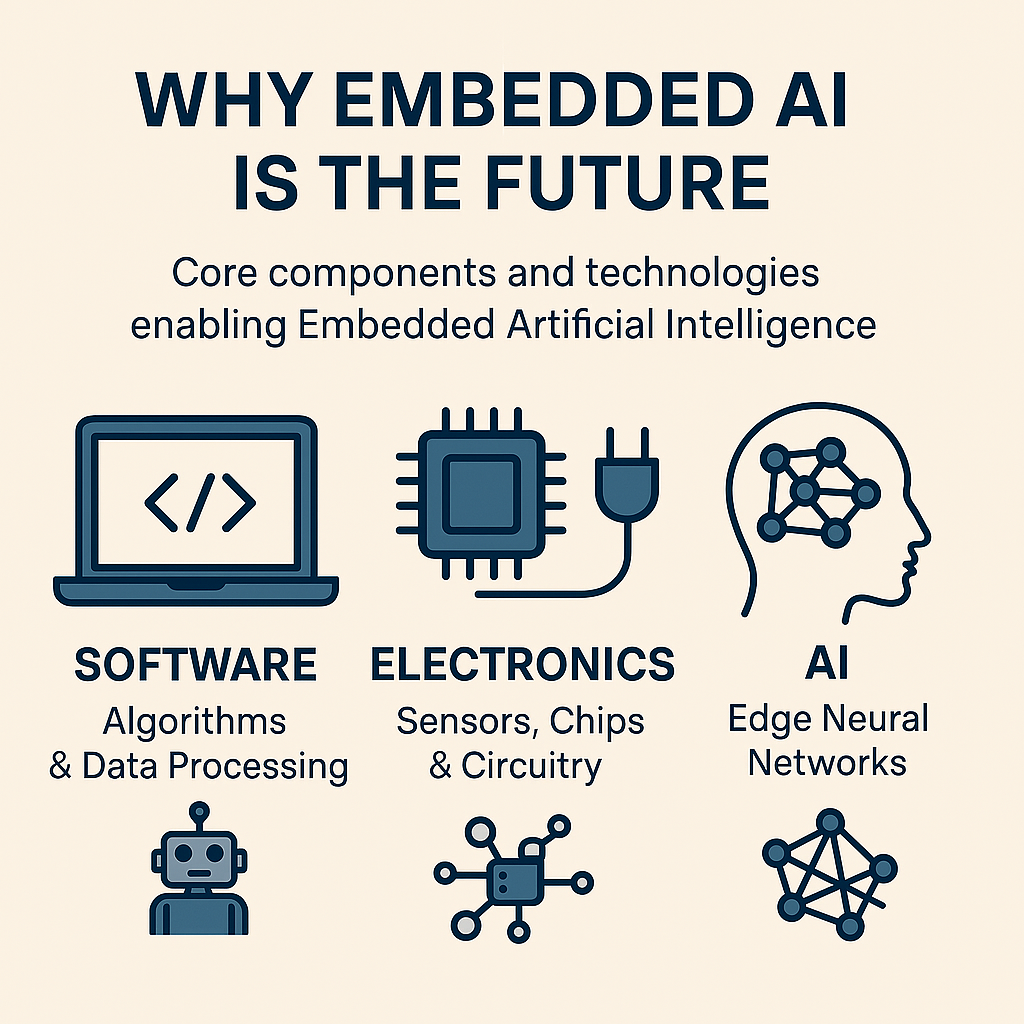
Why Embedded AI Is the Future: A Career Path for Engineers, Coders & Innovators

In today’s AI-driven world, we hear a lot about chatbots, recommendation engines, and cloud-powered tools. These are all part of what we call Traditional AI—systems that rely on massive infrastructure and powerful computing resources hosted on the cloud. But there’s a new, emerging alternative that’s faster, leaner, and smarter for edge applications: Embedded AI.

🧠 What is Traditional AI?

Traditional AI refers to high-performance artificial intelligence that runs on powerful servers—typically in cloud data centers. These systems are great for analyzing big data, generating insights, and powering large-scale enterprise solutions.

Examples of Traditional AI Applications:

  • Virtual assistants like Siri, Alexa, or Google Assistant
  • Search engines and recommendation systems (e.g., YouTube, Netflix)
  • Fraud detection systems used by banks
  • AI-powered cloud-based medical diagnostics

Key Characteristics of Traditional AI:

Feature Description
🧠 Model Complexity Uses large machine learning or deep learning models (e.g., GPT, CNNs, RNNs)
💾 Data Usage Requires large volumes of data for training and inference
☁️ Execution Platform Runs mostly on cloud servers, GPUs, or high-end CPUs
🌐 Connectivity Often needs internet access to communicate with the cloud
⚡ Power Consumption High, because of resource-intensive computations
⏱️ Latency Higher latency due to data transmission and processing delays
🧑‍💻 Application Areas Natural Language Processing (NLP), computer vision, finance, healthcare, recommendation systems

While powerful, traditional AI has limitations for real-time, offline, or power-constrained applications. That’s where Embedded AI comes in.

🔍 What is Embedded AI?

Embedded AI is the combination of electronics, software, and AI running on small, resource-limited hardware such as microcontrollers. Unlike traditional AI systems that depend on cloud servers for processing, Embedded AI enables local intelligence—allowing devices to think, learn, and act without internet or cloud access.

🧩 Real-World Applications of Embedded AI

Embedded AI is no longer a concept of the future — it’s already powering the intelligent devices all around us. From smart homes to industrial automation, here are some of the most impactful and current applications of Embedded AI today:

  • Smart Cameras & Appliances: Face detection, voice control, and personalized suggestions.
  • Wearables & Health Monitors: Track health vitals, detect falls, and monitor sleep patterns.
  • Industrial Automation: Predictive maintenance, quality checks, and smart energy metering.
  • ADAS & Smart Vehicles: Lane assist, collision detection, and AI-powered dashcams.
  • Drones & Surveillance: Real-time obstacle avoidance and intelligent mapping.
  • Smart Homes & IoT: AI security systems, energy optimization, and leak detection.
  • Agritech: Smart irrigation, disease detection in crops, and autonomous monitoring.
  • Retail & POS: Smart vending, fraud detection, and inventory tracking robots.

💡 Why Do We Need Embedded AI?

Embedded AI solves several critical issues posed by traditional cloud-based AI:

Feature Description
💡 Local Intelligence AI runs on the device itself, not in the cloud
⚙️ Hardware Used Microcontrollers (e.g., STM32), NPUs, DSPs, SoCs
⚡ Low Power Designed for low energy consumption, ideal for battery-powered devices
⏱️ Real-Time Response Fast decision-making without internet delays
🧩 Compact Models Uses TinyML, quantized and optimized models
🔒 Privacy Friendly Keeps data on-device, enhancing security
🌐 Connectivity Optional Works offline or intermittently connected

🧠 What Makes Embedded AI Possible?

🧩 Key Components:

Programming Concepts
Software

Foundations of coding and software tools.

Industrial Hardware
Electronics

Microcontrollers and sensor integration.

AI Framework & AI Tools
AI

TinyML and edge intelligence systems.

💻 Software
Core Topics:
  • Programming Languages – C, C++, Python for embedded and general-purpose development
  • Development Tools – STM32CubeIDE, Arduino IDE, and Visual Studio Code
  • Version Control – Git and GitHub for managing collaborative projects
🔌Electronics
Key Concepts:
  • Microcontrollers – STM32, ESP32, Arduino, and more
  • Sensors & Actuators – Interfacing with real-world inputs and outputs
  • Communication Protocols – I2C, SPI, UART for hardware integration
🤖 AI
Embedded AI Overview:
  • TinyML enables machine learning on microcontrollers with minimal resources
  • TensorFlow Lite for Microcontrollers – Lightweight ML runtime for constrained devices
  • STM32Cube.AI – Converts neural network models into optimized embedded code

Embedded AI is where software meets electronics and AI—a perfect blend of disciplines.

⚖️ Embedded AI vs Traditional AI

🔴 Traditional AI Problems 🟢 How Embedded AI Solves It
❗ High latency (due to cloud dependency) ✅ Runs locally on devices (real-time response)
❗ Requires constant internet connectivity ✅ Works offline — ideal for remote or mobile use
❗ High power consumption (GPU/CPU-heavy) ✅ Optimized for low-power microcontrollers (e.g., STM32)
❗ Privacy issues (data sent to cloud) ✅ Local inference means data stays on device
❗ Not suitable for real-time control (e.g., robotics, cars) ✅ Real-time decisions using embedded AI chips
❗ Expensive hardware required ✅ Uses low-cost, efficient MCUs and NPUs

🚀 Career Opportunities in Embedded AI

If you’re a student, fresher, or a professional with a passion for both coding and hardware, Embedded AI is a game-changing career path. Here’s why:

✅ Rare and Valuable Skillset

You’ll master both low-level embedded systems (e.g., STM32, C) and high-level AI (e.g., ML, TinyML).

🌐 High Industry Demand

Used in:

  • IoT Devices (Smart homes, Smart cities)
  • Automotive (ADAS, EVs)
  • Industry 4.0 (Robotics, predictive maintenance)
  • Healthcare (Wearables)
  • Agriculture (AI-powered drones)

🔄 Cross-Domain Roles

  • Embedded Software Developer
  • AI/ML Engineer
  • Firmware Developer
  • Robotics Engineer
  • AIoT Product Designer

🔮 Future-Proof Your Career

Embedded AI intersects with AI, IoT, and 5G—three massive future tech waves.

🏢 Top Companies Hiring in Embedded AI

Global Tech Giants:

  • NVIDIA (Jetson edge AI)
  • Intel (Movidius, OpenVINO)
  • Qualcomm (Snapdragon NPE)
  • STMicroelectronics (STM32 with AI)
  • NXP, Texas Instruments, ARM

These companies are investing heavily in edge computing and AI hardware—the backbone of Embedded AI.

🧑‍💻 Who Can Learn Embedded AI?

🚫 Myth: Only ECE/EEE students can build careers in Embedded AI
✅ Reality: Embedded AI is a cross-disciplinary field:

  • Software (CSE, IT)
  • Electronics (ECE, EEE)
  • AI/ML (Any branch)

If you love problem-solving, coding, or building smart systems, this path is for you.

🎓 Learn Embedded AI with Kernel Masters

If you’re looking for a practical, job-ready course in Embedded AI, Kernel Masters stands out with:

  1. Expert Instruction: 20+ years of experience from Kishore Kumar Sir.
  2. Industrial Syllabus: Covers embedded C, STM32, ARM, and AI tools.
  3. Hands-on Projects: Build real products like smart attendance systems and gateways.
  4. Personal Attention: One-on-one support, performance tracking.
  5. Placement Support: End-to-end career support—regardless of degree, marks, or batch.

📈 Conclusion

Embedded AI isn’t just the future—it’s the now for smart, scalable, and efficient AI solutions. Whether you’re an engineer, coder, or AI enthusiast, this is a path where hardware meets intelligence—and careers take off.

If you’re serious about building a future in tech, start with Embedded AI. 🌍💡

September 18, 2024
September 18, 2024

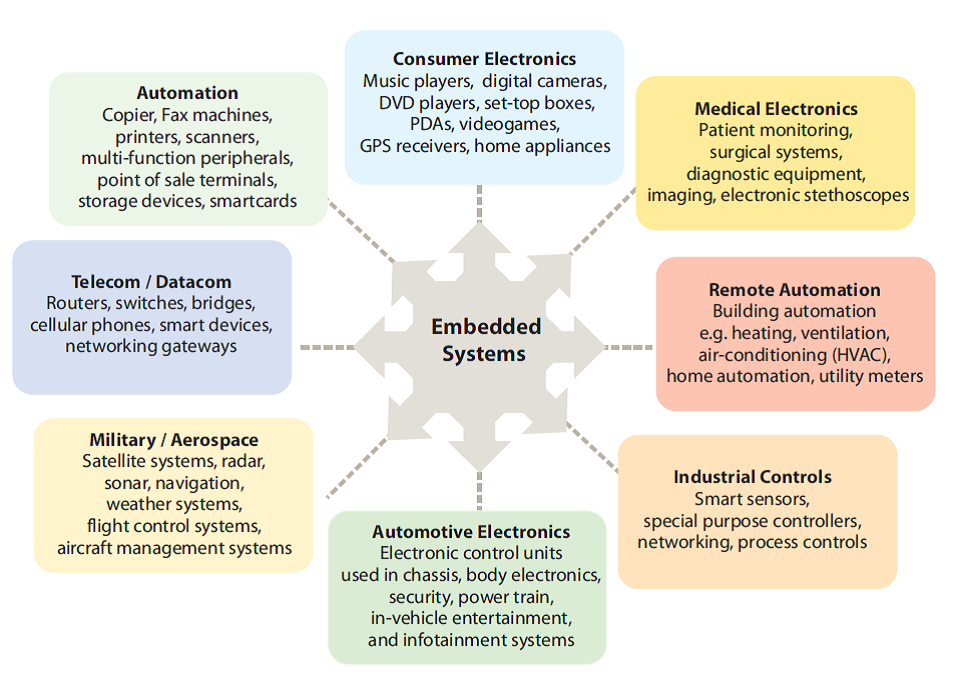
Embedded Systems Applications

Embedded systems development environment

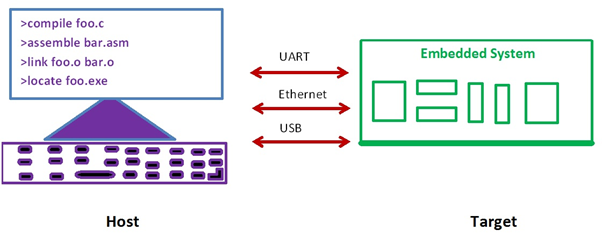
Embedded software build process is a transformation performed by software running on a general purpose computer.

The compiler, assembler, linker and locator are all pieces of software that run on a host computer, rather than on the embedded system itself. Finally executable image run on a target embedded system.

Host (Development) machine communicate to the target various types of interfaces like UART, Ethernet and USB.

Types of computer architectures

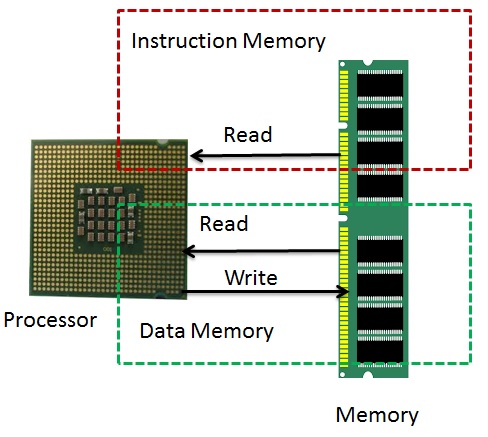
  1. Based on Program Memory and Data Memory (Harvard and Von Neumann computer architectures)
  2. Based on Mechanism (RISC and CISC)
  3. Based on Data transfer to the Memory (Little Endian and Big Endian)
  4. Based on Types of Address (I/O mapped I/O and Memory Mapped I/O)
  5. Based on Instruction Set

Harvard and Von Neumann computer architectures

Embedded Systems
Embedded device
VON NEUMANN ARCHITECTURE
  • It is named after the mathematician and early computer scientist John Von Neumann. The computer has single storage system memory) for storing data as well as program to be executed.
  • There is no real difference between data and instructions.
  • Data and instructions share the same memory.
  • Processor needs two clock cycles to complete an instruction. Pipelining the instructions is not possible with this architecture.
  • In the first clock cycle the processor gets the instruction from memory and decodes it. In the next clock cycle the required data is taken from memory. For each instruction this cycle repeats and hence needs two cycles to complete an instruction
Harvard Architecture
  • The name is originated from “Harvard Mark I” a relay based old computer.
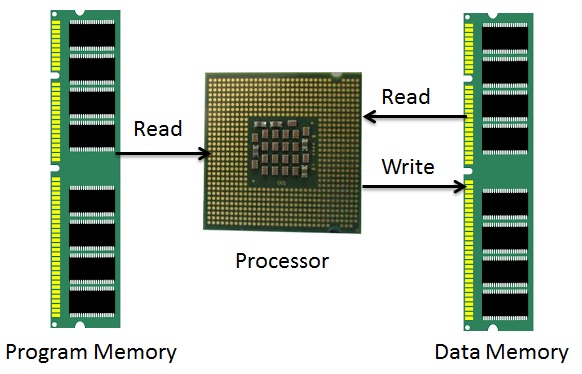
  • The computer has two separate memories for storing data and program.
  • Processor can complete an instruction in one cycle if appropriate pipelining strategies are implemented. In the first stage of pipeline the instruction to be executed can be taken from program memory. In the second stage of pipeline data is taken from the data memory using the decoded instruction or address.
  • Most of the modern computing architectures are based on Harvard architecture. But the number of stages in the pipeline varies from system to system.

RISC and CISC:

CISC RISC
Many complex instructions Simple instructions, few in Number, Few addressing modes
Variable length instructions Fixed length instructions
Many instructions can access memory Only LOAD/STORE instructions access
memory
mov ax, 10
mov bx, 5
mul bx, ax
mov ax, 0
mov bx, 10
mov cx, 5
Begin add ax, bx
loop Begin
The total clock cycles for the CISC version might be:
(2 movs × 1 cycle) + (1 mul × 30 cycles) = 32 cycles
While the clock cycles for the RISC version is:
(3 movs × 1 cycle) + (5 adds × 1 cycle) + (5 loops × 1 cycle) = 13
cycles
Example: x86 ISA Examples: ARM, MIPS, PowerPC (IBM), SPARC (Sun)

Little Endian and Big Endian

Little Endian Big Endian
“Little Endian” means that the lower-order byte of the number is stored in memory at the lowest address, and the high-order byte at the highest address. “Big Endian” means that the high-order byte of the number is stored in memory at the lowest address, and the low-order byte at the highest address.
For example, a 4 byte Integer
Byte3 Byte2 Byte1 Byte0
will be arranged in memory as follows:
Base Address+0 Byte0
Base Address+1 Byte1
Base Address+2 Byte2
Base Address+3 Byte3
The same 4 byte integer would be stored as:
Base Address+0 Byte3
Base Address+1 Byte2
Base Address+2 Byte1
Base Address+3 Byte0
Intel processors (those used in PC’s) use “Little Endian” byte order. ARM processors (those used in PC’s) use “Big Endian” byte order.

I/O mapped I/O and Memory Mapped I/O:

I/O Mapped I/O Memory Mapped I/O
Separate address bus for I/O and memory. Common address bus for I/O and Memory.
Support IN and OUT Assembly Instructions. There are no separate IN & OUT instructions. What are the instructions are to communicate memory same instructions useful to communicate I/O.
Separate control lines for I/O. IOR and IOW No separate control Lines for I/O. Memory control lines only MEMR, MEMW.

Register Plus Memory Architecture and Load Store Architecture

Register Plus Memory Load Store Architecture
Allows operations to be performed on (or from) memory, as well as registers.
If the architecture allows all operands to be in memory or in registers, or in combinations, it is called a “register plus memory” architecture.
load/store architecture divides instructions into 2 categories:
• Memory access (load and store between memory and registers).
• ALU operations (which only occur between registers).
Example: ADD M ; A <- A + [M Example: ADD r3,r2,r1

Embedded Hardware

Hardware Required Desktop Computer Simple Embedded
Computer
Ex: remote Controller
Complex Embedded
Computer
Ex: Mobile Phone
Processor
(Bus Width)
High end processor
32 bit/ 64 bit
Ex: Intel Processor
Low End Processor
8 bit/16 bit
Ex: 8051 (8 bit)
ARM Cortex M4
High end processor
32 bit/ 64 bit
Ex: ARM Cortex A9
CISC or RISC CISC RISC RISC
Caches and MMU Yes No Yes
Memory 2GB to 64 GB 32KB to 128 MB 128 MB to 4GB
Multiprocessor Supports Dual Core/ Quad Core/ Hexa Core Doesn’t support Multicore Supports Dual Core/ Quad Core/ Hexa Core
Sensors Doesn’t Support Sensor interface Support Sensors Interface Support High end sensors interface
External Device Interface Supports Once Device manufactured, can’t interface new device to the target. Once Device manufactured, can’t interface new device to the target.
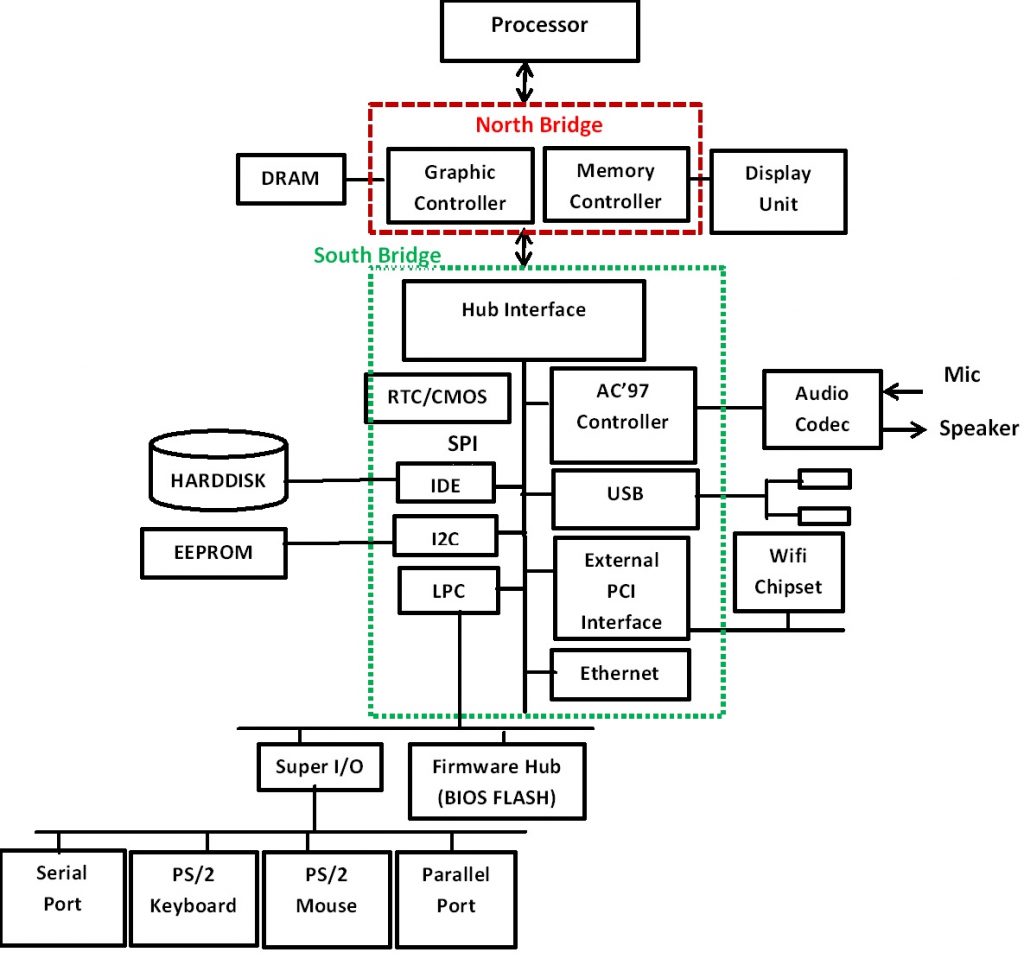
Desktop Block Diagram:
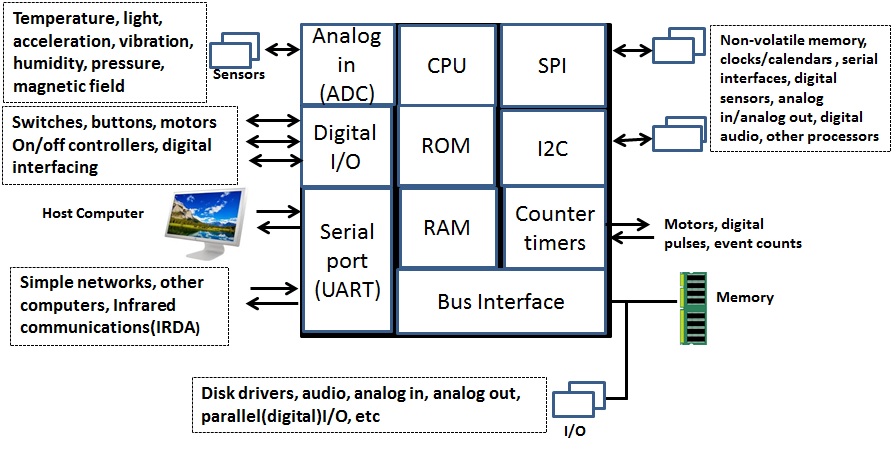
Simple Embedded Systems Block Diagram: (Remote Controller)
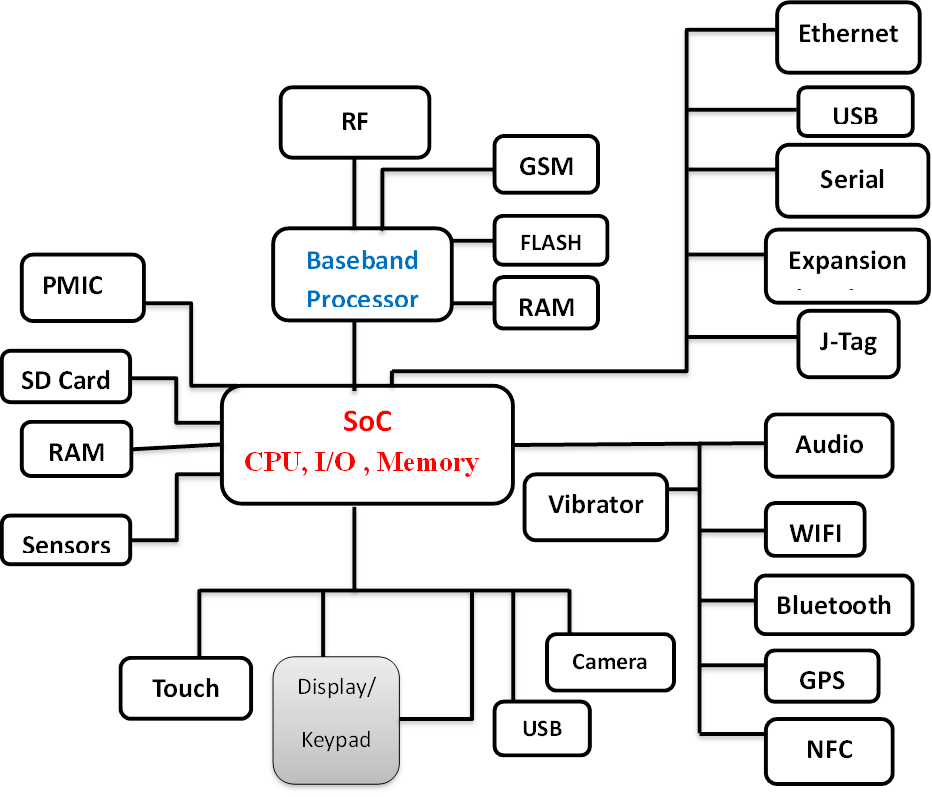
Complex Embedded systems Block Diagram (Example: Mobile Phone)

Embedded Software

Software Layers in the Computer

Software Required Desktop Computer Simple Embedded
Computer
Ex: remote Controller
Complex Embedded
Computer
Ex: Mobile Phone
Software layers in the Computer
Operating System Windows/Linux Doesn’t Support OS. Supports Windows/Linux/Android
Firmware BIOS Whole system develops using firmware Bootstrap program
Programming Languages C/C++/Java/html/
php
Assembly/C Assembly/C/C++/Java/
html/php

At the lowest level are programs that are run by the processor when the computer first powers up. These programs initialize the other hardware subsystems to a known state and configure the computer for correct operation. The software, because it is permanently stored in the computer’s memory, is known as firmware.

Above the firmware, the operating system controls the operation of the computer.

Firmware:

Firmware is software that is programmed into chips permanent/temporary and usually performs basic instructions, like BIOS, for various components, Network cards, and computer BIOS, etc…

Embedded C Programming is also called Firmware.

Embedded C vs General C:

  • C is a widely used general purpose high level programming language mainly intended for system programming.
  • Embedded C is an extension to C programming language that provides support for developing efficient programs for embedded devices.
  • Embedded C has to use with the limited resources, such as RAM, ROM, I/Os on an embedded processor.

Operating System

An operating system (OS) is system software that manages computer hardware and software resources and provides common services for computer programs.

Kernel

Kernel is core part of the operating system. Kernel provides core service like Process management, Memory management, File management, Device and network services.

September 18, 2024

Which course should be opted in Engineering?

To all the students who are looking forward to take Engineering admission, and to their parents, we would like to give some suggestions about branch selection.

There is no doubt that every student’s first choice is Computer Science only.But, to bring awareness in students, about the enormous opportunities provided by electronics field and about its importance and to encourage them to choose Electronics field, is the main agenda of this blog post.

Why is there so much demand for Computer Science Engineering?

Due to the salaries and lifestyle provided by software industry, not only the students, their parents are also attracted to this field.

Nowadays situation has become such that, job means only software engineer job, engineering means only computer engineering, nothing else is considered good.

As lot of people compete for Software Engineering jobs, only few of them get proper development opportunities.Remaining candidates just end up doing maintenance & support kind of jobs with no proper career growth.

What is the importance of Electronics branch in Engineering?

Nowadays mobile phone has become the basic necessity of human life along with food, clothes and shelter.

We cant imagine life without smart phone.

We cant find a house without atleast one electronic device. There will be atleast a TV and a Set top box to say minimum.

How are these electronic devices made?

Electronic core fields like Embedded Systems & VLSI design and manufacturing fields are the ,main reason that we have all these devices.

Electronics field is no way inferior to Software field in terms of Job opportunities.

Most of the Electronics students are not aware of the opportunities provided by Electronics field, so they are either choosing Software field or moving on to higher studies etc.

As long as the situation is like this, we will have to import every electronics device that we need, from other countries like China or Japan.Make In India can never become reality.

What are the new courses added to Computer science branch, and what are the consequences of adding them?

In this academic year (2020-2021), 6 new engineering courses were added to the computer science department.

Those are

  • Computer Science Engineering – Software Engineering
  • Computer Science Engineering – Artificial Intelligence & Machine Learning
  • Computer Science Engineering – Data Science
  • Computer Science Engineering – Cyber Security
  • Computer Science Engineering – Internet of Things
  • Computer Science Engineering – Networks

Most of the subjects in these courses are taken from the Computer Science Standard Curriculum.They should have been added as Specialisations in M.Tech instead of adding as new branches in B.Tech.

Because of adding these new branches in B.Tech, approximately 19000 new seats got added to Computer Science department alone.Because of the increased seats, most of the students will opt for Computers branches, which will effect core fields like Electronics Civil, Mechanical etc.

As these core fields get effected as no one is opting for them, the technology advancements in these fields will be hindered.If you see countries like China or Japan, they are technologically very advanced.

Why are these countries so developed? Because they give equal importance to all core fields, not just one field. That is why now they are in a stage to manufacture anything on their own and export it to other countries.

Because of the newly added seats in computer science department, all students will tend to choose Computer science branch only.

But we need to understand that increase of seats in a particular field does not mean increase in job opportunities. It means competition is increasing in that field.

One more thing is, technologies like Artificial Intelligence & Machine Learning are no doubt in demand, but these technologies have to be used in electronic devices only.So inorder to use these advanced technologies, we will require electronics basic knowledge.

Which means, Electronics field will continue to provide job opportunities and there will be demand for skilled resources.

So is it right that everyone chooses software field, leaving such an evergreen field like Electronics?

What I want to tell to students and their parents is,choose the field which provides good job opportunities, growth in career along with good salaries and job satisfaction. Choose Electronics Core field.

Let us together pledge to save the electronics core field branches like ECE & EEE. And make “Make In India” possible.

September 18, 2024

For Freshers, the resume should be mainly about their skill-set and academic details. Here are some tips about how to build your resume, section wise.

  • Career Objective Section:
    • It is absolutely unnecessary. The Career objectives are just like heritage carried from your senior’s CV’s to your CV, then to your junior’s. You can safely remove it as it is nothing but copy paste.
    • If you have something of your original, that reflects your real career motto or attitude, you may add it, just to bring some interest.
  • Technical Summary:
    • Add a line in technical summary about training attended at Kernel Masters. Course name is Certified Industrial Embedded Systems Developer training.
    • Or add any other relevant course that you have attended at any institute.
    • Update the skillset or technical summary section with whatever topics you learnt at Kernel Masters, or implemented, like socket programming, inter process communication etc.
    • You may also add the major subjects studied in technical summary/skillset, like C Programming, Embedded C with STM32, Operating System concepts, Git, GDB , KGDB etc.
    • Protocol names must be mentioned.
    • Sometimes it may be required that you have to update your technical skillset based on the company’s requirement and Job Description. So keep visiting this section from time to time and update.
  • Projects:
    • Add the embedded C project done at Kernel Masters, to your profile above your academic projects.
    • Add Project Title first.
    • Add project abstract / description. Add this in your own words, to reflect how you understood the project in general words. Include some key technical words that help describe the project.
    • Do not copy paste project description from anybody else.
    • Quality is more important than quantity when it comes to projects. You will be validated based on how much practical implementation you have done on one project with perfect understanding, than how many projects you have done.
    • Add the responsibilities handled by you and the technologies & protocols used.
    • Under responsibilities you will have to add details like ,data sheet study, any kind of analysis done, sensors studied etc in bullet points.
    • Academic project should be added only if you are able to explain about it in interviews.
  • Experience Summary:
    • Add your experience or internship details if any only if it is related to Embedded field.
    • Add companyname, designation and duration for which you have served at the company.
    • Do not add teaching experience or experience from any other field that is not relevant to Embedded Industry.
  • Education Details:
    • Academic percentages, branch or specialization and passedout years are mandatory in education details.
    • Also add the university and college names for graduation and post graduation.
  • Personal Details:
    • Personal details section is not usually required if you are providing your residential address at the top.
    • If you want to provide, put your date of birth & Residential address. Family details are not required.
  • Contact Information:
    • Add a valid mobile number and a mail id that you regularly use and check. The mobile number that you provide in resume, must always be available.
    • Make sure your email id that you provide has a professioal looking user name that shows your full name as part of it.
    • Do not use any unprofessional & funky mail ids like mylifemywish@gmail.com.
    • Better to add your residential address to give the employer an idea of your current location, there by decide the mode of interview.
    • Add your SkypeId.
  • Other Key points to Note:
    • Name your resume file in this format “FullName_Fresher/x+exp” Full name is mandatory. Never name it like “my_resume”, “resume”,”resumeupdated” etc. Resumes wrongly named will be discarded.
    • Send only word documents to me, if you are under my placement assistance program (only for Kernel Masters students).
    • Wish you All the Best.
September 14, 2024

Kernel Masters offers a Blended Learning mode to their students for Embedded Systems courses.

What is a Blended Learning Mode?

Blended Learning mode integrates virtual or recorded and physical classroom modes of teaching. We can make efficient usage of time and resources with the help of technology. This approach is gaining popularity over corporates and universities.

How does it work at Kernel Masters?

In Blended mode, the 6 months fresher course contains:

  • 30% recorded videos
  • 30% classroom sessions
  • 40% lab sessions

Recorded Videos: pre-requisites that are expected to know already, are covered in the course in the form of recorded videos, along with some theoretical sessions.

Recorded videos can be played in the classroom, just like normal sessions.After every recorded session, the instructor will explain the summary of the session and discuss the doubts or important points.

Some videos can be given to be watched at home, before starting a new topic, so that student gains some idea before attending actual class. This will help the student to watch the video multiple times and gain some understanding when the topic is complex.

The videos are recorded while our instructors were teaching in the same classroom environment.

They won’t be available to outsiders, the videos are the proprietary property of Kernel Masters.

Classroom Sessions:

30% of the syllabus is covered in classrooms, physically by the instructor.

LAB Sessions:

Everyday there will be 2 hours of classroom and 6 hours of lab sessions.

For every topic, we have a set of well-designed assignments to make the topic more understandable. The assignments are prepared in such a way that at the end of the day, they get complete understanding of the topic.

The assignments will be discussed in the classroom in following classes, whenever necessary to suggest the best approach to solve it.

Why Blended Learning ?

The entire world is moving towards a smart work life. Through Blended Learning, we are also trying to make smart and efficient usage of the instructor’s time.

The training is a 6 months duration course, with a lot of syllabus to cover. We have to cover pre-requisites and basics also, to bring everyone to the same level before starting the actual syllabus.

In Blended Learning mode, we can save the instructor’s energy, so that he/she gets to spend more time on the actual topics, doubts and on the lab issues instead of spending time on teaching the same theory for every batch. This will ensure a better learning experience for the students.

🚀 Admission for 6 months Embedded AI & IoT offline course at Hyderabad & Bangalore
🚀  Admission for 6 months Embedded AI & IoT offline course at Hyderabad & Bangalore
1s
C Programming & Data Structures
Working Professional
🕮 Kishore Kumar Boddu | 【┘】 2 Months
About This Course

This course is designed for working professionals who want to build a strong foundation in C Programming and Data Structures.
Starting from the fundamentals, the course focuses on practical programming, problem solving, pointers, strings, memory concepts and core data structures — helping learners strengthen their programming skills and prepare confidently for technical interviews.

Course Objective
  • Build in-depth knowledge of C Programming from the fundamentals
  • Gain hands-on experience with core C programming features
  • Develop a strong understanding of pointers, strings, arrays and memory concepts
  • Improve problem-solving and programming skills
  • Become interview-ready for C Programming technical rounds
  • Implement Data Structures using C
Course Details:
  • Batch Starts: 1st Oct 2026
  • Duration: 2 Months
  • Class Timings: 7 PM – 8:30 PM
  • Mode: 100% Online Blended Learning
         (Online Interactive Session + Primer Videos)
  • Prerequisite: Basic Linux knowledge and familiarity with common terminal commands
👉 Course Fee: ₹12000 /-
Working Professional
C Programming & Data Structures
🕮 Kishore Kumar Boddu  |【┘】2 Months
About This Course:
This course is designed for working professionals who want to build a strong foundation in C Programming and Data Structures.
Starting from the fundamentals, the course focuses on practical programming, problem solving, pointers, strings, memory concepts and core data structures — helping learners strengthen their programming skills and prepare confidently for technical interviews.
Course Objectives:
  • 1. Build in-depth knowledge of C Programming from the fundamentals
  • 2. Gain hands-on experience with core C programming features
  • 3. Implement Data Structures using C
  • 4. Improve problem-solving and programming skills
  • 5. Develop a strong understanding of pointers, strings, arrays and memory concepts
  • 6. Become interview-ready for C Programming technical rounds
  • Duration: 2 Months
  • Class Timings: 7 PM – 8:30 PM
  • Mode: 100% Online Blended Learning
    (Online Interactive Session + Video Primers)
  • Prerequisite: Basic experience with Linux
Course Details:
Course Fee:
₹12000 /-