
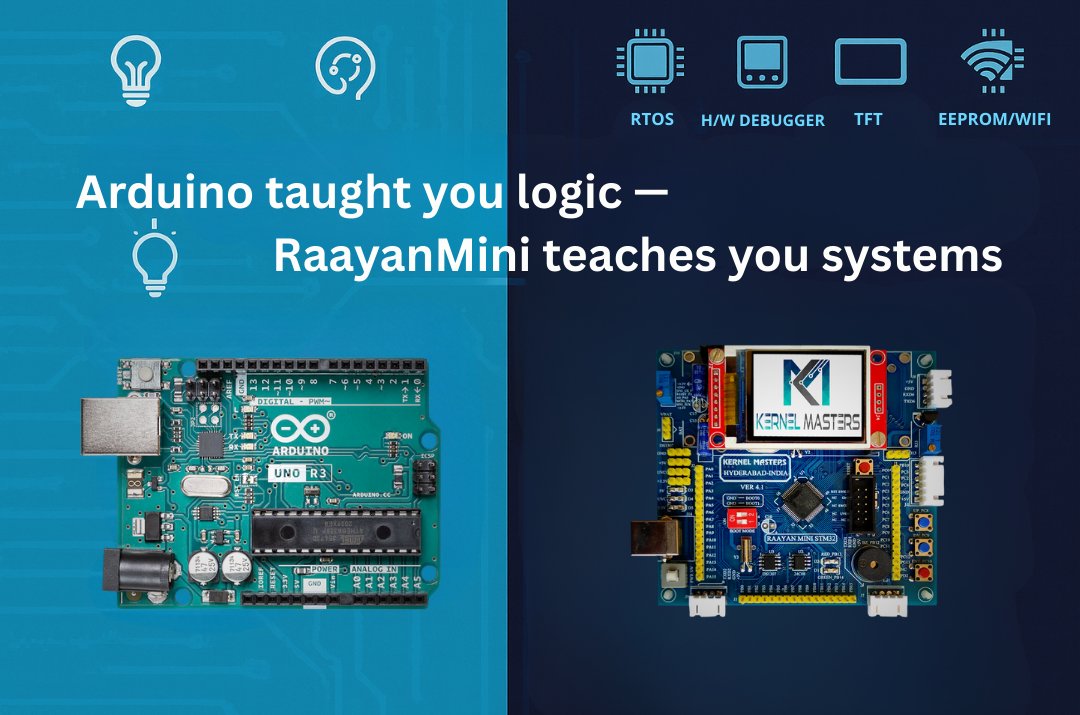
Arduino Uno Or Raayan Mini: Where Should You Really Start Your Embedded Journey?
If you’re a fresher (or working professional switching into embedded), your first board was probably Arduino.
It’s simple, affordable, and tutorials are everywhere. But here’s the critical question:
Is Arduino Uno enough for a professional embedded job, or do you need something like Raayan Mini?
Real question: “If I already know Arduino, do I really need STM32/Raayan Mini for an embedded job?”
Short answer: Arduino is a great start. Raayan Mini is where you grow if you’re serious.
TL;DR (save this):
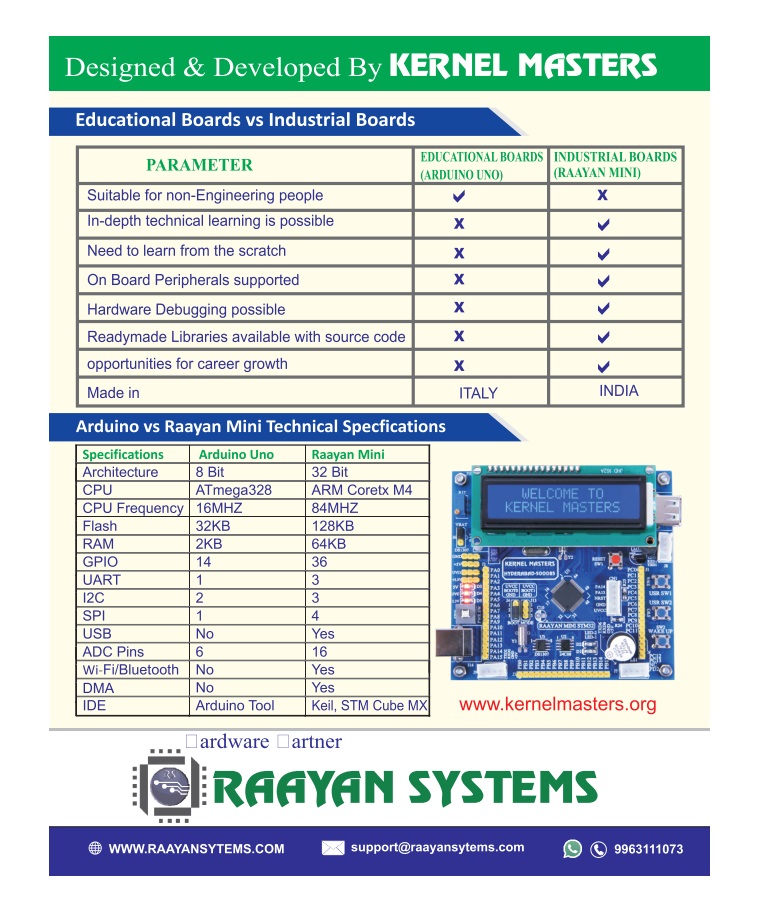
- Arduino Uno = fast entry to electronics + coding basics (8-bit, 2KB RAM)
- Raayan Mini = professional workflow: 32-bit ARM, hardware debugging (ST-LINK), multi-peripheral systems, industry tools
- If your goal is firmware/embedded jobs, move to 32-bit STM32 learning within 4–8 weeks (if dedicated)
- The real difference: Arduino teaches “make it work.” Raayan Mini teaches “understand how it works.”
1Understanding Arduino: Value, Limitations & Knowledge Gaps
Arduino Uno is genuinely valuable. It’s introduced millions to electronics and programming. It’s accessible, fun, and results are immediate. But here’s what matters for a fresher pursuing embedded careers: what’s it hiding from you?
⚙️ Arduino Uno Specs
- MCU: ATmega328P (8-bit AVR)
- Clock: 16 MHz
- Flash: 32 KB
- SRAM: 2 KB
- EEPROM: 1 KB
- Peripherals: UART, SPI, I²C (via libraries)
✓ Arduino Excels At
- First exposure to electronics + coding
- College projects & hobbyist robotics
- Rapid prototyping with pre-built libraries
- Immediate visual feedback (LED, motors)
- Lower cost barrier to entry
But here’s the real question: Can you answer these after Arduino?
- What’s in the MCU’s memory map?
- How does the bootloader start your code?
- What’s an interrupt vector table?
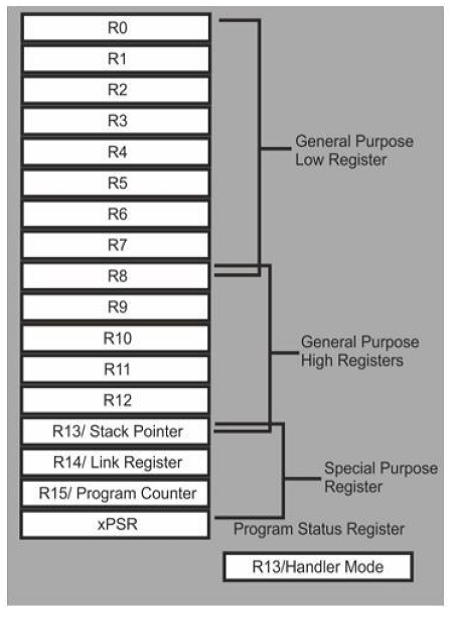
- How do you configure registers directly?
- What’s a hard fault and how do you debug it?
Key takeaway: Arduino is excellent for electronics basics. But for embedded careers, you need to move beyond it. The question isn’t “Is Arduino bad?” It’s “Is Arduino enough for what you’re trying to achieve?”
2Meet Raayan Mini: Built for Industry-Level Learning
Raayan Mini is an STM32-based industrial training board designed to bridge academic kits and professional embedded workflows.
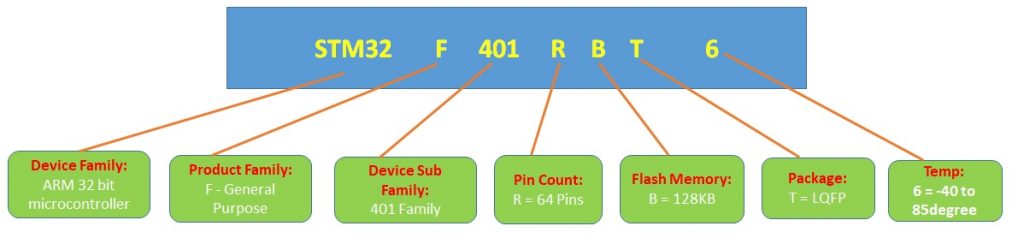
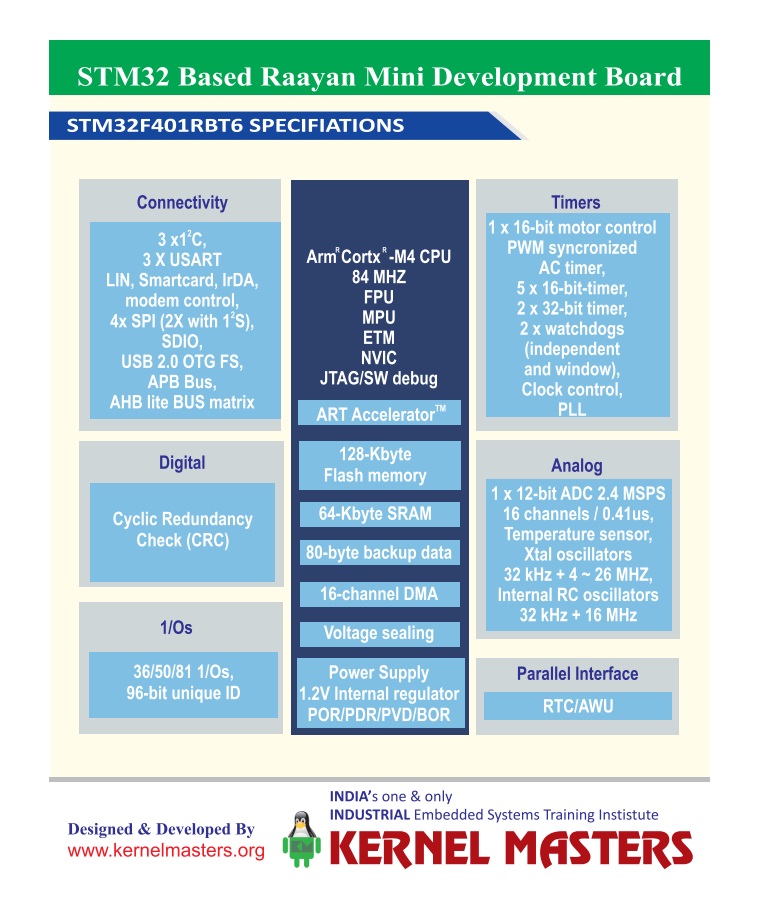
⚙️ Core MCU: STM32F401
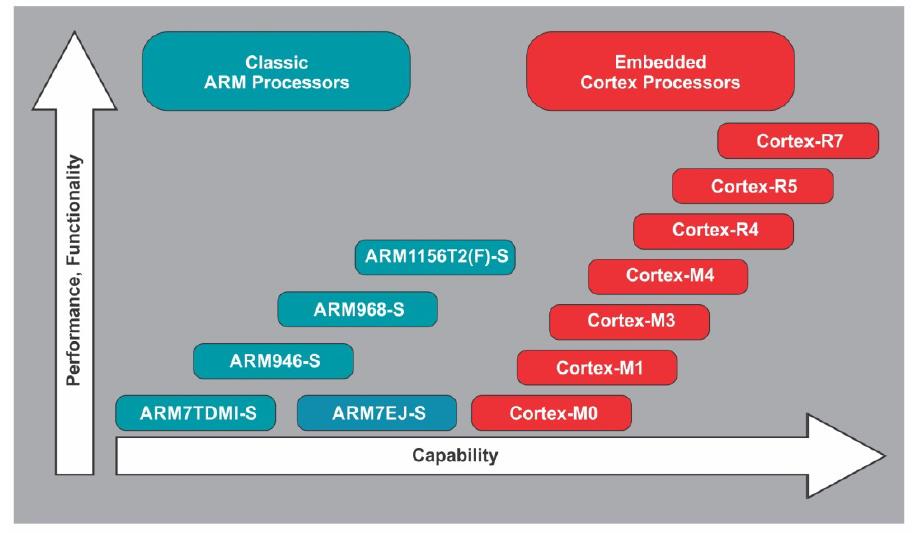
- 32-bit ARM Cortex-M4 + FPU
- Up to 84 MHz clock
- 128 KB flash, 64 KB SRAM
- 12-bit ADC + UART/I²C/SPI/etc
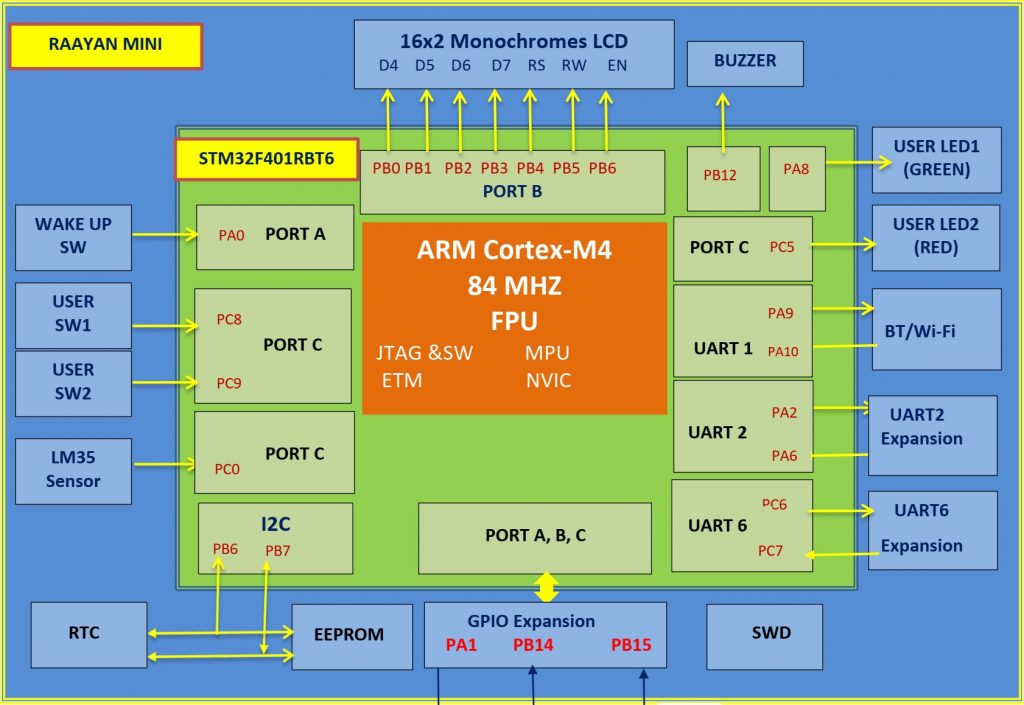
🔧 Mini-Lab Peripherals (One PCB)
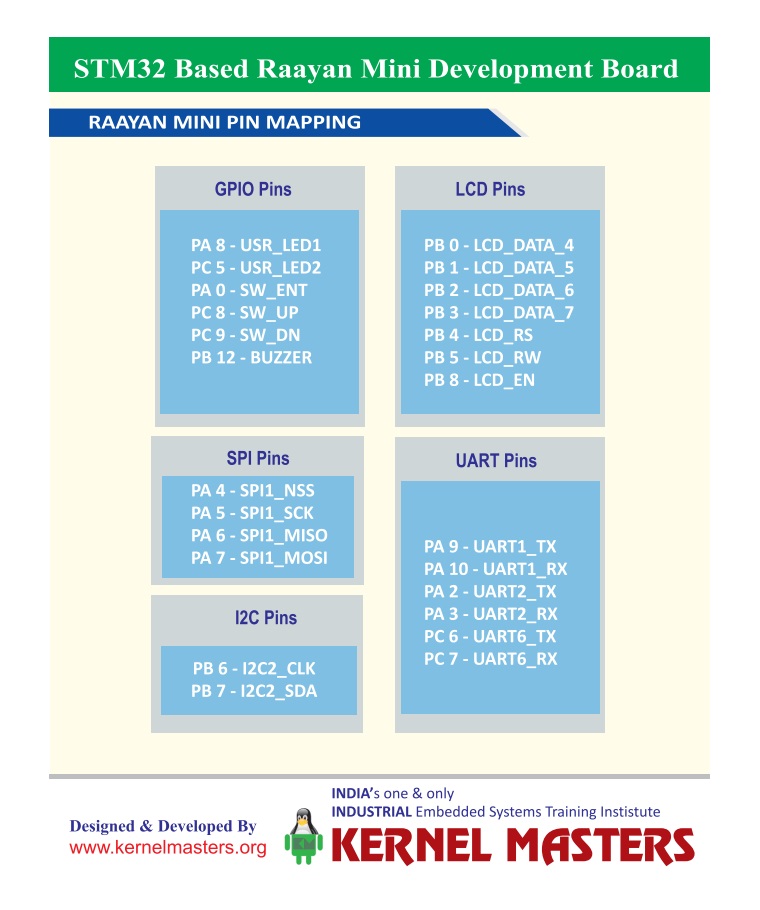
- On-board ST-LINK SWD debugger
- Temperature sensor (LM35) + potentiometer
- RTC (I²C) + EEPROM (I²C)
- 16×2 LCD + TFT SPI interfaces
- UART zones + GPIO/I²C/SPI breakouts
Here’s why Raayan Mini (STM32) answers those Section 1 questions:
- ST-LINK SWD Debugging: You SEE registers, memory, interrupts happening in real-time (solves the “hard fault” gap)
- On-board Peripherals: Forced to understand I²C, SPI, ADC configuration—not library abstractions
- Professional Tools: STM32CubeIDE shows register layouts, memory organization, interrupt vectors visually
- Architecture-first: You learn memory map, bootloader, startup BEFORE hiding behind libraries
What About Nucleo Boards or Other STM32 Kits?
They’re good, but bare MCU boards. You’re hunting for sensors, displays, debuggers. Raayan Mini (STM32) has LM35, RTC, EEPROM, LCD/TFT, and ST-LINK on one board—no breadboarding, more time learning systems.
Note for beginners: Yes, breadboarding teaches you connections. But managing wiring, connections, and debugging hardware issues can overwhelm your focus. Integrated tools let you concentrate on what actually matters—architecture and systems thinking.
3Quick Comparison: Different Designs, Different Purposes
Arduino and STM32 aren’t “better” or “worse”—they’re designed for different things. Arduino prioritizes ease-of-use and rapid prototyping. STM32 prioritizes system control and professional development. For job-ready embedded learning, the differences matter:
| Aspect | Arduino Uno | Raayan Mini (STM32) | Career Impact |
|---|---|---|---|
| Core | 8-bit AVR @ 16 MHz | 32-bit Cortex-M4 @ 84 MHz Standard | ARM dominates embedded jobs (90%+) |
| Memory | 32 KB flash, 2 KB RAM | 128 KB flash, 64 KB RAM 4x/32x | RTOS, logging, multi-system projects feasible |
| Peripherals | Mostly external (shields) | Many built-in (integrated) | Multi-peripheral projects |
| Debugging | Serial.print() + LEDs | Hardware breakpoints, watch, stack Professional | Hardware debugging is industry MUST |
| Job Market | ~2-3% of embedded roles | ~90%+ of embedded roles Industry Standard | ARM Cortex-M dominates; Arduino-only jobs are rare |
| Tools | Arduino IDE (simple) | STM32CubeIDE / Keil / IAR Professional | Professional toolchain signals expertise |
48-bit vs 32-bit: Why It Matters More Than You Think
On Arduino, math is optimized for 8-bit operations. On STM32, you work natively with 32-bit data, richer instruction sets, and hardware floating-point unit (FPU) for signal processing.
(timers, interrupts, registers, memory map, clock configuration)?
32-bit enables you to implement real embedded systems concepts:
Real-Time OS (RTOS)
Edge AI & ML
Data Logging
Multi-sensor Systems
Why it matters: On 8-bit Arduino with 2 KB RAM, you can’t implement signal processing (DSP) or meaningful ML inference. FreeRTOS technically fits (~1.5KB), but becomes impractical with application code and meaningful tasks. On 32-bit STM32 with 64 KB RAM, these become practical real-world projects that companies actually build.
Memory matters too: 2 KB RAM gets tight with buffers, logs, multiple peripherals. With 64 KB RAM,
you can build clean, modular applications and experiment with real-time concepts.
Note on Edge AI: TinyML and quantized models are possible on STM32 (including F401 with upto 256KB flash), but flash memory becomes tight—you’ll work with smaller models. This is still valuable learning, and more realistic than Arduino’s constraints.
5Project Thinking: Single Feature vs. System
Most Arduino Tutorials
- Read sensor
- Display on LCD
- Blink LED on threshold
Single feature. No integration.
Raayan Mini Style Project
- Read sensor
- Timestamp with RTC (I²C)
- Log to EEPROM
- Display on LCD/TFT
- UART menu for config
- Optional cloud via ESP8266
Multi-peripheral system. Product-like thinking.
Interview perspective: Multi-peripheral integration shows you understand how systems work,
not just libraries.
6Debugging & System Understanding: The Critical Difference
Arduino’s debugging approach: Serial.print() statements to track behavior. It works for simple projects, but here’s the problem: it teaches you the effects, but not the mechanisms of what’s happening under the hood.
You might argue: “But STM32 with HAL also abstracts things.” True! HAL does abstract register-level code. But here’s the critical difference:
Arduino Approach
- Start with abstraction (Serial.print)
- Never see what’s below
- Can’t debug hardware-level issues
- Knowledge stops at library level
Limited foundation
STM32 (Even with HAL)
- Start with architecture (memory map, interrupts, registers)
- Then use HAL libraries confidently
- CAN debug when HAL isn’t enough
- Knowledge goes deep + you use abstractions wisely
Strong foundation + tools
Hardware Debugging with ST-LINK SWD:
- Set breakpoints and step line-by-line
- Watch variables change in real-time
- Inspect registers and peripheral setup
- Analyze call stacks during crashes/hard faults
- Understand WHAT is happening, not just guess
This is the key: Companies don’t expect you to avoid abstractions. They expect you to understand what’s being abstracted so you can debug when something breaks. Arduino doesn’t give you that foundation. STM32 does—even if you use HAL.
7Other Board Options: Quick Reality Check
Let’s be honest about alternatives. Some are stepping stones, some can work—but the documentation story matters more than you think.
8-bit Arduinos (Nano, Mega, Pro Mini)
Spec: ATmega328P, 16 MHz, 2 KB RAM (same as Uno)
Problem: Still 8-bit AVR architecture. Arduino reference manual teaches you abstraction, not the microcontroller fundamentals your B.Tech curriculum covers.
Good for: Learning code logic. Bad for: Understanding embedded systems.
32-bit Arduinos (Due, Zero, Nano 33)
Spec: ARM Cortex-M3/M0+ processors (same architecture as STM32)
The catch: They’re ARM under the hood, YES—but Arduino’s documentation doesn’t prioritize this. The Arduino IDE reference manual focuses on libraries, not interrupts, memory maps, or peripheral control registers. You’re learning abstraction layers, not the architecture.
Good for: Quick prototyping. Bad for: Career preparation (conceptual gaps remain).
Bottom line: Choose a board where the reference documentation actually teaches you the concepts, not just the code. That’s what separates learning-for-fun from learning-for-careers.
8What Hiring Managers Actually Evaluate
| Skill Area | STM32 Signal |
|---|---|
| Architecture | ARM Cortex-M/Similar MPU: memory map, startup, interrupts Strong |
| Drivers | Write drivers: GPIO, UART, I²C, SPI, ADC, displays Strong |
| Debugging | Breakpoints, watches, call stack, faults Professional |
| Projects | Multi-peripheral systems Mature |
| Advanced | FreeRTOS tasks, queues, ISRs Optional → Required |
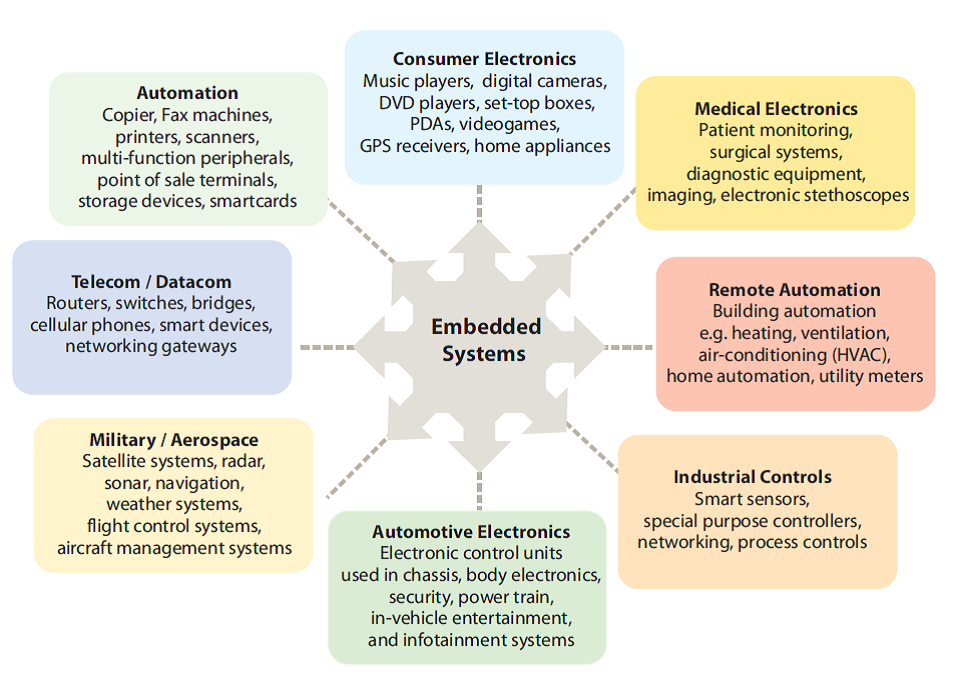
9What Real Companies Actually Use
Here’s why learning STM32 and ARM Cortex-M architecture is smart—it’s what the industry actually manufactures:
🚗 Automotive
- STM32H7 series (high performance)
- NXP S32 family
- Microchip PIC32
Example: In-car infotainment, ADAS systems
🌐 IoT & Smart Devices
- STM32L series (ultra-low power)
- Nordic nRF52 (Bluetooth)
- Espressif ESP32 (WiFi)
Example: Smart home, wearables, sensors
🏥 Medical Devices
- Microchip PIC32MX/MZ
- STM32F4/L4 series
- TI MSP432
Example: Glucose monitors, patient monitors
⚙️ Industrial Control
- STM32H7 series
- TI C2000 (real-time)
- NXP LPC55
Example: Motor drives, PLCs, robotics
Bottom line: ARM Cortex-M (used in STM32, NXP, TI, Microchip) powers millions of professional products—automotive, medical, industrial, IoT. Arduino exists commercially too (toys, hobbyist IoT gadgets), but if you’re pursuing an embedded career, learning ARM architecture prepares you for what real companies actually hire for. Learning STM32 specifically teaches you this architecture; the exact vendor matters less once you know the fundamentals.
10Common Fresher Mistakes (Don’t Make These)
❌ Mistake #1
Spending 6+ months on Arduino
Most Arduino tutorials plateau after 3–4 projects. To go deeper, you must read ATmega328P datasheets independently.
STM32’s ecosystem teaches this naturally—that’s why the timeline matters.
❌ Mistake #2
Skipping datasheets
“I’ll learn by tutorials” is fine at first, but professional jobs require reading 100-page datasheets.
Start early with datasheet practice.
❌ Mistake #3
Not using hardware debugging from Day 1
Hardcoding Serial.print() for debugging becomes a bad habit.
Use ST-LINK breakpoints from your first project.
❌ Mistake #4
Ignoring architecture
“How does the MCU start?” “Where is my code in memory?” “What’s an ISR vector?”
These aren’t optional—they’re fundamental.
11Quick Questions Answered
Q1: If I write 32-bit math on an 8-bit AVR, what happens?
The compiler breaks it into multiple 8-bit operations. It works, but it’s slower and heavier than native 32-bit math.
This is why architecture matters for real applications.
Q2: What’s the biggest difference between Arduino and STM32?
Debug workflow + system visibility. Breakpoints, register inspection, call stacks, fault analysis—
plus understanding MCU startup, linker scripts, and interrupt vectors. Arduino hides all of this.
Q3: Do I need FreeRTOS to get a job?
Entry-level (freshers): Not mandatory—most companies train you on RTOS after hiring.
Mid-level (3+ years, ₹8-12 LPA+): RTOS fundamentals are expected in interviews.
Strategy: Master it within your first 6 months of dedicated learning, or before applying for senior intern/mid-level positions. In India’s embedded job market, RTOS is increasingly common even at 6-8 LPA roles.
Q4: What should I explain in an interview after STM32 practice?
Interrupt flow, timer configuration, peripheral initialization, debugging techniques, and how your firmware
is structured (modules, layers, state machines). Not just “it works,” but “here’s why I architected it this way.”
12Final Takeaway
Arduino is an educational prototyping platform. Raayan Mini is an industrial training board.
When you can honestly say: “I built multi-peripheral firmware on STM32, debugged with ST-LINK,
read datasheets, and wrote drivers,” you’ve transitioned from prototyping-focused to systems-thinking.
That’s the inflection point most companies value.
Whether you choose Raayan Mini, Nucleo, or any other STM32 board—success depends on your dedication to learning architecture, not just writing code.
Ready to Start Your Professional Embedded Journey?
Master registers, debugging, multi-peripheral systems, and real-time concepts.
With dedicated focus (40+ hours/week), 10–12 weeks gets you interview-ready. For part-time learning, expect 4–6 months.








 Embedded Linux & Device Driver Online Demo Session | 4th April 2026 | 11AM IST