

Loading...
Hi, How Can We Help You?
  • +91 9949062828
  • Address: Hyderabad | Bengaluru
  • Email Address: info@kernelmasters.com

Author Archives: Kishore kumar boddu

September 10, 2026
Day 3 · Embedded Systems Awareness Course

From Classroom to Industry: How Engineering Subjects Are Used in Real Embedded Products

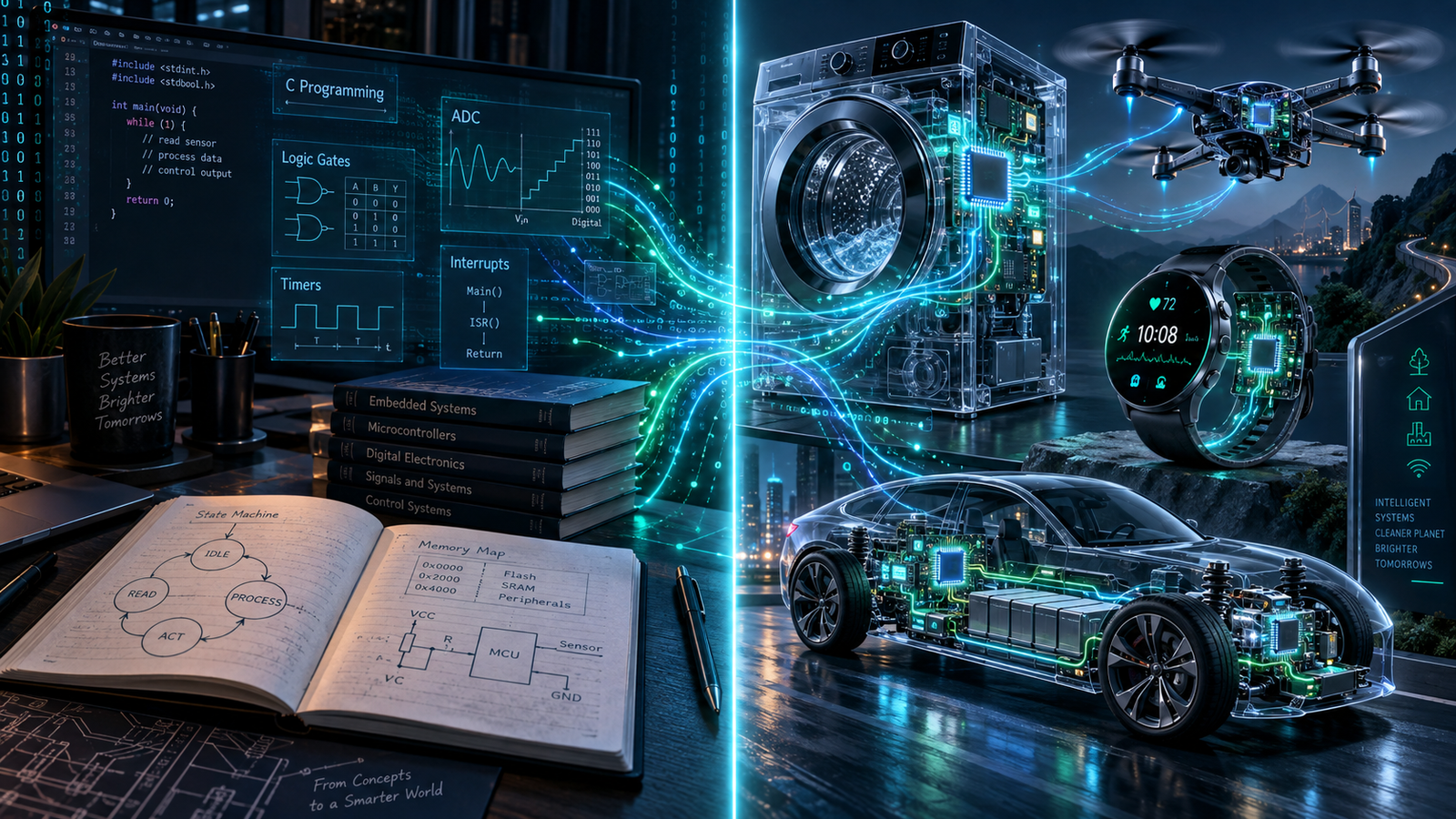
Many Electronics students study Digital Electronics, Microprocessors, Microcontrollers, C Programming, Signals and Systems, Communication Systems and Control Systems as separate subjects.

But industry does not use them separately. A real embedded product may combine concepts from all of them at the same time.

The objective of Day 3 is simple: understand where the subjects you already studied are actually used inside modern electronic products.
Classroom Concept→Microcontroller→Real Product→Industry Application

01 · Academic to Industrial

Are Engineering Subjects Really Useful?

Students sometimes ask: “Why did we study Multiplexers?” “Where will I use ADC?” “Why do we need Timers?” “Why should I learn Signals and Systems?” “Where are Flip-Flops used?”

The problem is usually not the subject. The missing piece is the connection between academic knowledge and industrial application.

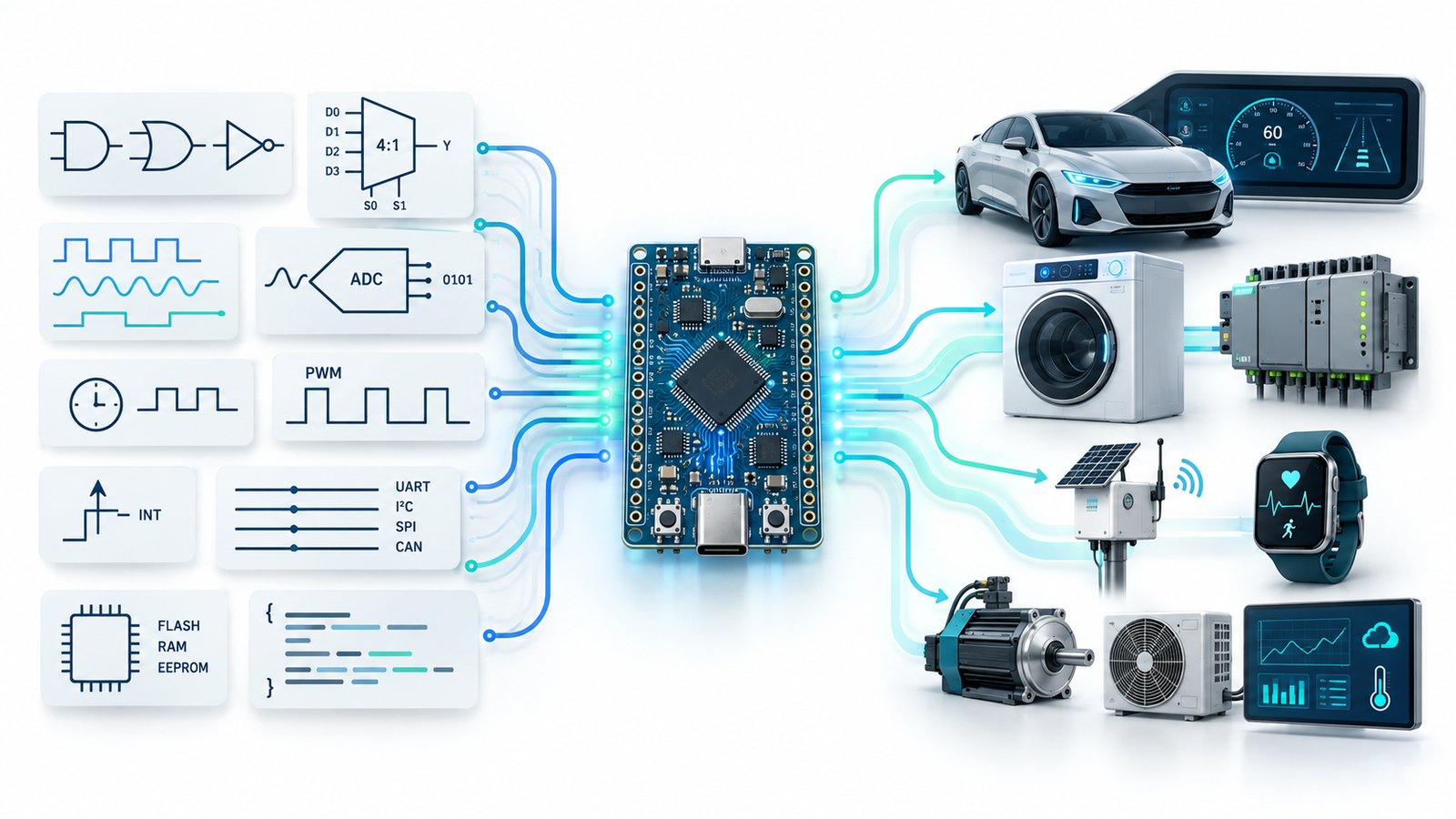
A modern embedded product may use Digital Electronics for logic and registers, microprocessor concepts for CPU and memory, C for firmware, Signals and Systems for sensor data, communication protocols for connecting devices, and Control Systems for motors and automation.

Do you know it?

Which statement is closest to reality?

A. Most engineering subjects are useful only for examinations
B. Industry uses completely different concepts
C. Industry combines many academic concepts inside products
D. Only C Programming matters in Embedded Systems
Correct answer: C. A real product is where your individual engineering subjects finally meet.
A better question is not “Is this subject useful?” Ask: “Where is this concept being used inside a real product?”

02 · Multiplexer to Pin Multiplexing

Can One Microcontroller Pin Perform Different Jobs?

Most Electronics students learn Multiplexers in Digital Electronics. A multiplexer can be thought of as multiple inputs → selection → one output.

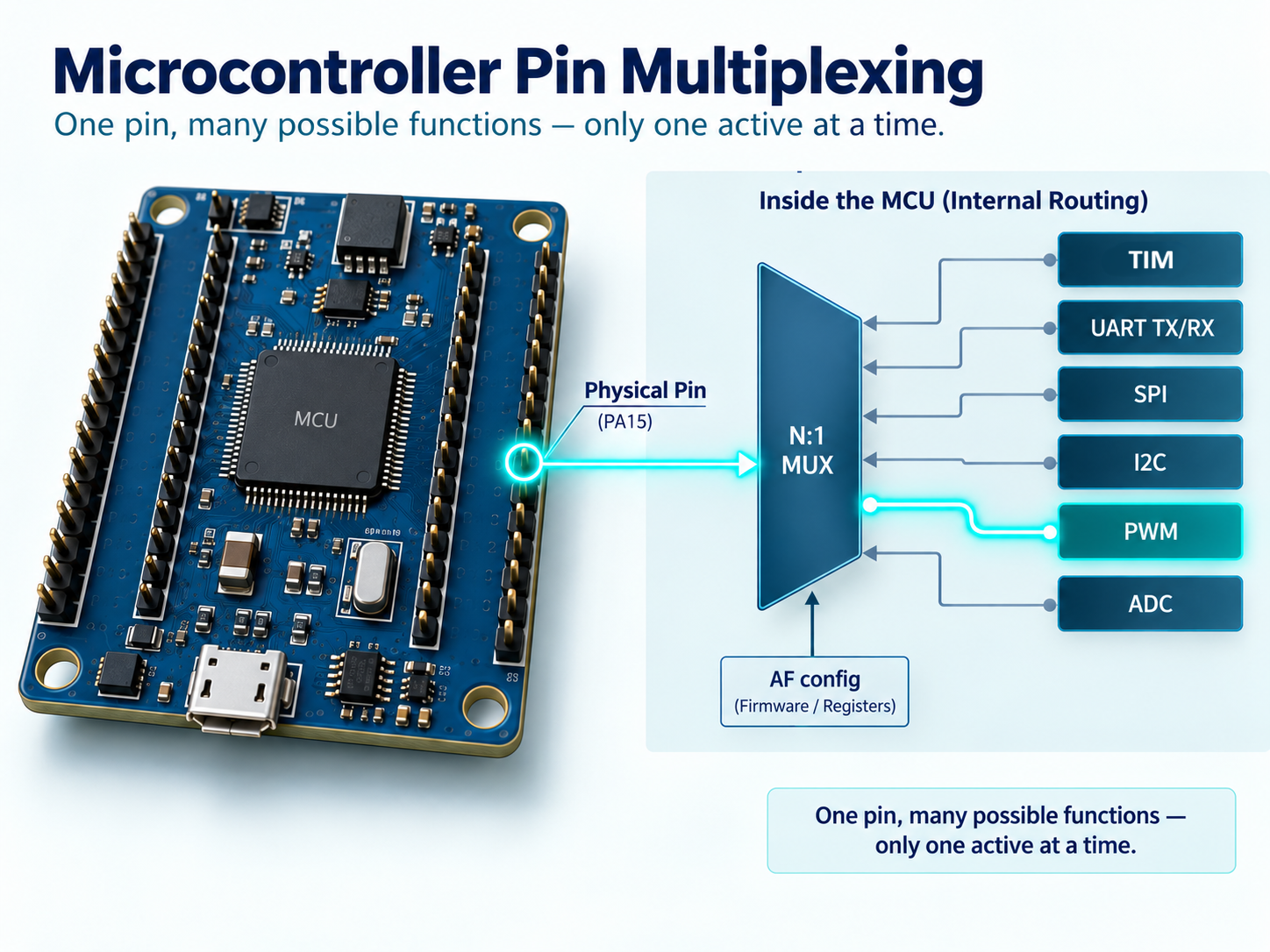
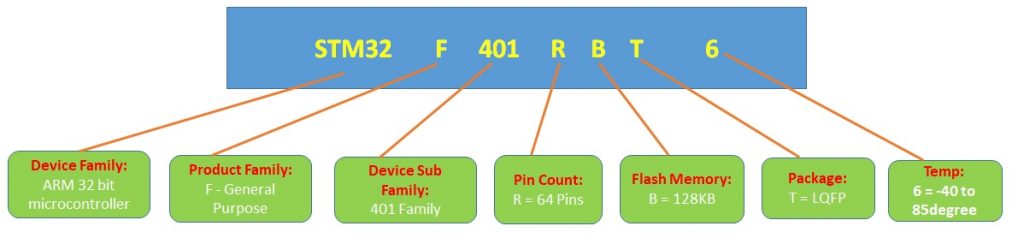
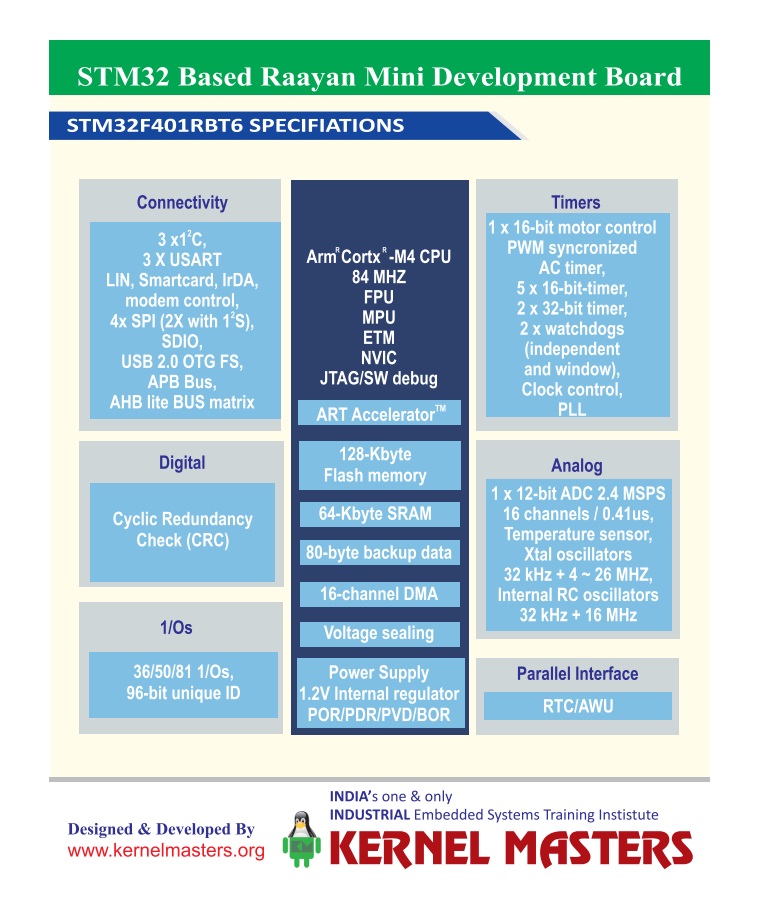
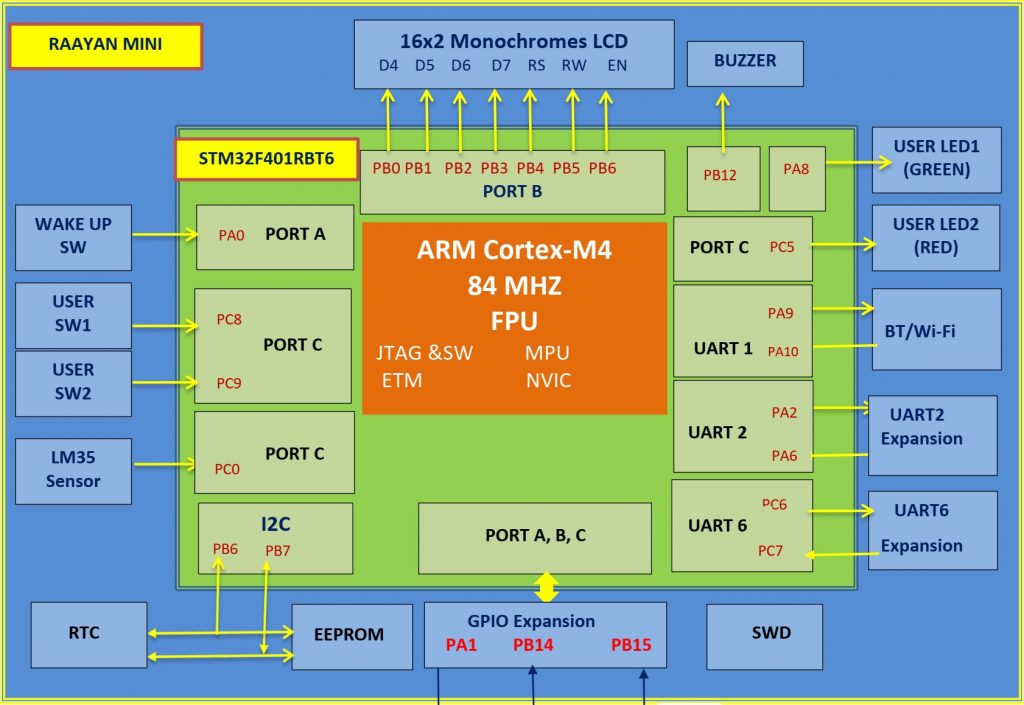
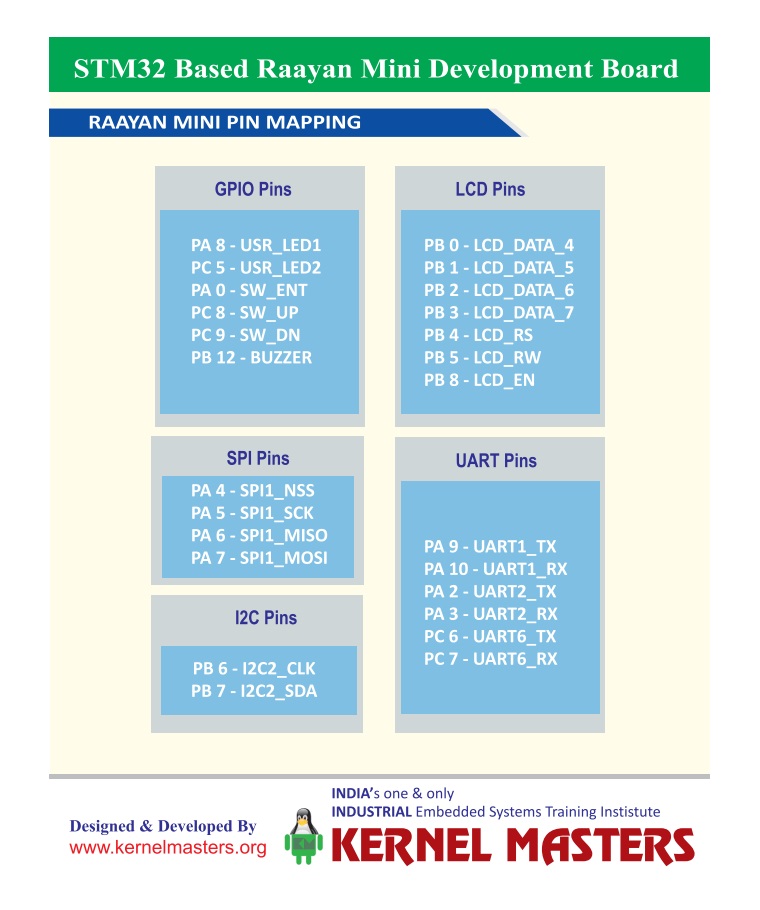
Now consider a modern microcontroller such as the STM32F401RBT6 Cortex-M4 used on the Kernel Masters Raayan Mini platform. The microcontroller contains GPIO, UART, I²C, SPI, timers, ADC and other functions, but the physical IC package has a limited number of pins.

Providing a separate external pin for every possible internal peripheral signal would make the device much larger and more expensive. Instead, microcontrollers use pin multiplexing.

GPIODigital I/O
→
UART / SPIAlternate functions
→
Timer / ADCPeripheral signals
→
Pin-Mux LogicSelection
→
Physical PinExternal connection

Do you know it?

Can one physical microcontroller pin support multiple possible functions?

A. No, one pin can perform only one job
B. Yes, depending on internal configuration
C. Only if external hardware is added
D. Only in high-end processors
Correct answer: B. This is one practical application of the Multiplexer concept you studied in Digital Electronics.
Important correction: Multiple possible functions do not mean multiple simultaneous functions. A pin may support UART TX and SPI clock, but under normal configuration, one function is selected for that pin at a given time.

Why pin planning matters

Which MCU pin is physically connected on the board?
Which alternate functions does that pin support?
Is another peripheral already using the same pin?
Does the board schematic match the intended peripheral?

This is why embedded engineers work with both datasheets and schematics, not just C code.

Microcontroller pin multiplexing showing one physical pin supporting multiple possible functions

03 · Signals to Action

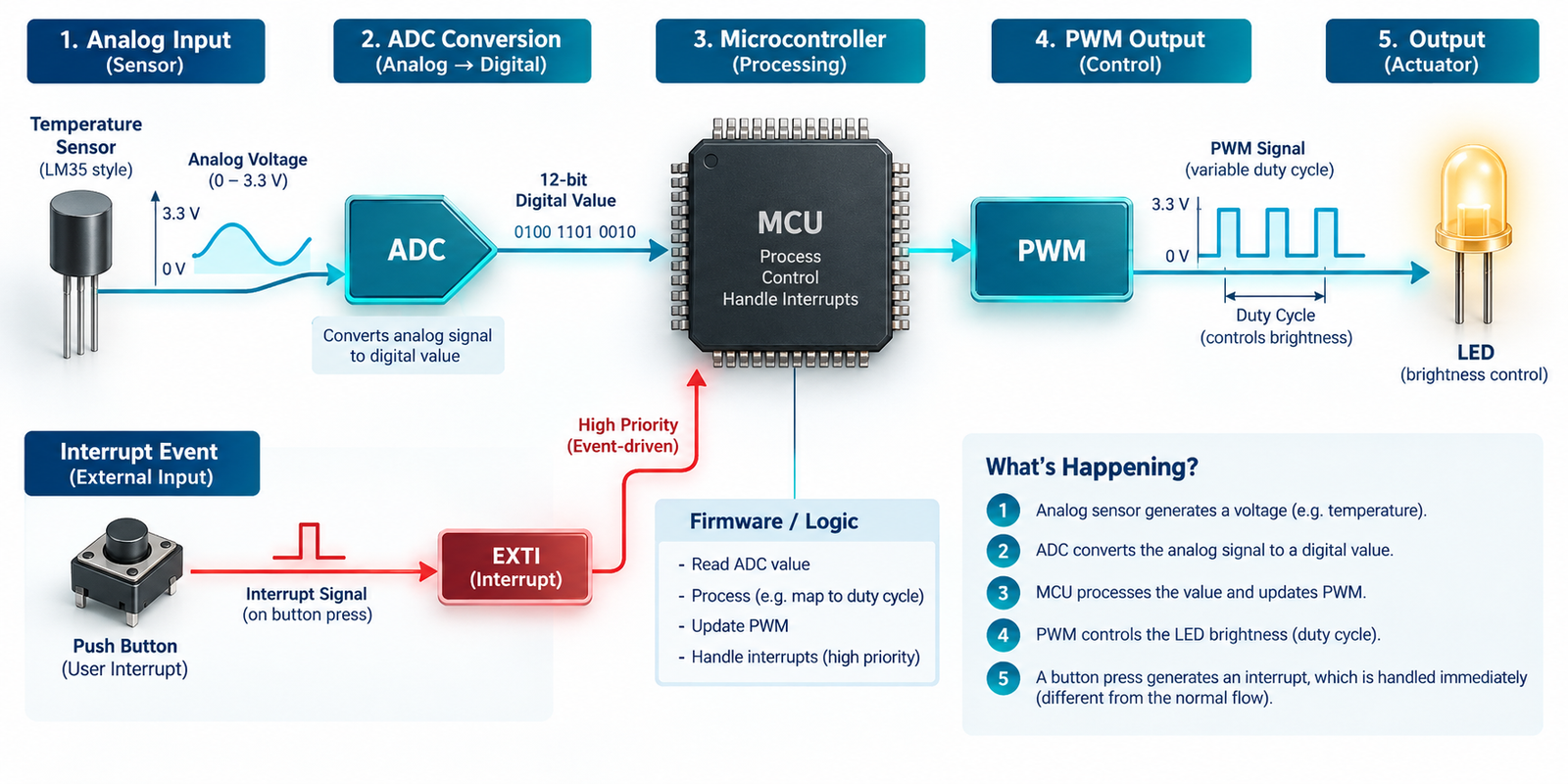
ADC, Timers and PWM: Connecting the Physical World to Software

A microcontroller works with digital information. But the real world contains analog quantities such as temperature, pressure, light, battery voltage, current, sound and vibration.

ADC: Analog quantity to digital number

Suppose a temperature sensor produces an analog voltage. The CPU does not directly understand “this voltage means 32°C.” The ADC converts the analog signal into a digital code, and firmware interprets that code as an engineering value.

TemperaturePhysical world
→
SensorAnalog voltage
→
ADCDigital code
→
FirmwareCalculation
→
TemperatureValue in °C

Do you know it?

How many possible digital codes can a 12-bit ADC represent?

A. 12
B. 256
C. 1024
D. 4096
Correct answer: D. A 12-bit ADC can represent 2¹² = 4096 codes, usually from 0 to 4095.

Timers

A hardware timer counts clock events and generates accurate timing events. Timers are used for periodic execution, timeouts, frequency measurement, input capture, output compare, PWM generation and RTOS timing.

Concept note: Timers allow accurate timing without forcing the CPU to waste all its time in software delay loops.

PWM

Pulse Width Modulation rapidly switches an output ON and OFF. The percentage of each cycle for which the signal remains ON is called duty cycle.

Example: For an LED driven appropriately by PWM, increasing duty cycle generally increases perceived brightness.

04 · Event Response

Interrupts: When Something Important Happens

Imagine a processor monitoring an emergency-stop button. One method is to repeatedly check: “Pressed?” “Pressed?” “Pressed?” This is called polling.

Another approach is to let the processor continue useful work. When the event occurs, the hardware informs the processor: “Something important happened!” This mechanism is called an interrupt.

The CPU temporarily handles the event and then returns to its previous work.

Do you know it?

Which mechanism is often suitable when the processor must respond quickly to an unexpected event?

A. Ignore the event
B. Interrupt
C. Only software delay
D. ADC
Correct answer: B. An interrupt tells the CPU: “Something happened that needs your attention.”
Interrupts can be generated by emergency inputs, UART data reception, timer expiry, ADC conversion completion and hardware faults. But interrupts are not automatically better than polling in every situation. The right choice depends on timing requirements, complexity and system design.
05 · Devices Talking to Devices

Communication Protocols: How Devices Talk to Each Other

A microcontroller rarely works alone. It may communicate with sensors, memories, displays, wireless modules, other microcontrollers, automotive ECUs and industrial controllers.

ProtocolCommon applicationsBeginner idea
UARTDebug console, GPS, Bluetooth/Wi-Fi modules and simple serial devices.Simple serial communication between devices.
I²CRTC, EEPROM, accelerometers, temperature sensors and low-speed peripherals.Multiple devices can share SDA and SCL lines using addresses.
SPITFT displays, external Flash memories, SD cards, ADCs and high-speed sensors.Useful for relatively fast peripheral communication.
CANAutomotive ECUs and industrial control systems.Reliable communication between controllers in demanding systems.

CAN inside vehicles

Modern automobiles contain many Electronic Control Units such as engine ECU, ABS, airbag controller and dashboard. These controllers need a reliable communication mechanism. CAN is one of the most important protocols used in automotive embedded systems.

Engine ECU ABS Airbag Controller Dashboard CAN Network

06 · Digital Electronics Inside Products

Memory, Logic Gates and Registers

Computer Organization and Digital Electronics become more interesting when students understand where those ideas appear inside embedded products.

Flash Memory

Typically stores program code, constants and non-volatile information. Flash retains its contents when power is removed.

RAM

Typically stores runtime variables, stack, buffers and temporary data. RAM normally loses its contents when power is removed.

Registers

Registers store processor or peripheral state and provide fast access to control information.

C Variables

Your variables eventually occupy real memory locations. This connects C programming to processor memory.

Logic gates: not just truth tables

Consider an industrial machine. It should run only when the door is closed, the start button is pressed and emergency stop is not active.

RUN = Door_OK AND Start AND NOT Emergency

The same AND, OR and NOT concepts studied in Digital Electronics appear in real safety and control logic.

Flip-Flops → Registers → Processor

Flip-FlopStores one bit
→
RegisterStores state
→
CPU / PeripheralControl information
→
Embedded CFirmware access
Digital Electronics → Processor Architecture → Firmware

07 · Signals to Intelligence

Signals, Control Systems and Embedded AI

Embedded AI does not begin with AI. It begins with the physical world. A vibration sensor on an industrial machine collects raw signals that may contain noise, useful frequencies, transient events and mechanical signatures.

Signal processing may be used to clean, filter or extract useful information before an intelligent decision is made.

Vibration SensorPhysical signal
→
Raw SignalNoisy data
→
Signal ProcessingUseful features
→
AI ModelDecision support
→
Normal / AbnormalEdge decision
Important idea: Before an Edge AI model can make a meaningful decision using sensor information, it needs meaningful sensor data. This is why sensing, Electronics, Signals and Embedded Software remain important even in the AI era.

This is an example of Edge AI, where intelligence operates closer to the device instead of depending entirely on a remote cloud.

08 · Complete Mapping

Academic Concept → Industrial Application

Here is the complete connection. This is the section students should revisit whenever they feel their classroom subjects are disconnected from real products.

Academic concept Industrial application
Logic Gates Safety logic and control decisions.
Multiplexer MCU pin and peripheral-function selection.
Flip-Flops Registers and state storage.
ADC Analog sensor acquisition.
Timers Precise timing.
PWM Motor, fan and LED control.
Interrupts Event-driven response.
UART / I²C / SPI / CAN Debugging, sensors, displays, memories, automotive and industrial communication.
RAM / Flash Runtime data and firmware storage.
Signals Sensor processing.
Control Systems Motors, robotics and automation.
AI Intelligent local decision-making where applicable.

09 · Challenge

Mini Challenge: Smart Industrial Temperature Controller

Imagine an industrial system that must measure temperature, display the value, control a cooling fan, sound an alarm if temperature becomes dangerous and send status information to another controller.

Requirement Embedded concept
Temperature measurement Sensor + ADC
Decision making STM32 + Firmware
Display SPI or I²C depending on the display
Fan speed Timer + PWM
Critical alarm Firmware + output control
Communication UART / CAN / another suitable interface
Look carefully. One small embedded product already combines multiple academic subjects. This is how industry works.

Day 3 Summary

Day 3 Key Takeaways

The most important lesson from Day 3 is that your engineering subjects are not isolated academic chapters.

Multiplexer appears in MCU pin selection.
ADC converts physical-world signals into digital information.
Timers create accurate timing.
PWM controls motors, fans and LEDs.
Interrupts respond to real events.
Communication protocols connect devices.
Memory stores code and runtime data.
Signals become the starting point for Edge AI systems.
The Product Is Where Your Engineering Subjects Meet.

Day 3 Assignment: Classroom-to-Industry Challenge

Choose one engineering subject such as Digital Electronics, Microprocessors, Signals and Systems, Control Systems, Communication Systems, Electronic Devices or C Programming.

Identify three concepts from that subject and, for each concept, find one real industrial application. Try to explain your answer in 60 seconds.

Example: Digital Electronics

Multiplexer → MCU pin multiplexing

Logic Gates → Industrial safety logic

Flip-Flops → Processor registers

Final Thought

Your engineering subjects were never completely separate. The separation existed mainly in your academic timetable.

Inside a real embedded product, Digital Electronics meets C, sensors meet ADC, timers meet motors, communication meets devices, and signals meet AI.

And the Embedded Engineer connects all of them.

Learn → Implement → Debug → Demonstrate
Kernel Masters
September 9, 2026

Day 2 · Embedded Systems Awareness Course

From Sensor to Processor to Firmware to Action

Embedded Systems are everywhere around us — in smartphones, washing machines, smartwatches, cars, Wi-Fi routers, medical equipment, industrial machines and even simple remote controls.

In Day 1, we discovered where Embedded Systems are used. Today, we go one step deeper and ask: what actually happens inside an embedded product?

By the end of this article, you should be able to look at a product and identify its input, processor, firmware role, decision logic, output and communication path.
Sensor / Input→Processor→Firmware→Decision→Action

01 · Button to Action

What Happens When You Press a Button?

Let us start with a simple example. Imagine pressing a button on an electronic product. A common assumption is that the button directly controls the LED, motor or buzzer.

But in most modern embedded products, that is not how it works. The button creates an input. The microcontroller reads that input. The firmware decides what action the product should perform.

ButtonUser input
→
GPIO InputPin state
→
MicrocontrollerReads input
→
FirmwareMakes decision
→
OutputLED / buzzer / motor

Do you know it?

When you press a button on an embedded product, what part of the system decides what happens next?

A. Button
B. Sensor
C. Microcontroller / Processor
D. LED
Correct answer: C. The processor executes the instructions written in firmware and decides how the product should respond.
Hardware detects the event. Firmware decides the behaviour.

02 · Real Product Example

Inside a Washing Machine

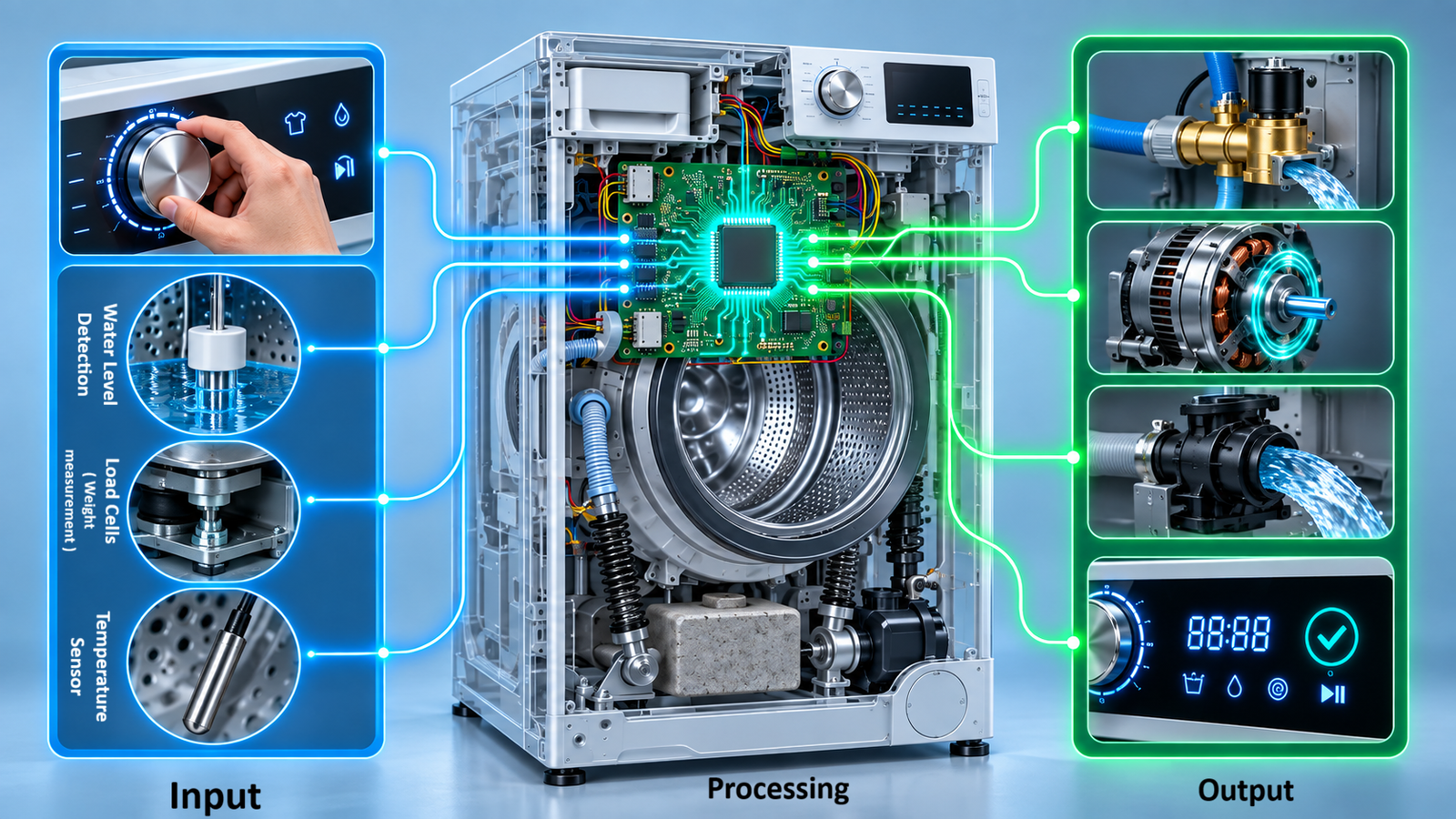
A washing machine is a very good embedded-system example because almost everyone understands the product from the outside. But internally, many decisions happen after you press the START button.

Inputs the machine may read

  • Start button
  • Door sensor
  • Water-level sensor
  • Temperature sensor
  • Load sensor

Outputs it may control

  • Motor
  • Water inlet valve
  • Heater
  • Display
  • Buzzer and drain pump

The firmware checks questions such as: Is the door closed? Is enough water available? Which wash mode was selected? How long should the motor rotate? When should the direction change?

Based on these decisions, the product controls motors, valves, pumps, display and alerts. So a washing machine is not simply electrical hardware. It is a combination of sensors, electronics, processor, firmware and outputs.

Important idea: A sensor provides information. It normally does not make the overall product decision by itself. Firmware reads that information and decides the next action.

03 · System Layers

Hardware, Firmware, Operating System and Application

Students often hear these terms, but they may not clearly understand the difference. Let us simplify them.

Layer Meaning Examples
Hardware The physical electronic system that provides capability. Microcontroller, processor, memory, sensors, display, motor, communication ICs and power electronics.
Firmware Low-level software that controls the hardware and defines product behaviour. Sensor reading, motor control, alarm logic, communication handling and peripheral configuration.
Operating System Used when the product becomes complex and needs task, memory, driver and resource management. FreeRTOS, other RTOS platforms, Embedded Linux and Android.
Application The user-facing functionality built above lower software layers. Smartphone apps, dashboards, screens, settings and product features.

Example: Android stack

ApplicationUser feature
→
Android FrameworkSoftware services
→
Linux KernelLow-level foundation
→
HardwareDevice resources

Android uses the Linux kernel as its low-level operating-system foundation. The Linux kernel handles important functions such as memory management, process management, device drivers, hardware access and networking.

This is one reason why Linux is an important skill in the embedded industry. It can lead toward careers in Embedded Linux, Linux Device Drivers, Android platform development, BSP development, semiconductor software and system software.

04 · Universal Flow

The Universal Embedded System Flow

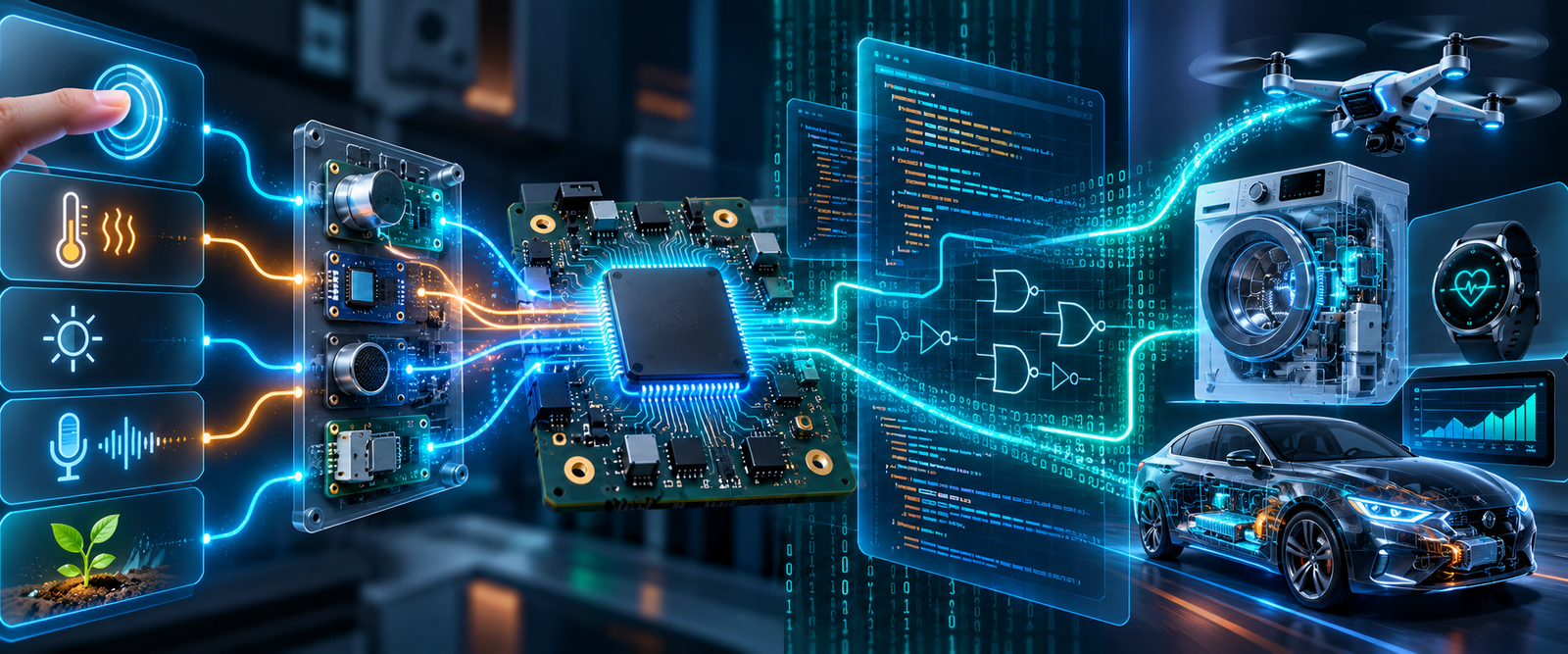
Almost every embedded system can be understood through one simple flow. Something happens in the physical world, the product senses it, the processor receives information, firmware makes a decision, and the product creates an output or communication response.

Physical WorldTemperature, motion, button, obstacle
→
Sensor / InputElectrical information
→
InterfaceGPIO, ADC, UART, I²C, SPI, CAN
→
ProcessorReads and executes
→
Firmware ActionDecision, output, communication
What is an interface? It is the connection method through which the processor reads or communicates with another part of the system. It may be GPIO, ADC, UART, I²C, SPI, CAN or another hardware interface.

Analog and digital inputs

Some inputs are already digital, like a button. Some inputs are analog, like a sensor voltage. Analog inputs usually need an ADC before firmware can process them.

Do you know it?

A temperature sensor gives an analog voltage. Can the microcontroller directly understand that voltage as temperature?

A. Yes
B. No
C. Only through Wi-Fi
D. Only through UART
Correct answer: B. The microcontroller first needs ADC — Analog-to-Digital Converter — to convert the analog signal into digital data. Firmware then converts the ADC value into a useful engineering value such as degrees Celsius.

Examples of the same flow

Product Input Processing / Decision Output / Communication
Temperature monitor Temperature sensor and ADC value STM32 firmware calculates temperature Display, fan or alarm
Car parking sensor Ultrasonic sensor detects obstacle distance Firmware calculates distance and warning level Buzzer frequency changes
Smartwatch Accelerometer detects body movement Processor runs signal processing and step-count algorithm Display update or Bluetooth communication
Smart weather monitor Temperature and humidity sensors Firmware processes data and checks abnormal conditions Display, Wi-Fi/cloud update or buzzer alert

05 · Firmware and Debugging

Real Hardware Makes the Difference

Embedded systems cannot be understood only through presentation slides. Real learning starts when software interacts with actual hardware.

For example, using the Kernel Masters Raayan Mini STM32 platform, students can observe a simple system:

ButtonExternal event
→
STM32 GPIOInput read
→
FirmwareDecision
→
LED / BuzzerVisible output

Same hardware. Different firmware. Different behaviour.

Version 1: Button → LED ON
Version 2: Button → Buzzer ON
Version 3: Button → Change system mode

The hardware remains almost the same. The product behaviour changes because the firmware changes. This is one of the most powerful characteristics of embedded software.

What does an embedded software engineer actually do?

Many students assume, “Embedded Engineer means C programmer.” C programming is extremely important, but embedded engineering involves much more than writing code.

Requirement→Hardware→Datasheet→Firmware→Flash→Test→Debug→Validate

An embedded software or firmware engineer may read circuit schematics, study processor datasheets, configure peripherals, write Embedded C, develop drivers, interface sensors, implement communication, test hardware, debug failures, integrate modules, use Git/version control and coordinate with hardware and testing teams.

Build successful does not mean product successful.

A program may compile successfully but still fail on hardware. Possible reasons include wrong GPIO pin, incorrect clock configuration, wrong peripheral configuration, wiring problem, timing issue, protocol failure, power-supply issue, logic error or memory problem.

A strong embedded engineer must know how to find the root cause when something does not work.

Two small academic connections

Processor evolution

The Intel 4004, introduced in 1971, is widely recognized as an early commercially available single-chip microprocessor. From early processors, the industry evolved toward modern microcontrollers such as STM32 that integrate CPU, RAM, Flash, timers, ADC, UART, SPI, I²C, CAN and interrupt controllers in one device.

Digital electronics inside processors

Binary subtraction can be implemented using addition through two’s-complement arithmetic. This connects classroom concepts such as binary numbers, adders and complements to processor architecture.

06 · Interfaces and Careers

How Does the Processor Communicate With Other Devices?

A microcontroller usually does not work alone. It may communicate with sensors, memories, displays, other processors, communication modules, automotive controllers and industrial devices.

Protocol Common use Typical examples
UART Simple serial communication Debug console, GPS, Bluetooth module, Wi-Fi modem and serial devices
I²C Multiple low-speed devices using fewer communication lines EEPROM, RTC, accelerometer, temperature sensors and low-speed peripherals
SPI Relatively fast peripheral communication TFT displays, Flash memory, ADCs, SD cards and sensors
CAN Reliable communication between controllers Automotive systems, industrial control and multi-controller systems

Do you know it?

Which communication protocol is strongly associated with communication between Electronic Control Units in automobiles?

A. UART
B. HDMI
C. CAN
D. USB only
Correct answer: C. A vehicle may contain many ECUs, such as engine ECU, ABS ECU, airbag ECU and dashboard controller. These units can communicate over a CAN network.

One embedded product can involve many career roles

A single smart product may involve different engineers. This helps students understand that embedded systems is not one narrow job title; it is a complete engineering ecosystem.

Role Works on
Hardware Engineer Circuit design, power, interfaces and board design
Firmware Engineer Microcontroller, peripherals, drivers and low-level Embedded C
Embedded Software Engineer Product logic, system integration and software architecture
RTOS Engineer Tasks, scheduling, synchronization and timing
Embedded Linux Engineer Linux platform, system software, BSP and Linux configuration
Linux Device Driver Engineer The interface between operating system and hardware
IoT Engineer Connectivity, MQTT, gateways and cloud communication
Embedded AI Engineer Intelligent decision-making closer to the device, where applicable
07 · Takeaways and Next Step

Five Important Takeaways From Day 2

Embedded products follow a basic flow: Input → Processing → Decision → Output.
Firmware gives hardware its behaviour.
Embedded engineering is more than programming.
UART, I²C, SPI and CAN allow processors to communicate with other devices.
Engineering subjects such as Digital Electronics, ADC, Microprocessors, Signals, Communication and C Programming are used inside real products.

Day 2 observation task

Choose any one product: smartwatch, washing machine, car, drone, smart AC or medical device.

Try to identify the product using these checkpoints:

Input Processor Firmware role Decision Output Communication

Explain the product using this simple format:

Input → Processor → Firmware → Decision → Output

Final Thought

An Embedded Engineer understands what the hardware can do, how software controls it, how devices communicate and how to debug when things go wrong.

Learn→ Implement→ Debug→ Demonstrate
September 8, 2026

Day 1 · Discover the Embedded World

The Technology Hidden Around You

You may be studying Digital Electronics, Microprocessors, Microcontrollers, C Programming, Signals, Communication Systems and Electronic Devices as part of your engineering degree.

But have you ever stopped to ask: Where are these subjects actually used in industry?

When you look at a car, smartwatch, washing machine, drone, medical device or industrial machine, you see a finished product. An Embedded Engineer sees something different.

Sensors→Electronics→Processor→Firmware→Decision→Output

Before We Begin

How Many Computers Have You Used Today?

Think before checking the answer.

You may immediately think: Smartphone + Laptop = 2.

But what about your smartwatch, Wi-Fi router, television, washing machine, car, air conditioner or Bluetooth earbuds?

Many computers around us do not look like computers. They are hidden inside products and designed to perform specific functions.

Simple Definition

What Is an Embedded System?

An Embedded System is a computing system designed to perform a specific function as part of a larger product or system.

InputSensors, buttons, switches
→
ProcessingMCU / processor + firmware
→
OutputDisplay, LED, buzzer, motor

For connected products, communication interfaces such as Wi-Fi, Bluetooth, UART, CAN or Ethernet may also be part of the system.

Embedded system concept showing input processing output and communication

Everyday Examples

Embedded Systems Are Already Around You

When students understand this, everyday products start looking different. A washing machine, smartwatch, automobile or medical device is not just hardware. It is electronics and software working together.

Washing Machine

Buttons and sensors provide input. The controller runs firmware to manage water flow, motor control, timing, display and buzzer output.

Smartwatch

Motion sensors, optical sensors, touch input, processor, display, Bluetooth and battery electronics work together continuously.

Automobile

Modern vehicles use electronic controllers for powertrain, braking, airbags, body electronics, infotainment, EV battery systems and driver-assistance functions.

Medical Device

A patient monitor converts physical signals through sensors, electronics, ADC, processor software, display, alarms and communication.

Beginner insight: Even a computer keyboard contains an embedded controller. It scans keys, handles debouncing, converts key presses into data and communicates through USB, Bluetooth or another interface.

Hardware + Firmware

Hardware Alone Does Not Make a Smart Product

Suppose we have a simple setup: Button + STM32 Microcontroller + LED.

The hardware remains exactly the same, but firmware can change the product behaviour.

Firmware Version 1

Press button → Turn LED ON

Firmware Version 2

Single press → LED ON
Double press → LED blink
Long press → LED OFF

Hardware provides capability. Firmware defines behaviour.

What is the “brain” of an embedded product?

People commonly call the microcontroller or processor the “brain”. That is useful as a beginner analogy, but a processor alone cannot create the complete product.

SensorsPhysical input
→
Processor / MCUDecision-making hardware
→
FirmwareDefines behaviour

The magic comes from sensors, electronics, processor, firmware, output devices and communication working together.

Academic → Industry

Why Did We Study Digital Electronics and Microcontrollers?

This is a question many students ask during engineering. The answer becomes clear when you connect academic concepts to real systems.

Academic Concept Where It Appears in Real Systems
Logic Gates Control logic and digital systems
Flip-Flops / Registers State storage, processor registers and peripheral configuration
Multiplexers Signal selection, peripheral routing and pin alternate functions
ADC Analog sensor acquisition
Timers / PWM Periodic operations, motor control, LED brightness and power control
Interrupts Immediate response to external or internal events
UART / I²C / SPI / CAN Debugging, sensors, displays, memory, automotive and industrial communication

A few “Do You Know It?” connections

Android and Linux

Android’s software stack is built on a modified Linux kernel. This creates a direct career connection to Embedded Linux.

Intel 4004

The Intel 4004, introduced in 1971, is widely recognized as the first commercially available microprocessor.

Binary Subtraction

In fixed-width binary arithmetic, subtraction can be implemented using addition and two’s complement. Digital logic concepts are connected to processor design.

Pin Multiplexing

A physical MCU pin may support GPIO, UART, SPI, I²C, timer or ADC functions depending on the device and pin configuration.

During Kernel Masters awareness sessions, these ideas are demonstrated using the Raayan Mini development board based on the STM32F401RBT6 ARM Cortex-M4 microcontroller.

Industry Readiness

What Does an Embedded Software Engineer Actually Do?

Many beginners assume: “Embedded Engineer means someone who writes C programs.” Writing code is important, but it is only one part of the job.

Understand requirementsStudy hardwareRead datasheetsDesign softwareConfigure peripheralsWrite Embedded CCompileFlash firmwareTestDebugIntegrateValidate

This is why Embedded Engineering requires more than programming knowledge. You need to understand the relationship between hardware and software.

Electronics Graduate vs Software Programmer vs Embedded Engineer

An electronics student already has an important advantage: you are studying the hardware foundation. The next step is learning how to apply that knowledge through software and practical implementation.

Profile Main Focus
Electronics Graduate Academic foundation in electronics and engineering
Software Programmer Software logic and application development
Embedded Hardware Engineer Electronic circuits, PCB and hardware design
Embedded Software Engineer Software interacting directly with hardware
Firmware Engineer Low-level software controlling a device or system
Note: In industry, these titles may overlap depending on the company, product and team structure.

Knowing is not the same as implementing

You may know what an ADC is academically. But can you connect a temperature sensor to a microcontroller, configure the ADC, acquire the voltage, convert it into temperature and make a decision based on that value?

That is the transition from knowing → implementing.

“Build Successful” Does Not Mean Product Successful

Your program may compile perfectly. You flash the program. But the LED does not turn on. Possible reasons include wrong pin selection, incorrect hardware connection, peripheral clock not configured, wrong register settings, hardware fault, logic error or timing issue.

A good Embedded Engineer is not someone whose code never fails. A good Embedded Engineer knows how to systematically find out why it failed.

Does Every Embedded System Need an Operating System?

No. The right software platform depends on product complexity, timing needs, hardware resources and system requirements.

Bare-Metal Firmware

A simple microcontroller application can run directly without an operating system.

RTOS

As timing and task complexity increases, engineers may use an RTOS such as FreeRTOS.

Embedded Linux

For more complex connected products, Linux may be suitable because it supports rich drivers, networking and system software.

Connected / AI Systems

Depending on the application, engineers may also work on IoT, gateways, edge processing or Embedded AI workflows.

Can a Software Bug Affect the Physical World?

Yes. This is one major difference between Embedded Software and many ordinary software applications.

Embedded firmware may control motors, relays, power systems, sensors, batteries, industrial equipment, automotive functions or medical systems. A software problem can therefore affect the behaviour of a physical product.

That is why embedded industries give serious importance to testing, debugging, validation, reliability and, where applicable, functional safety.

Career directions in Embedded Systems

Embedded Systems opens multiple career directions. In industry, job titles may overlap depending on the company and product, but students commonly see roles such as:

Embedded Firmware EngineerRTOS / Firmware EngineerAutomotive Embedded EngineerSemiconductor Firmware EngineerEmbedded Linux EngineerLinux Device Driver EngineerIoT EngineerEmbedded AI / Edge AI Engineer

Beginner roadmap: Electronics Fundamentals → C Programming → Embedded C → ARM / STM32 → GPIO, ADC, Timers, Interrupts → UART, I²C, SPI, CAN → RTOS → Embedded Linux → IoT → Embedded AI / Edge AI

Depending on the product and career direction, an embedded engineer may work with microcontroller firmware, RTOS, Embedded Linux, connected systems, IoT or Embedded AI.

At every stage: Learn → Implement → Debug → Demonstrate.

Today’s Challenge

Look Around Your Home and Identify Five Embedded Products

For each product, try to identify the system flow before Day 2.

Input: What information enters the system?
Processing: What could be making the decisions?
Output: What action does the product perform?
Communication: Does it communicate with another device?
Example — Smart Washing Machine: Input: buttons and sensors. Processing: microcontroller and firmware. Output: motor, pump and display. Communication: Wi-Fi, if supported.

What Comes Next?

Today we discovered where Embedded Systems exist. But the next question is more interesting: what is actually happening inside an embedded product?

How does a sensor communicate with the processor? What does firmware actually do? How does software control hardware? Why do we need UART, I²C, SPI or CAN?

Day 2 — Inside an Embedded Product: Sensor → Processor → Firmware → Decision → Action

Final Thought

Your engineering degree gives you the foundation. Becoming industry-ready requires you to connect academic knowledge with real hardware, software, debugging and product development.

Prepare to become an Engineer who can understand, build, debug and explain a real system.

Kernel Masters
Industrial Embedded AI & IoT Software Developer Program
Learn → Implement → Debug → Demonstrate

July 25, 2026
THE QUESTION BEHIND THIS ARTICLE

Will AI Replace Linux Device Driver Engineers?

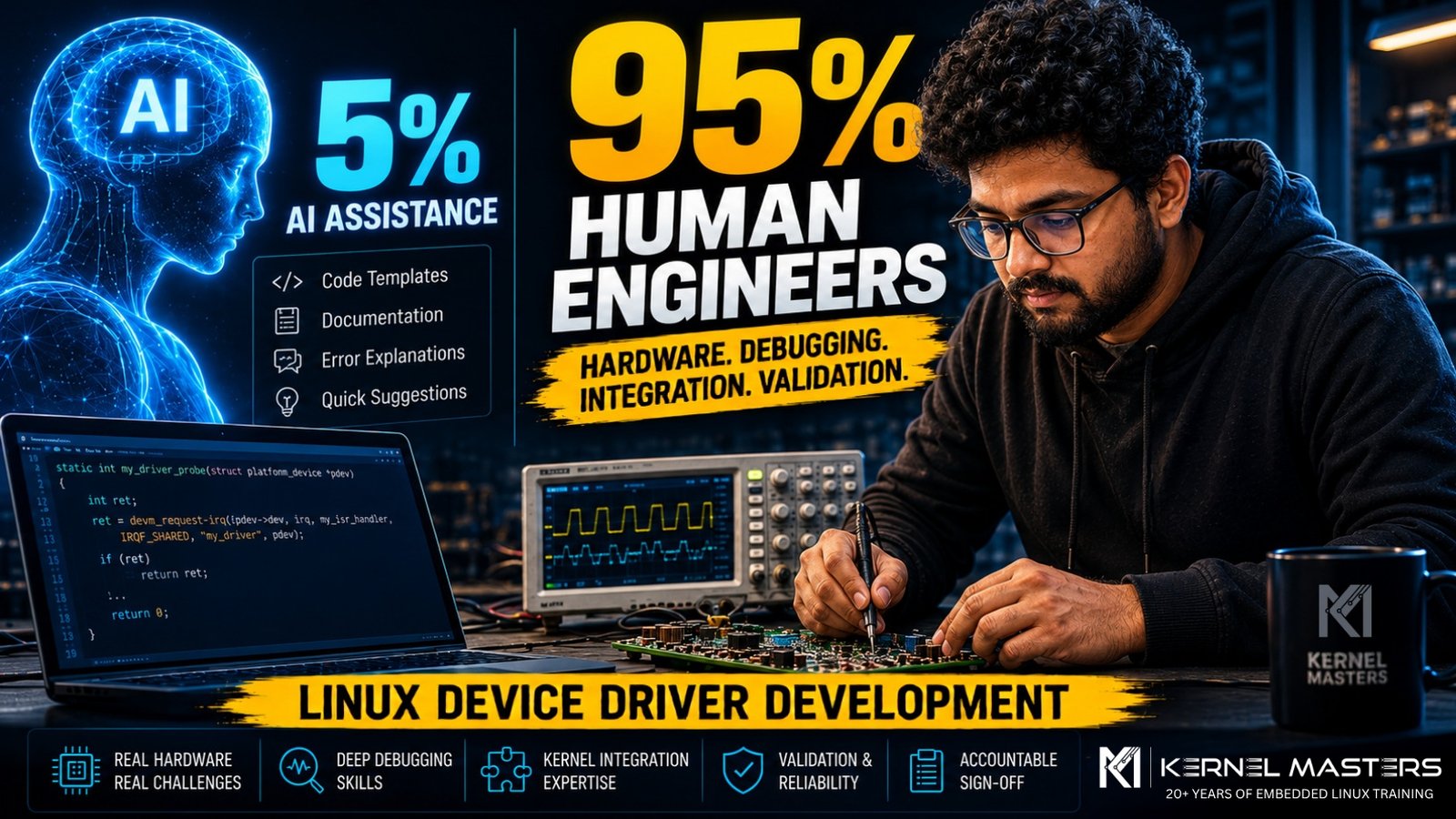
AI can generate code snippets, explain kernel errors and create basic driver templates. But making a driver work reliably on real hardware is still an engineering responsibility.

The short answer: No. AI can assist the engineer, but it cannot independently own hardware bring-up, debugging, integration and production validation.
AI Assistance≈5%Boilerplate, templates and explanations
Engineer Responsibility≈95%Hardware, debugging, integration and validation

Kernel Masters practical estimate based on training and hardware-development experience.

Short Answer: No.

AI is a powerful assistant, but Linux device driver development is not only about producing C code. The difficult work is understanding the hardware, integrating it with the kernel, measuring what is happening on a board, finding timing and memory problems, and validating the final system.

Artificial Intelligence is transforming many areas of software development. Today, AI tools can generate code snippets, explain kernel errors, and even create basic Linux driver templates within seconds.

This has led many students and professionals to ask an important question: “Will AI replace Linux Device Driver Engineers?”

The short answer is: No.

AI can help with a small portion of the work, but the majority of real-world Linux Device Driver development still depends on human engineers with strong hardware and debugging skills.

At Kernel Masters, based on our practical training and hardware-development experience, we estimate that AI can assist with roughly 5% of the overall work, while experienced engineers remain responsible for the remaining 95%.

AI accelerates Boilerplate, templates, explanations and repetitive coding tasks.
Engineers establish Hardware correctness, timing, integration, reliability and performance.
Production requires Evidence from documentation, measurement, testing and accountable review.

The Difference Between Writing C Code and Building a Working Driver

Many beginners think a Linux driver is just a C program.

In reality, a driver sits at the boundary between software and hardware.

A successful driver requires knowledge of:

  • Hardware architecture
  • Datasheets and errata
  • Interrupts and DMA
  • Device Tree integration
  • Power sequencing
  • Memory coherency
  • Kernel internals
  • Performance optimization
  • Real hardware debugging
  • Validation and reliability
The critical distinctionAI can generate generic driver-shaped code. A working driver must match a specific device, SoC, board design, kernel configuration and real operating conditions.

The 4 Main Reasons AI Cannot Write a 100% Working Linux Device Driver

1

Hardware Datasheets and Errata Contain Critical “Secret” Knowledge

Every embedded processor, camera sensor, NPU, SPI device, or I²C peripheral comes with large technical documentation.

Indicative documentation ranges: actual document volume varies by vendor, device family and product maturity.

Hardware Type Typical Documentation Size
Microcontrollers 500–1500 pages
Application processors 2000+ pages
Camera sensors 800–2000 pages
NPUs / AI accelerators 1000–3000 pages

The most important information is often not obvious. A vendor may include a device-specific note such as:

Illustrative exampleSet register 0x43, bit 3, before enabling DMA; otherwise the system may hang.

Such requirements may appear in hardware errata sheets, vendor application notes, internal engineering documents or NDA-protected updates.

Why AI Fails Here

AI can only reason from the technical information made available to it. It may not have access to confidential errata, vendor support history, internal workarounds or proprietary initialization sequences.

As a result, AI may generate code that looks correct but fails on real hardware.

What Human Engineers Do

  • Read hundreds of pages of documentation
  • Identify hidden initialization requirements
  • Compare datasheet and errata revisions
  • Test different register sequences
  • Validate behaviour on actual boards

This is a hardware engineering task, not just a coding task.

2

Real Hardware Debugging Cannot Be Automated by AI

A driver does not operate in isolation. It interacts with interrupt controllers, DMA engines, caches, clocks, power domains and external peripherals.

Many failures are caused by timing, ordering or hardware-state problems.

Hypothetical timing-sensitive C example
/* Interrupt arrives */
irq_handler();

/* Device-specific interrupt acknowledge */
writel(IRQ_CLEAR, base + STATUS_REG);

/* On some non-coherent streaming DMA paths,
 * synchronize before CPU access when required. */
dma_sync_single_for_cpu(dev, dma_addr, size, direction);

If the sequence or timing is wrong, the interrupt may repeat forever, DMA data may be corrupted, the kernel may crash intermittently, or the board may freeze only once every few hours.

How Engineers Debug This

Physical instruments

  • Oscilloscope
  • Logic analyzer
  • JTAG debugger
  • UART console
  • Power measurement tools

Kernel-level tools

  • Dynamic debug and kernel logs
  • Ftrace and tracepoints
  • KGDB / GDB where appropriate
  • KASAN, lockdep and fault reports
  • Subsystem-specific debug facilities

An engineer may need to measure an SPI clock, verify reset pulse width, check whether an interrupt line toggles, confirm DMA completion timing or observe power sequencing.

Why AI cannot replace this responsibilityAI cannot independently validate hardware that it cannot physically observe, control or reproduce. Without board access, schematics, measurements and instrument data, it cannot confirm what is happening electrically.

This is why debugging skills remain one of the most valuable abilities in embedded Linux development.

3

Every Board Requires Custom Integration

A common misconception is: “If the driver works on one board, it will work on another.”

A reusable driver may work across several boards, but every board still requires correct hardware description, resource configuration and validation.

Device Tree Problems

A driver may fail simply because the Device Tree is wrong.

Device Tree example
&spi1 {
    status = "okay";
    pinctrl-0 = <&spi1_pins>;
};

A single incorrect pinmux setting can prevent the device from being created or the driver from binding correctly.

Power Sequencing Problems

Many peripherals require a strict sequence:

Example sequence3.3 V ON → 1.8 V ON → wait 5 ms → release RESET → enable clock

If the order is wrong, the device may not respond, the sensor may remain in reset, or—in poorly protected hardware—components may be stressed or damaged.

Memory Architecture Problems

DMA behaviour depends on whether memory is coherent, non-coherent, IOMMU-mapped, cached or non-cached. The correct implementation depends on the SoC, device and board design.

What Human Engineers Must Understand

  • Board schematics
  • Power rails
  • Clock trees
  • Reset circuits
  • GPIO routing
  • Memory architecture
  • Kernel configuration
  • Firmware description

AI does not know the complete behaviour of a custom board unless the relevant design information, constraints and measurements are supplied—and even then, the result must be verified on hardware.

4

Safety and Liability Require Human Responsibility

Imagine drivers used in automotive ADAS systems, medical equipment, aerospace electronics or industrial robots. A single bug can have serious consequences.

Car camera driverLoss or corruption of perception data
Medical imaging deviceIncorrect or missing diagnostic information
Industrial controllerUnsafe behaviour or equipment damage
Aerospace sensor driverLoss of critical system information

Responsible engineering teams will not release production driver code without human review, hardware validation, testing and accountable sign-off.

The Required Engineering Process

  • Code review
  • Hardware validation
  • Stress testing
  • Performance testing
  • Safety analysis
  • Documentation
  • Regression testing
  • Engineering sign-off

A human engineer must take responsibility for the final result.

What AI Can Actually Help With (≈ 5%)

AI is still useful. It can accelerate repetitive work and help engineers navigate information faster.

  • Generate boilerplate probe/remove structures
  • Create Device Tree node templates
  • Explain common kernel errors
  • Suggest register read/write helpers
  • Summarize supplied datasheet sections
  • Convert vendor code into cleaner Linux-style code
  • Draft test checklists and documentation
  • Compare patterns in existing drivers
Illustrative platform-driver boilerplate
static int my_probe(struct platform_device *pdev)
{
    /* Acquire resources and initialize the device */
    return 0;
}

static void my_remove(struct platform_device *pdev)
{
    /* Release resources not managed automatically */
}

This saves time, but it is only a small part of the complete project. Kernel APIs also evolve, so generated examples must always be checked against the target kernel version and subsystem documentation.

What Human Engineers Still Do (≈ 95%)

≈5%

AI Assistance

  • Templates
  • Boilerplate
  • Explanations
  • Documentation support
≈95%

Engineer Responsibility

  • Understand hardware architecture
  • Read datasheets and schematics
  • Debug real hardware
  • Analyze interrupts and DMA
  • Fix races and lifetime bugs
  • Optimize and validate reliability

These are the skills companies pay for.

The Most Valuable Skill: Hardware Debugging

The future of embedded Linux belongs to engineers who can answer questions such as:

  • Why is the interrupt not triggering?
  • Why is DMA returning corrupted data?
  • Why does the board hang during boot?
  • Why does the camera work only after reset?
  • Why is performance limited to 10 FPS instead of 30 FPS?
  • Why does suspend/resume fail only after repeated cycles?

These problems cannot be solved by copying code from the internet. They require observation, measurement, experimentation, reasoning and experience.

AI can suggest possibilities. The engineer must collect evidence, isolate the failure and prove the fix.

Why We Teach Real Hardware at Kernel Masters

At Kernel Masters, we focus on industrial embedded Linux training.

Students work with real development boards, oscilloscopes, logic analyzers, Linux kernel source code, Device Tree, U-Boot, custom drivers and performance profiling tools.

Our goal is not to create “code generators.”

Our goal is to create engineers who can bring up hardware, debug systems, and build real embedded products.

Final Takeaway

AI Is a Powerful Assistant—Not a Replacement for Embedded Linux Engineers

Remember this simple rule:

AI ≈ 5%

Boilerplate code, templates and explanations.

Engineers ≈ 95%

Hardware understanding, debugging, integration, optimization and validation.

The companies that build automotive systems, AI cameras, robotics platforms, medical devices and industrial products are not looking for people who can merely generate code.

They are looking for engineers who can understand hardware, debug complex systems, solve problems under pressure and deliver reliable products.

The Future Belongs to Engineers Who Can Debug Hardware—Not Just Write Code.

Kernel Masters

Industrial Embedded Linux and Linux Device Driver Training.
We Build Engineers, Not Just Programmers.

Explore Training

December 5, 2025

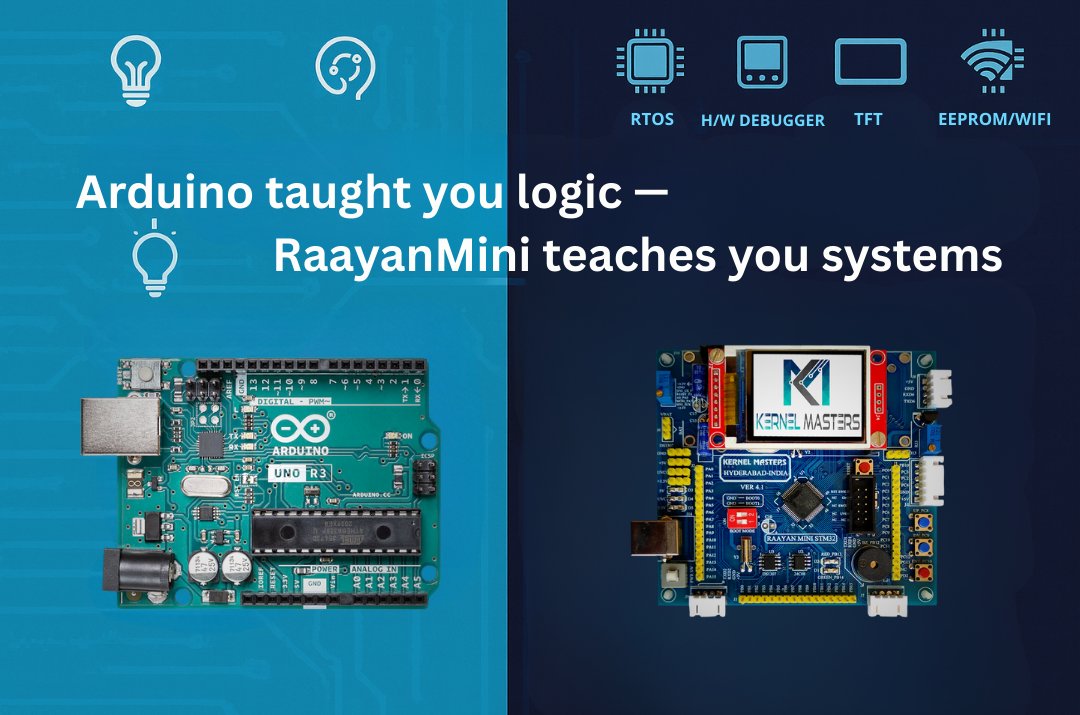
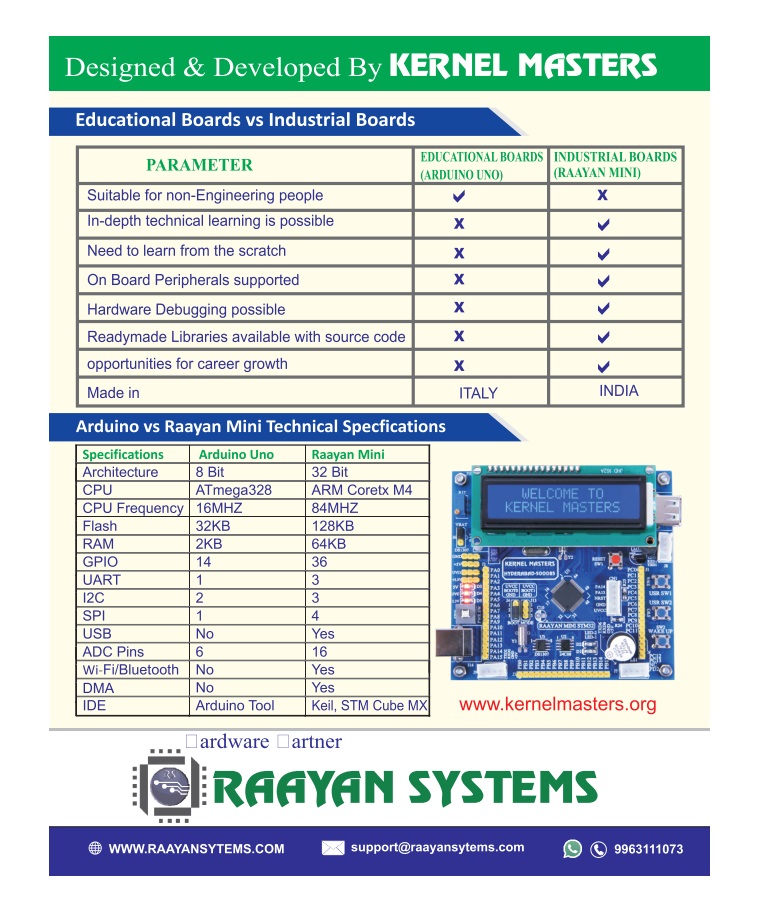
Arduino Uno Or Raayan Mini: Where Should You Really Start Your Embedded Journey?

If you’re a fresher (or working professional switching into embedded), your first board was probably Arduino.
It’s simple, affordable, and tutorials are everywhere. But here’s the critical question:
Is Arduino Uno enough for a professional embedded job, or do you need something like Raayan Mini?

Real question: “If I already know Arduino, do I really need STM32/Raayan Mini for an embedded job?”

Short answer: Arduino is a great start. Raayan Mini is where you grow if you’re serious.

TL;DR (save this):

  • Arduino Uno = fast entry to electronics + coding basics (8-bit, 2KB RAM)
  • Raayan Mini = professional workflow: 32-bit ARM, hardware debugging (ST-LINK), multi-peripheral systems, industry tools
  • If your goal is firmware/embedded jobs, move to 32-bit STM32 learning within 4–8 weeks (if dedicated)
  • The real difference: Arduino teaches “make it work.” Raayan Mini teaches “understand how it works.”

1Understanding Arduino: Value, Limitations & Knowledge Gaps

Arduino Uno is genuinely valuable. It’s introduced millions to electronics and programming. It’s accessible, fun, and results are immediate. But here’s what matters for a fresher pursuing embedded careers: what’s it hiding from you?

⚙️ Arduino Uno Specs

  • MCU: ATmega328P (8-bit AVR)
  • Clock: 16 MHz
  • Flash: 32 KB
  • SRAM: 2 KB
  • EEPROM: 1 KB
  • Peripherals: UART, SPI, I²C (via libraries)

✓ Arduino Excels At

  • First exposure to electronics + coding
  • College projects & hobbyist robotics
  • Rapid prototyping with pre-built libraries
  • Immediate visual feedback (LED, motors)
  • Lower cost barrier to entry

But here’s the real question: Can you answer these after Arduino?

  • What’s in the MCU’s memory map?
  • How does the bootloader start your code?
  • What’s an interrupt vector table?
  • How do you configure registers directly?
  • What’s a hard fault and how do you debug it?
The Knowledge Gap: Arduino abstracts away the “how” so you can focus on “what.” But when you enter embedded jobs, companies expect you to know the “how.” A fresher who can answer those questions above is ready for production work. One who can’t? Still learning hobbyist skills.

Key takeaway: Arduino is excellent for electronics basics. But for embedded careers, you need to move beyond it. The question isn’t “Is Arduino bad?” It’s “Is Arduino enough for what you’re trying to achieve?”

2Meet Raayan Mini: Built for Industry-Level Learning

Raayan Mini is an STM32-based industrial training board designed to bridge academic kits and professional embedded workflows.

⚙️ Core MCU: STM32F401

  • 32-bit ARM Cortex-M4 + FPU
  • Up to 84 MHz clock
  • 128 KB flash, 64 KB SRAM
  • 12-bit ADC + UART/I²C/SPI/etc

🔧 Mini-Lab Peripherals (One PCB)

  • On-board ST-LINK SWD debugger
  • Temperature sensor (LM35) + potentiometer
  • RTC (I²C) + EEPROM (I²C)
  • 16×2 LCD + TFT SPI interfaces
  • UART zones + GPIO/I²C/SPI breakouts

Here’s why Raayan Mini (STM32) answers those Section 1 questions:

  • ST-LINK SWD Debugging: You SEE registers, memory, interrupts happening in real-time (solves the “hard fault” gap)
  • On-board Peripherals: Forced to understand I²C, SPI, ADC configuration—not library abstractions
  • Professional Tools: STM32CubeIDE shows register layouts, memory organization, interrupt vectors visually
  • Architecture-first: You learn memory map, bootloader, startup BEFORE hiding behind libraries

What About Nucleo Boards or Other STM32 Kits?

They’re good, but bare MCU boards. You’re hunting for sensors, displays, debuggers. Raayan Mini (STM32) has LM35, RTC, EEPROM, LCD/TFT, and ST-LINK on one board—no breadboarding, more time learning systems.

Note for beginners: Yes, breadboarding teaches you connections. But managing wiring, connections, and debugging hardware issues can overwhelm your focus. Integrated tools let you concentrate on what actually matters—architecture and systems thinking.

3Quick Comparison: Different Designs, Different Purposes

Arduino and STM32 aren’t “better” or “worse”—they’re designed for different things. Arduino prioritizes ease-of-use and rapid prototyping. STM32 prioritizes system control and professional development. For job-ready embedded learning, the differences matter:

Aspect Arduino Uno Raayan Mini (STM32) Career Impact
Core 8-bit AVR @ 16 MHz 32-bit Cortex-M4 @ 84 MHz Standard ARM dominates embedded jobs (90%+)
Memory 32 KB flash, 2 KB RAM 128 KB flash, 64 KB RAM 4x/32x RTOS, logging, multi-system projects feasible
Peripherals Mostly external (shields) Many built-in (integrated) Multi-peripheral projects
Debugging Serial.print() + LEDs Hardware breakpoints, watch, stack Professional Hardware debugging is industry MUST
Job Market ~2-3% of embedded roles ~90%+ of embedded roles Industry Standard ARM Cortex-M dominates; Arduino-only jobs are rare
Tools Arduino IDE (simple) STM32CubeIDE / Keil / IAR Professional Professional toolchain signals expertise

48-bit vs 32-bit: Why It Matters More Than You Think

On Arduino, math is optimized for 8-bit operations. On STM32, you work natively with 32-bit data, richer instruction sets, and hardware floating-point unit (FPU) for signal processing.

Ask yourself: Do you want to only “make it work”… or understand how it works
(timers, interrupts, registers, memory map, clock configuration)?

32-bit enables you to implement real embedded systems concepts:

Signal Processing
Real-Time OS (RTOS)
Edge AI & ML
Data Logging
Multi-sensor Systems

Why it matters: On 8-bit Arduino with 2 KB RAM, you can’t implement signal processing (DSP) or meaningful ML inference. FreeRTOS technically fits (~1.5KB), but becomes impractical with application code and meaningful tasks. On 32-bit STM32 with 64 KB RAM, these become practical real-world projects that companies actually build.

Memory matters too: 2 KB RAM gets tight with buffers, logs, multiple peripherals. With 64 KB RAM,
you can build clean, modular applications and experiment with real-time concepts.

Note on Edge AI: TinyML and quantized models are possible on STM32 (including F401 with upto 256KB flash), but flash memory becomes tight—you’ll work with smaller models. This is still valuable learning, and more realistic than Arduino’s constraints.

5Project Thinking: Single Feature vs. System

Most Arduino Tutorials

  • Read sensor
  • Display on LCD
  • Blink LED on threshold

Single feature. No integration.

Raayan Mini Style Project

  • Read sensor
  • Timestamp with RTC (I²C)
  • Log to EEPROM
  • Display on LCD/TFT
  • UART menu for config
  • Optional cloud via ESP8266

Multi-peripheral system. Product-like thinking.

Interview perspective: Multi-peripheral integration shows you understand how systems work,
not just libraries.

6Debugging & System Understanding: The Critical Difference

Arduino’s debugging approach: Serial.print() statements to track behavior. It works for simple projects, but here’s the problem: it teaches you the effects, but not the mechanisms of what’s happening under the hood.

You might argue: “But STM32 with HAL also abstracts things.” True! HAL does abstract register-level code. But here’s the critical difference:

Arduino Approach

  • Start with abstraction (Serial.print)
  • Never see what’s below
  • Can’t debug hardware-level issues
  • Knowledge stops at library level

Limited foundation

STM32 (Even with HAL)

  • Start with architecture (memory map, interrupts, registers)
  • Then use HAL libraries confidently
  • CAN debug when HAL isn’t enough
  • Knowledge goes deep + you use abstractions wisely

Strong foundation + tools

Hardware Debugging with ST-LINK SWD:

  • Set breakpoints and step line-by-line
  • Watch variables change in real-time
  • Inspect registers and peripheral setup
  • Analyze call stacks during crashes/hard faults
  • Understand WHAT is happening, not just guess

This is the key: Companies don’t expect you to avoid abstractions. They expect you to understand what’s being abstracted so you can debug when something breaks. Arduino doesn’t give you that foundation. STM32 does—even if you use HAL.

7Other Board Options: Quick Reality Check

Let’s be honest about alternatives. Some are stepping stones, some can work—but the documentation story matters more than you think.

8-bit Arduinos (Nano, Mega, Pro Mini)

Spec: ATmega328P, 16 MHz, 2 KB RAM (same as Uno)

Problem: Still 8-bit AVR architecture. Arduino reference manual teaches you abstraction, not the microcontroller fundamentals your B.Tech curriculum covers.

Good for: Learning code logic. Bad for: Understanding embedded systems.

32-bit Arduinos (Due, Zero, Nano 33)

Spec: ARM Cortex-M3/M0+ processors (same architecture as STM32)

The catch: They’re ARM under the hood, YES—but Arduino’s documentation doesn’t prioritize this. The Arduino IDE reference manual focuses on libraries, not interrupts, memory maps, or peripheral control registers. You’re learning abstraction layers, not the architecture.

Good for: Quick prototyping. Bad for: Career preparation (conceptual gaps remain).

Here’s the real issue: You can have an ARM chip, but if your reference manual doesn’t teach you how ARM works, you’re missing the point. Arduino’s docs are tutorials, not technical references. STM32’s ecosystem provides both: tutorials AND detailed datasheets that explain architecture, memory, peripherals at the register level.

Bottom line: Choose a board where the reference documentation actually teaches you the concepts, not just the code. That’s what separates learning-for-fun from learning-for-careers.

8What Hiring Managers Actually Evaluate

Skill Area STM32 Signal
Architecture ARM Cortex-M/Similar MPU: memory map, startup, interrupts Strong
Drivers Write drivers: GPIO, UART, I²C, SPI, ADC, displays Strong
Debugging Breakpoints, watches, call stack, faults Professional
Projects Multi-peripheral systems Mature
Advanced FreeRTOS tasks, queues, ISRs Optional → Required

9What Real Companies Actually Use

Here’s why learning STM32 and ARM Cortex-M architecture is smart—it’s what the industry actually manufactures:

🚗 Automotive

  • STM32H7 series (high performance)
  • NXP S32 family
  • Microchip PIC32

Example: In-car infotainment, ADAS systems

🌐 IoT & Smart Devices

  • STM32L series (ultra-low power)
  • Nordic nRF52 (Bluetooth)
  • Espressif ESP32 (WiFi)

Example: Smart home, wearables, sensors

🏥 Medical Devices

  • Microchip PIC32MX/MZ
  • STM32F4/L4 series
  • TI MSP432

Example: Glucose monitors, patient monitors

⚙️ Industrial Control

  • STM32H7 series
  • TI C2000 (real-time)
  • NXP LPC55

Example: Motor drives, PLCs, robotics

Bottom line: ARM Cortex-M (used in STM32, NXP, TI, Microchip) powers millions of professional products—automotive, medical, industrial, IoT. Arduino exists commercially too (toys, hobbyist IoT gadgets), but if you’re pursuing an embedded career, learning ARM architecture prepares you for what real companies actually hire for. Learning STM32 specifically teaches you this architecture; the exact vendor matters less once you know the fundamentals.

10Common Fresher Mistakes (Don’t Make These)

❌ Mistake #1

Spending 6+ months on Arduino

Most Arduino tutorials plateau after 3–4 projects. To go deeper, you must read ATmega328P datasheets independently.
STM32’s ecosystem teaches this naturally—that’s why the timeline matters.

❌ Mistake #2

Skipping datasheets

“I’ll learn by tutorials” is fine at first, but professional jobs require reading 100-page datasheets.
Start early with datasheet practice.

❌ Mistake #3

Not using hardware debugging from Day 1

Hardcoding Serial.print() for debugging becomes a bad habit.
Use ST-LINK breakpoints from your first project.

❌ Mistake #4

Ignoring architecture

“How does the MCU start?” “Where is my code in memory?” “What’s an ISR vector?”
These aren’t optional—they’re fundamental.

11Quick Questions Answered

Q1: If I write 32-bit math on an 8-bit AVR, what happens?

The compiler breaks it into multiple 8-bit operations. It works, but it’s slower and heavier than native 32-bit math.
This is why architecture matters for real applications.

Q2: What’s the biggest difference between Arduino and STM32?

Debug workflow + system visibility. Breakpoints, register inspection, call stacks, fault analysis—
plus understanding MCU startup, linker scripts, and interrupt vectors. Arduino hides all of this.

Q3: Do I need FreeRTOS to get a job?

Entry-level (freshers): Not mandatory—most companies train you on RTOS after hiring.

Mid-level (3+ years, ₹8-12 LPA+): RTOS fundamentals are expected in interviews.

Strategy: Master it within your first 6 months of dedicated learning, or before applying for senior intern/mid-level positions. In India’s embedded job market, RTOS is increasingly common even at 6-8 LPA roles.

Q4: What should I explain in an interview after STM32 practice?

Interrupt flow, timer configuration, peripheral initialization, debugging techniques, and how your firmware
is structured (modules, layers, state machines). Not just “it works,” but “here’s why I architected it this way.”

12Final Takeaway

Arduino is an educational prototyping platform. Raayan Mini is an industrial training board.

When you can honestly say: “I built multi-peripheral firmware on STM32, debugged with ST-LINK,
read datasheets, and wrote drivers,” you’ve transitioned from prototyping-focused to systems-thinking.
That’s the inflection point most companies value.

Remember: The board is a tool. Your commitment to understanding systems is what matters.
Whether you choose Raayan Mini, Nucleo, or any other STM32 board—success depends on your dedication to learning architecture, not just writing code.

Ready to Start Your Professional Embedded Journey?

Master registers, debugging, multi-peripheral systems, and real-time concepts.
With dedicated focus (40+ hours/week), 10–12 weeks gets you interview-ready. For part-time learning, expect 4–6 months.


Explore Raayan Mini


View Learning Resources

June 3, 2025
June 3, 2025

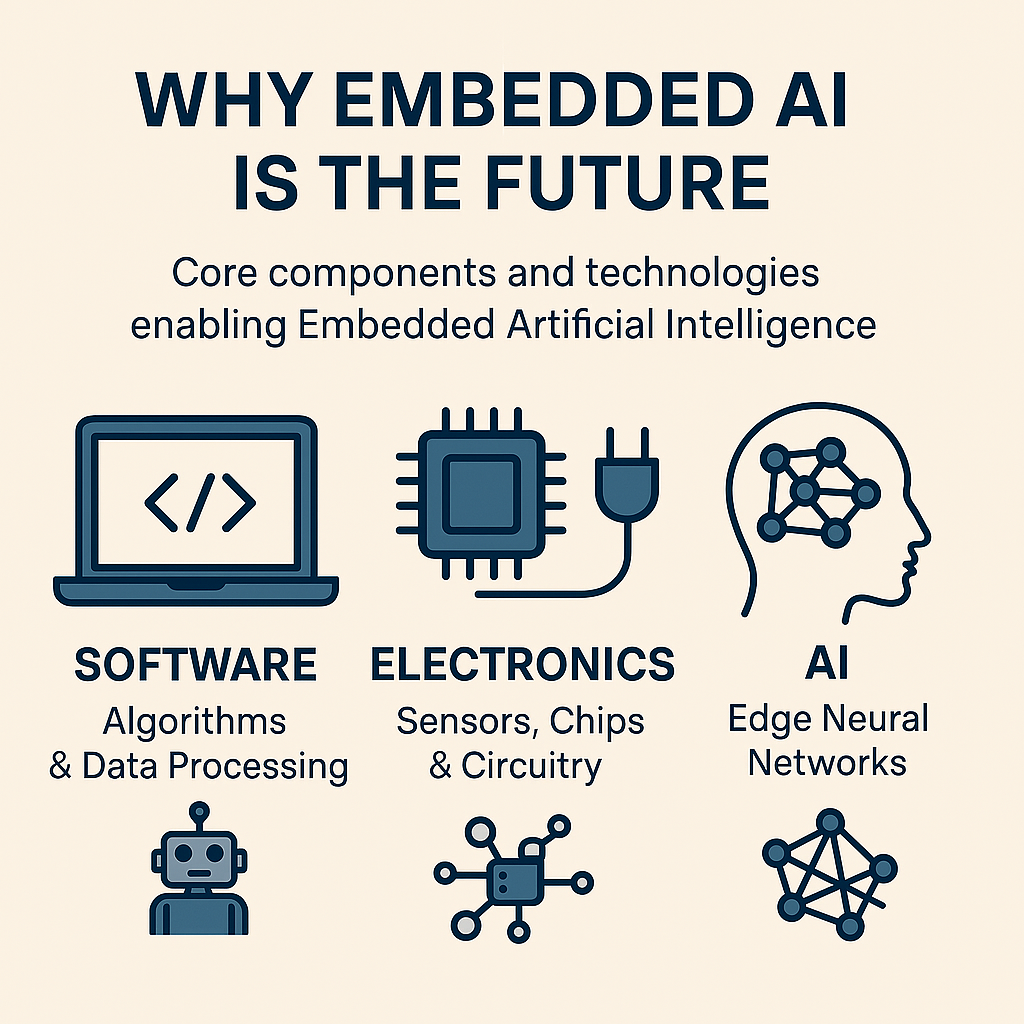
Why Embedded AI Is the Future: A Career Path for Engineers, Coders & Innovators

In today’s AI-driven world, we hear a lot about chatbots, recommendation engines, and cloud-powered tools. These are all part of what we call Traditional AI—systems that rely on massive infrastructure and powerful computing resources hosted on the cloud. But there’s a new, emerging alternative that’s faster, leaner, and smarter for edge applications: Embedded AI.

🧠 What is Traditional AI?

Traditional AI refers to high-performance artificial intelligence that runs on powerful servers—typically in cloud data centers. These systems are great for analyzing big data, generating insights, and powering large-scale enterprise solutions.

Examples of Traditional AI Applications:

  • Virtual assistants like Siri, Alexa, or Google Assistant
  • Search engines and recommendation systems (e.g., YouTube, Netflix)
  • Fraud detection systems used by banks
  • AI-powered cloud-based medical diagnostics

Key Characteristics of Traditional AI:

Feature Description
🧠 Model Complexity Uses large machine learning or deep learning models (e.g., GPT, CNNs, RNNs)
💾 Data Usage Requires large volumes of data for training and inference
☁️ Execution Platform Runs mostly on cloud servers, GPUs, or high-end CPUs
🌐 Connectivity Often needs internet access to communicate with the cloud
⚡ Power Consumption High, because of resource-intensive computations
⏱️ Latency Higher latency due to data transmission and processing delays
🧑‍💻 Application Areas Natural Language Processing (NLP), computer vision, finance, healthcare, recommendation systems

While powerful, traditional AI has limitations for real-time, offline, or power-constrained applications. That’s where Embedded AI comes in.

🔍 What is Embedded AI?

Embedded AI is the combination of electronics, software, and AI running on small, resource-limited hardware such as microcontrollers. Unlike traditional AI systems that depend on cloud servers for processing, Embedded AI enables local intelligence—allowing devices to think, learn, and act without internet or cloud access.

🧩 Real-World Applications of Embedded AI

Embedded AI is no longer a concept of the future — it’s already powering the intelligent devices all around us. From smart homes to industrial automation, here are some of the most impactful and current applications of Embedded AI today:

  • Smart Cameras & Appliances: Face detection, voice control, and personalized suggestions.
  • Wearables & Health Monitors: Track health vitals, detect falls, and monitor sleep patterns.
  • Industrial Automation: Predictive maintenance, quality checks, and smart energy metering.
  • ADAS & Smart Vehicles: Lane assist, collision detection, and AI-powered dashcams.
  • Drones & Surveillance: Real-time obstacle avoidance and intelligent mapping.
  • Smart Homes & IoT: AI security systems, energy optimization, and leak detection.
  • Agritech: Smart irrigation, disease detection in crops, and autonomous monitoring.
  • Retail & POS: Smart vending, fraud detection, and inventory tracking robots.

💡 Why Do We Need Embedded AI?

Embedded AI solves several critical issues posed by traditional cloud-based AI:

Feature Description
💡 Local Intelligence AI runs on the device itself, not in the cloud
⚙️ Hardware Used Microcontrollers (e.g., STM32), NPUs, DSPs, SoCs
⚡ Low Power Designed for low energy consumption, ideal for battery-powered devices
⏱️ Real-Time Response Fast decision-making without internet delays
🧩 Compact Models Uses TinyML, quantized and optimized models
🔒 Privacy Friendly Keeps data on-device, enhancing security
🌐 Connectivity Optional Works offline or intermittently connected

🧠 What Makes Embedded AI Possible?

🧩 Key Components:

Programming Concepts
Software

Foundations of coding and software tools.

Industrial Hardware
Electronics

Microcontrollers and sensor integration.

AI Framework & AI Tools
AI

TinyML and edge intelligence systems.

💻 Software
Core Topics:
  • Programming Languages – C, C++, Python for embedded and general-purpose development
  • Development Tools – STM32CubeIDE, Arduino IDE, and Visual Studio Code
  • Version Control – Git and GitHub for managing collaborative projects
🔌Electronics
Key Concepts:
  • Microcontrollers – STM32, ESP32, Arduino, and more
  • Sensors & Actuators – Interfacing with real-world inputs and outputs
  • Communication Protocols – I2C, SPI, UART for hardware integration
🤖 AI
Embedded AI Overview:
  • TinyML enables machine learning on microcontrollers with minimal resources
  • TensorFlow Lite for Microcontrollers – Lightweight ML runtime for constrained devices
  • STM32Cube.AI – Converts neural network models into optimized embedded code

Embedded AI is where software meets electronics and AI—a perfect blend of disciplines.

⚖️ Embedded AI vs Traditional AI

🔴 Traditional AI Problems 🟢 How Embedded AI Solves It
❗ High latency (due to cloud dependency) ✅ Runs locally on devices (real-time response)
❗ Requires constant internet connectivity ✅ Works offline — ideal for remote or mobile use
❗ High power consumption (GPU/CPU-heavy) ✅ Optimized for low-power microcontrollers (e.g., STM32)
❗ Privacy issues (data sent to cloud) ✅ Local inference means data stays on device
❗ Not suitable for real-time control (e.g., robotics, cars) ✅ Real-time decisions using embedded AI chips
❗ Expensive hardware required ✅ Uses low-cost, efficient MCUs and NPUs

🚀 Career Opportunities in Embedded AI

If you’re a student, fresher, or a professional with a passion for both coding and hardware, Embedded AI is a game-changing career path. Here’s why:

✅ Rare and Valuable Skillset

You’ll master both low-level embedded systems (e.g., STM32, C) and high-level AI (e.g., ML, TinyML).

🌐 High Industry Demand

Used in:

  • IoT Devices (Smart homes, Smart cities)
  • Automotive (ADAS, EVs)
  • Industry 4.0 (Robotics, predictive maintenance)
  • Healthcare (Wearables)
  • Agriculture (AI-powered drones)

🔄 Cross-Domain Roles

  • Embedded Software Developer
  • AI/ML Engineer
  • Firmware Developer
  • Robotics Engineer
  • AIoT Product Designer

🔮 Future-Proof Your Career

Embedded AI intersects with AI, IoT, and 5G—three massive future tech waves.

🏢 Top Companies Hiring in Embedded AI

Global Tech Giants:

  • NVIDIA (Jetson edge AI)
  • Intel (Movidius, OpenVINO)
  • Qualcomm (Snapdragon NPE)
  • STMicroelectronics (STM32 with AI)
  • NXP, Texas Instruments, ARM

These companies are investing heavily in edge computing and AI hardware—the backbone of Embedded AI.

🧑‍💻 Who Can Learn Embedded AI?

🚫 Myth: Only ECE/EEE students can build careers in Embedded AI
✅ Reality: Embedded AI is a cross-disciplinary field:

  • Software (CSE, IT)
  • Electronics (ECE, EEE)
  • AI/ML (Any branch)

If you love problem-solving, coding, or building smart systems, this path is for you.

🎓 Learn Embedded AI with Kernel Masters

If you’re looking for a practical, job-ready course in Embedded AI, Kernel Masters stands out with:

  1. Expert Instruction: 20+ years of experience from Kishore Kumar Sir.
  2. Industrial Syllabus: Covers embedded C, STM32, ARM, and AI tools.
  3. Hands-on Projects: Build real products like smart attendance systems and gateways.
  4. Personal Attention: One-on-one support, performance tracking.
  5. Placement Support: End-to-end career support—regardless of degree, marks, or batch.

📈 Conclusion

Embedded AI isn’t just the future—it’s the now for smart, scalable, and efficient AI solutions. Whether you’re an engineer, coder, or AI enthusiast, this is a path where hardware meets intelligence—and careers take off.

If you’re serious about building a future in tech, start with Embedded AI. 🌍💡

September 18, 2024


Linux Kernel Programming Linux Device Drivers
Kernel Developers focus on interfaces, data structures, algorithms and optimization for the core of the operating system. Device Drivers use the interfaces and data structures written by the kernel developers to implement device control and IO.
Kernel programming is done using Module programming technique.There are no standard libraries available. Have to use pure C programming. Device Drivers is done using Module programming technique.There are no standard libraries available. Have to use pure C programming.
A very good kernel programmer may not know a lot about interrupt latency and hardware determinism, but he will know a lot about how locks, queues and Kobjects work. A device driver programmer will know how to use locks, queues and other kernel interfaces to get their hardware working properly and responsively, but he won’t be as likely to fix a page allocation bug or write a new scheduler.


September 18, 2024

Embedded Software

  • C Programming Skills (Function, Pointers, Arrays, and Structures, Bit-wise operations should be your best friends). Master C programming skill. This is the most essential skill for the ECE students today. Without this skill you will find it difficult to enter into electronics core companies.
  • Embedded C Programming (Microcontroller Programming)
  • Operating Systems Concepts (Process Management, File Management, Memory Management, Inter Process Communication)
  • Linux Basics/Commands
  • Work on Community development boards.

Resources

  • C in Depth by Srivastava and The C Programming Language by K & R
  • Operating System Concepts (book) by Galvin

Embedded Hardware

  • Computer Organization (Microprocessor,  Microcontroller)
    • I/O Organization (Polling, Interrupt, DMA)
    • Memory Organization (Memory Hierarchy, cache Memory, MMU, Virtual Memory)
  • Understand the Digital Circuit thoroughly from AND, OR, NOT gates to Microprocessors.

Resources:

  • Computer organization by Morris Mano
  • Digital Systems by Morris Mano
  • 8086 microprocessor interfacing

Project Work:

Buy a Community development board and apply the C programming skill to do good electronic projects by yourself without copying a single line of code from net/book/friends.

September 18, 2024
September 18, 2024

ARM cores are designed specifically for embedded systems. The needs of embedded systems can be satisfied only if features of RISC and CISC are considered together for processor design. So ARM architecture is not a pure RISC architecture. It has a blend of both RISC and CISC features.

ARM Architecture Features and Benefits:

Features Benefits to embedded system
High Performance Ensures the system has a fast response
Low power consumption Makes the system more energy efficient
Low silicon area Reduces the size and also consumes less power
High Code density Helps embedded system to have less memory footprint
Load/store architecture Used to load data from the memory to the ARM CPU register or store data
from the CPU register to the memory; enables the memory access when
required
Register bank with large number
of working registers
Required to perform most of the operations within the CPU and provides
faster context switch in a multitasking applications

In the path of architectural evolution, ARM has contributed many versions of IP cores to the embedded computing world. ARM pioneered embedded products are excelling in every visible spectrum. Since its inception, ARM has migrated over a long meaningful road map starting from v4T ARM7TDMI to v7 Cortex series of architectures achieving many strong milestones in between. It is currently the new era of feature rich ARM Cortex series architectures truly empowering the embedded computing world.

ARM architecture evolution:

Comparison chart showing performance and capability of Classic ARM Processors versus Embedded Cortex Processors
Performance and capability comparison of ARM7, ARM9, ARM11 series processors with Cortex-M and Cortex-R embedded cores

ARM architecture v7 profile:

In order to provide a wide coverage of different application domains, addressing their specific requirements, ARM core is evolved into architecture version7 which has three different profiles: the application profile, real time profile and microcontroller profile. Architecture v7 should not be confused with ARM7 which has been explained before under architecture v4.

Application profile (Cortex -A)

Cortex A series of architectures are multicores with power efficiency and high performance. Every Cortex – A implementation is intended for highest performance at ultralow power design. It supports with, in-built memory management unit. Being influenced by multitasking OS system requirements, it has virtualization extensions and provides a trust zone for a safe and extensible system. It has enhanced Java support and provides a secure program execution environment. These architectures are typically designed for high end real time safety critical applications like automotive powertrain system. Some Cortex- A application products are smart phones, tablets, televisions and even high end computing servers.

Real-time profile (Cortex -R)

Cortex R series of architectures are designed for deeply embedded real time multitasking applications. They have low interrupt latency and predictability features for real time needs. It provides memory protection for supervisory OS tasks being in privileged mode. It also provides tightly coupled memories for fast deterministic access. Typical application examples are: hard disk drive controller and base band controller for mobile applications and engine management unit where high performance and reliability at very low interrupt latency and determinism are critical requirements.

Microcontroller profile (Cortex -M)

Cortex M series of architectures have v6-M as cortex M0, M0+ and M1 and v7-M with Cortex M3, M4 and other successors. This series of architectures developed for deeply embedded microcontroller profile, offer lowest gate count so smallest silicon area. These are flexible and powerful designs with completely predictable and deterministic interrupt handling capabilities by introducing the nested vector interrupt controller (NVIC). The small instruction sets support for high code density and simplified software development. Developers are able to achieve 32-bit performance at 8-bit price. The very low gate count of Cortex M0 facilitates its deployment in analog and mixed mode devices. Due to further demanding applications requiring even better energy efficiency, Cortex M0+ was designed with two stage pipeline and achieved high performance with very low dynamic power consumption, reduced branch shadow and reduced number of flash memory access. Cortex M1 was designed for implementation in FPGA. It is functionally a subset of Cortex M3 and runs ARM v6 instruction set with OS extension options. It has 32-bit AHB lite bus interface, separate tightly coupled memory interface and JTAG interface to facilitate debug options. It has three stage pipeline implementation and configurable NVIC for reducing interrupt latency.

Cortex M4 Features:

  • Thumb2 instruction set delivers the significant benefits of high code density of Thumb with
  • 32-bit performance of ARM.
  • Optional IEEE754-compliant single-precision Floating Point Unit.
  • Code-patch ability for memory system updates.
  • Power control optimization by integrating sleep and deep sleep modes.
  • Hardware division and fast multiply and accumulate for SIMD DSP instructions.
  • Saturating arithmetic for noise cancellation in signal processing.
  • Deterministic, low latency interrupt handling for real time-critical applications.
  • Optional Memory Protection Unit(MPU) for safety-critical applications
  • Extensive implementation of debug, trace and code profiling capabilities.

ARM Cortex M Programming Model:

The programming model of the Cortex-M4 processors has 18 working registers shown in below Figure. Thirteen of them are general purpose 32-bit registers, three have special uses and two stack pointers.

Diagram of ARM processor register set including low, high, special purpose registers and program status register
Visual overview of ARM processor registers showing R0–R12 general purpose registers, special purpose registers R13–R15, and xPSR status register
Diagram showing the layout of ARM processor status register bits including flags N, Z, C, V, Q, ISR number, and reserved sections
Detailed breakdown of the ARM processor status register showing key flags and reserved bits crucial for system-level programming
🚀 Admission for 6 months Embedded AI & IoT offline course at Hyderabad & Bangalore
🚀  Admission for 6 months Embedded AI & IoT offline course at Hyderabad & Bangalore
1s
C Programming & Data Structures
Working Professional
🕮 Kishore Kumar Boddu | 【┘】 2 Months
About This Course

This course is designed for working professionals who want to build a strong foundation in C Programming and Data Structures.
Starting from the fundamentals, the course focuses on practical programming, problem solving, pointers, strings, memory concepts and core data structures — helping learners strengthen their programming skills and prepare confidently for technical interviews.

Course Objective
  • Build in-depth knowledge of C Programming from the fundamentals
  • Gain hands-on experience with core C programming features
  • Develop a strong understanding of pointers, strings, arrays and memory concepts
  • Improve problem-solving and programming skills
  • Become interview-ready for C Programming technical rounds
  • Implement Data Structures using C
Course Details:
  • Batch Starts: 1st Oct 2026
  • Duration: 2 Months
  • Class Timings: 7 PM – 8:30 PM
  • Mode: 100% Online Blended Learning
         (Online Interactive Session + Primer Videos)
  • Prerequisite: Basic Linux knowledge and familiarity with common terminal commands
👉 Course Fee: ₹12000 /-
Working Professional
C Programming & Data Structures
🕮 Kishore Kumar Boddu  |【┘】2 Months
About This Course:
This course is designed for working professionals who want to build a strong foundation in C Programming and Data Structures.
Starting from the fundamentals, the course focuses on practical programming, problem solving, pointers, strings, memory concepts and core data structures — helping learners strengthen their programming skills and prepare confidently for technical interviews.
Course Objectives:
  • 1. Build in-depth knowledge of C Programming from the fundamentals
  • 2. Gain hands-on experience with core C programming features
  • 3. Implement Data Structures using C
  • 4. Improve problem-solving and programming skills
  • 5. Develop a strong understanding of pointers, strings, arrays and memory concepts
  • 6. Become interview-ready for C Programming technical rounds
  • Duration: 2 Months
  • Class Timings: 7 PM – 8:30 PM
  • Mode: 100% Online Blended Learning
    (Online Interactive Session + Video Primers)
  • Prerequisite: Basic experience with Linux
Course Details:
Course Fee:
₹12000 /-